From Containers to Kubernetes Architecture

In the previous post, What Is Azure Kubernetes Service (AKS) and Why Should You Care?, we got an intro to AKS, compared it to Azure PaaS services in terms of asking when is the right choice, and finally spun up an AKS cluster to demonstrate what exactly Microsoft exposes to you in terms of responsibilities.

In this post, we’ll take a step back to first principles and understand why containers and microservices emerged, how Docker changed application delivery, and how those pressures ultimately led to Kubernetes.

Only then does Kubernetes and by extension AKS architecture fully make sense.


From Monoliths to Microservices

If you rewind to the 1990s and early 2000s, most enterprise systems followed a fairly predictable pattern: client/server.

You either had thick desktop clients connecting to a central database server, or you had early web applications running on a handful of physical servers in a data centre. Access was often via terminal services, remote desktop, or tightly controlled internal networks.

Applications were typically deployed as monoliths. One codebase. One deployment artifact. One server—or maybe two, if you were lucky enough to have a test environment.

Infrastructure and application were deeply intertwined. If you needed more capacity, you bought another server. If you needed to update the application, you scheduled downtime. And this wasn’t like the downtime we know today – this could run into days, normally public holiday weekends where you had an extra day. Think you’re going to be having Christmas dinner or opening Easter eggs? Nope – thtere’s an upgrade on those weekends!

This model worked in a world where:

  • Release cycles were measured in months
  • Scale was predictable
  • Users were primarily internal or regionally constrained

But as the web matured in the mid-2000s, and SaaS became mainstream, expectations changed.


Virtualisation and Early Cloud

Virtual machines were the first major shift.

Instead of deploying directly to physical hardware, we began deploying to hypervisors. Infrastructure became more flexible. Provisioning times dropped from weeks to hours, and rollback of changes became easier too which de-risked the deployment process.

Then around 2008–2012, public cloud platforms began gaining serious enterprise traction. Infrastructure became API-driven. You could provision compute with a script instead of a purchase order.

Despite these changes, the application model was largely the same. We were still deploying monoliths—just onto virtual machines instead of physical servers.

The client/server model had evolved into a browser/server model, but the deployment unit was still large, tightly coupled, and difficult to scale independently.


The Shift to Microservices

Around the early 2010s, as organisations like Netflix, Amazon, and Google shared their scaling stories, the industry began embracing microservices more seriously.

Instead of a single large deployment, applications were broken into smaller services. Each service had:

  • A well-defined API boundary
  • Its own lifecycle
  • Independent scaling characteristics

This made sense in a world of global users and continuous delivery.

However, it introduced new complexity. You were no longer deploying one application to one server. You might be deploying 50 services across 20 machines. Suddenly, your infrastructure wasn’t just hosting an app—it was hosting an ecosystem.

And this is where the packaging problem became painfully obvious.


Docker and the Rise of Containers

Docker answered the packaging problem.

Containers weren’t new. Linux containers had existed in various forms for years. But Docker made them usable, portable, and developer-friendly.

Instead of saying “it works on my machine,” developers could now package:

  • Their application code
  • The runtime
  • All dependencies
  • Configuration

Into a single container image. That image could run on a laptop, in a data centre, or in the cloud—consistently. This was a major shift in the developer-to-operations contract.

The old model:

  • Developers handed over code
  • Operations teams configured servers
  • Problems emerged somewhere in between

The container model:

  • Developers handed over a runnable artifact
  • Operations teams provided a runtime environment

But Docker alone wasn’t enough.

Running a handful of containers on a single VM was manageable. Running hundreds across dozens of machines? That required coordination.

We had solved packaging. We had not solved orchestration. As container adoption increased, a new challenge emerged:

Containers are easy. Running containers at scale is not.


Why Kubernetes Emerged

Kubernetes emerged to solve the orchestration problem.

Instead of manually deciding where containers should run, Kubernetes introduced a declarative model. You define the desired state of your system—how many replicas, what resources, what networking—and Kubernetes continuously works to make reality match that description.

This was a profound architectural shift.

It moved us from:

  • Logging into servers via SSH
  • Manually restarting services
  • Writing custom scaling scripts

To:

  • Describing infrastructure and workloads declaratively
  • Letting control loops reconcile state
  • Treating servers as replaceable capacity

The access model changed as well. Instead of remote desktop or SSH being the primary control mechanism, the Kubernetes API became the centre of gravity. Everything talks to the API server.

This shift—from imperative scripts to declarative configuration—is one of the most important architectural changes Kubernetes introduced.


Core Kubernetes Architecture

To understand AKS, you first need to understand core Kubernetes components.

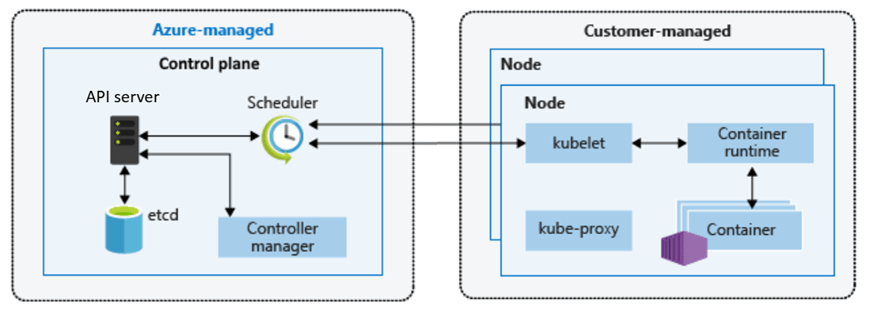
At its heart, Kubernetes is split into two logical areas: the control plane and the worker nodes.

The Control Plane – The Brain of the Cluster

The control plane is the brain of the cluster. It makes decisions, enforces state, and exposes the Kubernetes API.

Key components include:

API Server

The API server is the front door. Whether you use kubectl, a CI/CD pipeline, or a GitOps tool, every request flows through the API server. It validates requests and persists changes.

  • Entry point for all Kubernetes operations
  • Validates and processes requests
  • Exposes the Kubernetes API

Everything—kubectl, CI/CD pipelines, controllers—talks to the API server.

etcd

Behind the scenes sits etcd, a distributed key-value store that acts as the source of truth. It stores the desired and current state of the cluster. If etcd becomes unavailable, the cluster effectively loses its memory.

  • Distributed key-value store
  • Holds the desired and current state of the cluster
  • Source of truth for Kubernetes

If etcd is unhealthy, the cluster cannot function correctly.

Scheduler

The scheduler is responsible for deciding where workloads run. When you create a pod, the scheduler evaluates resource availability and constraints before assigning it to a node.

  • Decides which node a pod should run on
  • Considers resource availability, constraints, and policies

Controller Manager

The controller manager runs continuous reconciliation loops. It constantly compares the desired state (for example, “I want three replicas”) with the current state. If a pod crashes, the controller ensures another is created.

  • Runs control loops
  • Continuously checks actual state vs desired state
  • Takes action to reconcile differences

This combination is what makes Kubernetes self-healing and declarative.


Worker Nodes – Where Work Actually Happens

Worker nodes are where your workloads actually run.

Each node contains:

kubelet

Each node runs a kubelet, which acts as the local agent communicating with the control plane. It ensures that the containers defined in pod specifications are actually running.

  • Agent running on each node
  • Ensures containers described in pod specs are running
  • Reports node and pod status back to the control plane

Container Runtime

Underneath that sits the container runtime—most commonly containerd today. This is what actually starts and stops containers.

  • Responsible for running containers
  • Historically Docker, now containerd in most environments

kube-proxy

Networking between services is handled through Kubernetes networking constructs and components such as kube-proxy, which manages traffic rules.

  • Handles networking rules
  • Enables service-to-service communication n

Pods, Services, and Deployments

Above this infrastructure layer, Kubernetes introduces abstractions like pods, deployments, and services. These abstractions allow you to reason about applications instead of machines.

Pods

  • Smallest deployable unit in Kubernetes
  • One or more containers sharing networking and storage

Deployments

  • Define how pods are created and updated
  • Enable rolling updates and rollback
  • Maintain desired replica counts

Services

  • Provide stable networking endpoints
  • Abstract away individual pod lifecycles

You don’t deploy to a server. You declare a deployment. You don’t track IP addresses. You define a service.

How This Maps to Azure Kubernetes Service (AKS)

AKS does not change Kubernetes—it operationalises it. The Kubernetes architecture remains the same, but the responsibility model changes.

In a self-managed cluster, you are responsible for the control plane. You deploy and maintain the API server. You protect and back up etcd. You manage upgrades.

In AKS, Azure operates the control plane for you.

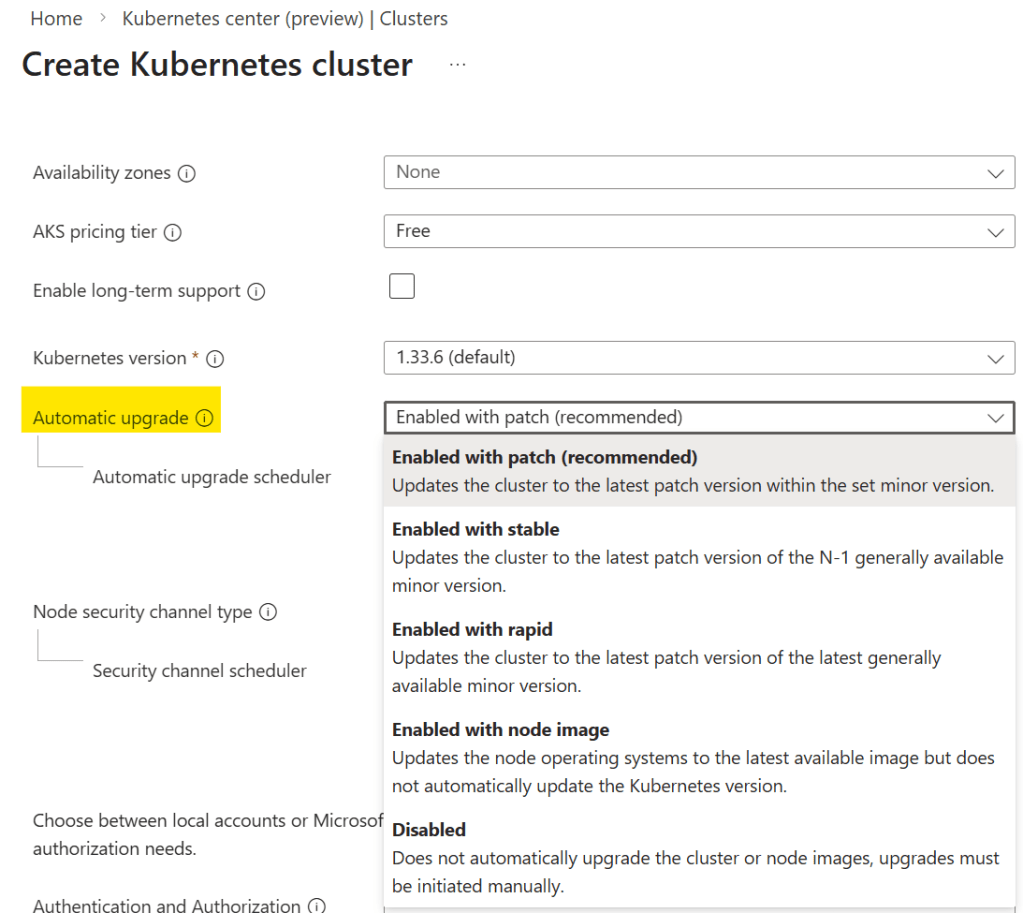
Microsoft manages the API server, etcd, and control plane upgrades. You still interact with Kubernetes in exactly the same way—through the API—but you are no longer responsible for maintaining its most fragile components.

You retain responsibility for worker nodes, node pools, scaling, and workload configuration. That boundary is deliberate.

It aligns directly with the Azure Well-Architected Framework:

  • Operational Excellence through managed control plane abstraction
  • Reduced operational risk and complexity
  • Clear separation between platform and workload responsibility

AKS is Kubernetes—operationalised.


Why This Matters for Production AKS

Every production AKS decision maps back to Kubernetes architecture:

  • Networking choices affect kube-proxy and service routing
  • Node pool design affects scheduling and isolation
  • Scaling decisions interact with controllers and the scheduler

Without understanding the underlying architecture, AKS can feel opaque.

With that understanding, it becomes predictable.


What Comes Next

Now that we understand:

  • Why containers emerged
  • Why Kubernetes exists
  • How Kubernetes is architected
  • How AKS maps to that architecture

We’re ready to start making design decisions.

In the next post, we’ll move into AKS architecture fundamentals, including:

  • Control plane and data plane separation
  • System vs user node pools
  • Regional design and availability considerations

See you on the next post

What Is Azure Kubernetes Service (AKS) and Why Should You Care?

In every cloud native architecture discussion you have had over the last few years or are going to have in the coming years, you can be guaranteed that someone has or will introduce Kubernetes as a hosting option on which your solution will run.

There’s also different options when Kubernetes enters the conversation – you can choose to run:

Kubernetes promises portability, scalability, and resilience. In reality, operating Kubernetes yourself is anything but simple.

Have you’ve ever wondered whether Kubernetes is worth the complexity—or how to move from experimentation to something you can confidently run in production?

Me too – so let’s try and answer that question. For anyone who knows me or has followed me for a few years knows, I like to get down to the basics and “start at the start”.

This is the first post is of a blog series where we’ll focus on Azure Kubernetes Service (AKS), while also referencing the core Kubernetes offerings as a reference. The goal of this series is:

By the end (whenever that is – there is no set time or number of posts), we will have designed and built a production‑ready AKS cluster, aligned with the Azure Well‑Architected Framework, and suitable for real‑world enterprise workloads.

With the goal clearly defined, let’s start at the beginning—not by deploying workloads or tuning YAML, but by understanding:

  • Why AKS exists
  • What problems it solves
  • When it’s the right abstraction.

What Is Azure Kubernetes Service (AKS)?

Azure Kubernetes Service (AKS) is a managed Kubernetes platform provided by Microsoft Azure. It delivers a fully supported Kubernetes control plane while abstracting away much of the operational complexity traditionally associated with running Kubernetes yourself.

At a high level:

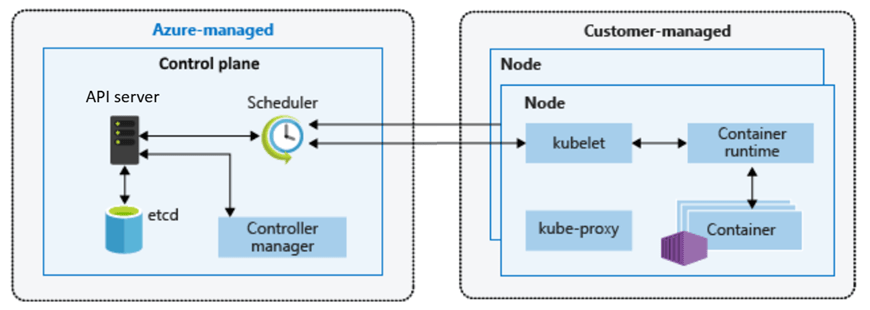
  • Azure manages the Kubernetes control plane (API server, scheduler, etcd)
  • You manage the worker nodes (VM size, scaling rules, node pools)
  • Kubernetes manages your containers and workloads

This division of responsibility is deliberate. It allows teams to focus on applications and platforms rather than infrastructure mechanics.

You still get:

  • Native Kubernetes APIs
  • Open‑source tooling (kubectl, Helm, GitOps)
  • Portability across environments

But without needing to design, secure, patch, and operate Kubernetes from scratch.

Why Should You Care About AKS?

The short answer:

AKS enables teams to build scalable platforms without becoming Kubernetes operators.

The longer answer depends on the problems you’re solving.

AKS becomes compelling when:

  • You’re building microservices‑based or distributed applications
  • You need horizontal scaling driven by demand
  • You want rolling updates and self‑healing workloads
  • You’re standardising on containers across teams
  • You need deep integration with Azure networking, identity, and security

Compared to running containers directly on virtual machines, AKS introduces:

  • Declarative configuration
  • Built‑in orchestration
  • Fine‑grained resource management
  • A mature ecosystem of tools and patterns

However, this series is not about adopting AKS blindly. Understanding why AKS exists—and when it’s appropriate—is essential before we design anything production‑ready.


AKS vs Azure PaaS Services: Choosing the Right Abstraction

Another common—and more nuanced—question is:

“Why use AKS at all when Azure already has PaaS services like App Service or Azure Container Apps?”

This is an important decision point, and one that shows up frequently in the Azure Architecture Center.

Azure PaaS Services

Azure PaaS offerings such as App Service, Azure Functions, and Azure Container Apps work well when:

  • You want minimal infrastructure management responsibility
  • Your application fits well within opinionated hosting models
  • Scaling and availability can be largely abstracted away
  • You’re optimising for developer velocity over platform control

They provide:

  • Very low operational overhead – the service is an “out of the box” offering where developers can get started immediately.
  • Built-in scaling and availability – scaling comes as part of the service based on demand, and can be configured based on predicted loads.
  • Tight integration with Azure services – integration with tools such as Azure Monitor and Application Insights for monitoring, Defender for Security monitoring and alerting, and Entra for Identity.

For many workloads, this is exactly the right choice.

AKS

AKS becomes the right abstraction when:

  • You need deep control over networking, runtime, and scheduling
  • You’re running complex, multi-service architectures
  • You require custom security, compliance, or isolation models
  • You’re building a shared internal platform rather than a single application

AKS sits between IaaS and fully managed PaaS:

Azure PaaS abstracts the platform for you. AKS lets you build the platform yourself—safely.

This balance of control and abstraction is what makes AKS suitable for production platforms at scale.


Exploring AKS in the Azure Portal

Before designing anything that could be considered “production‑ready”, it’s important to understand what Azure exposes out of the box – so lets spin up an AKS instance using the Azure Portal.

Step 1: Create an AKS Cluster

  • Sign in to the Azure Portal
  • In the search bar at the top, Search for Kubernetes Service
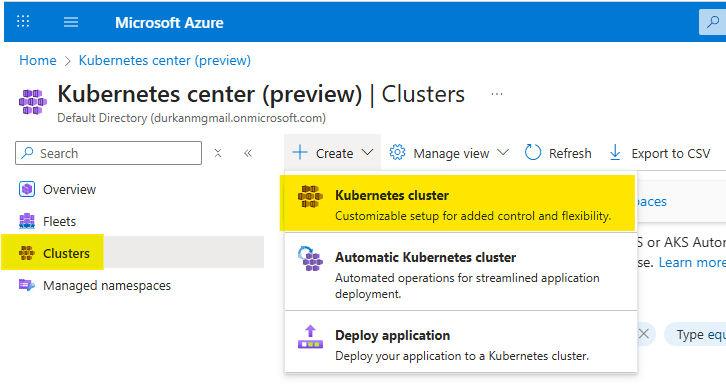
  • When you get to the “Kubernetes center page”, click on “Clusters” on the left menu (it should bring you here automatically). Select Create, and select “Kubernetes cluster”. Note that there are also options for “Automatic Kubernetes cluster” and “Deploy application” – we’ll address those in a later post.
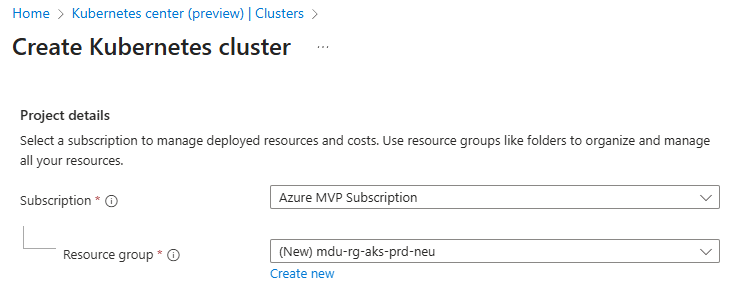
  • Choose your Subscription and Resource Group
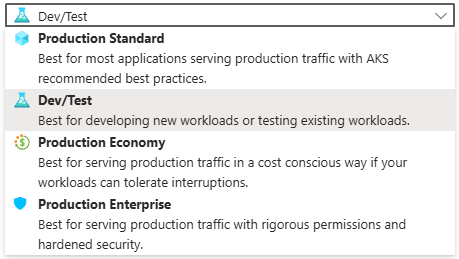
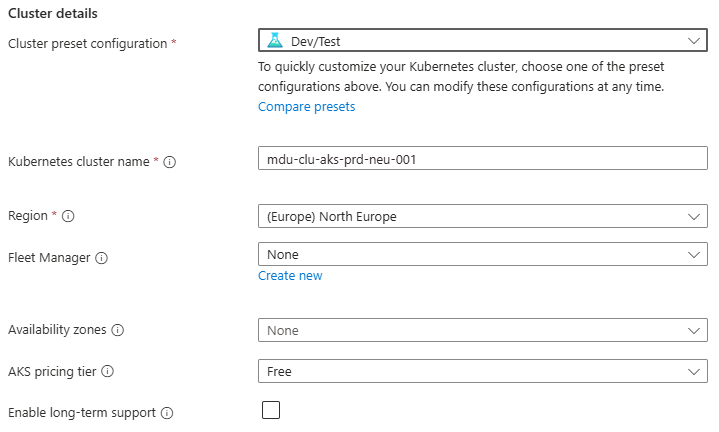
  • Enter a Cluster preset configuration, Cluster name and select a Region. You can choose from four different preset configurations which have clear explanations based on your requirements
  • I’ve gone for Dev/Test for the purposes of spinning up this demo cluster.
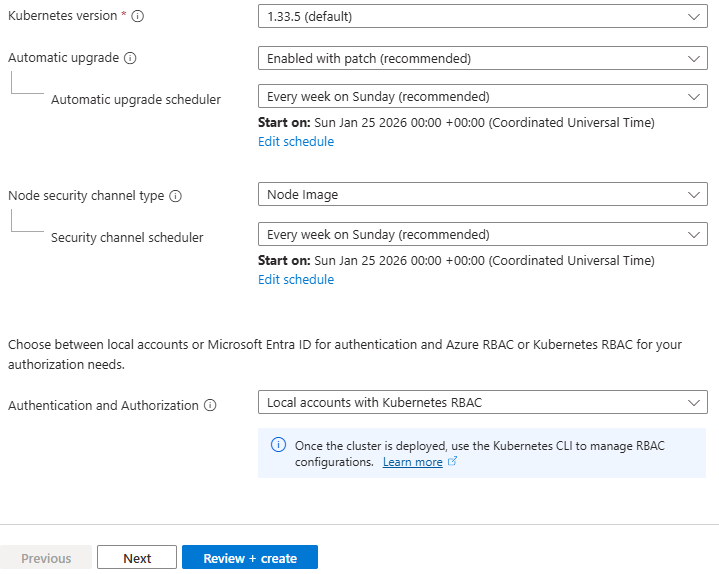
  • Leave all other options as default for now and click “Next” – we’ll revisit these in detail in later posts.

Step 2: Configure the Node Pool

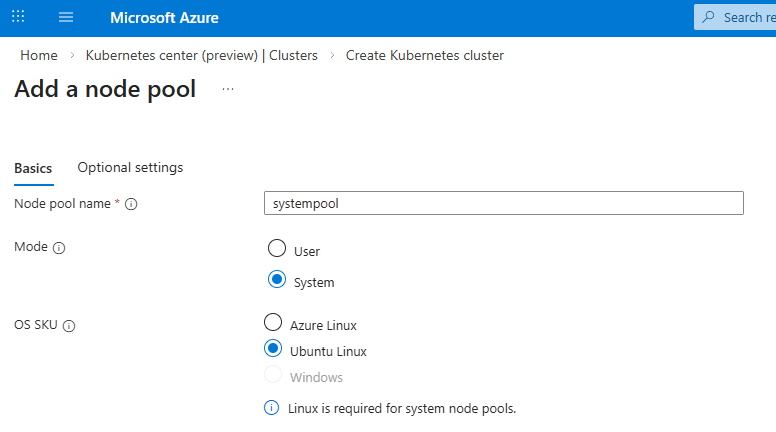
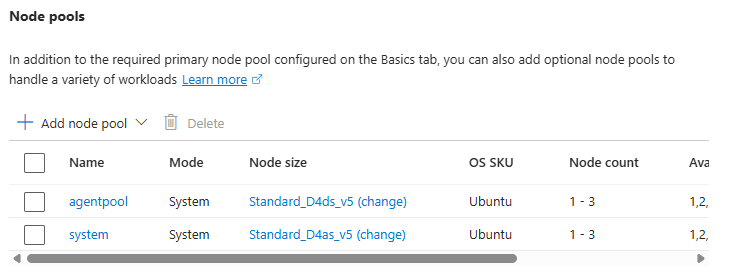
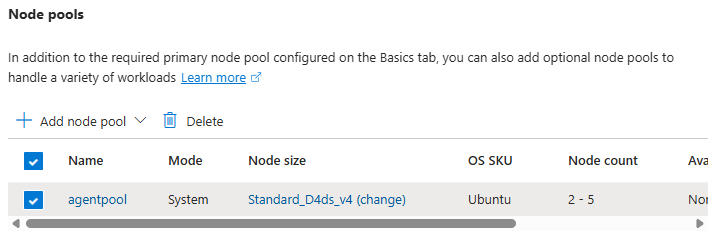
  • Under Node pools, there is an agentpool automatically added for us. You can change this if needed to select a different VM size, and set a low min/max node count

    This is your first exposure to separating capacity management from application deployment.

    Step 3: Networking

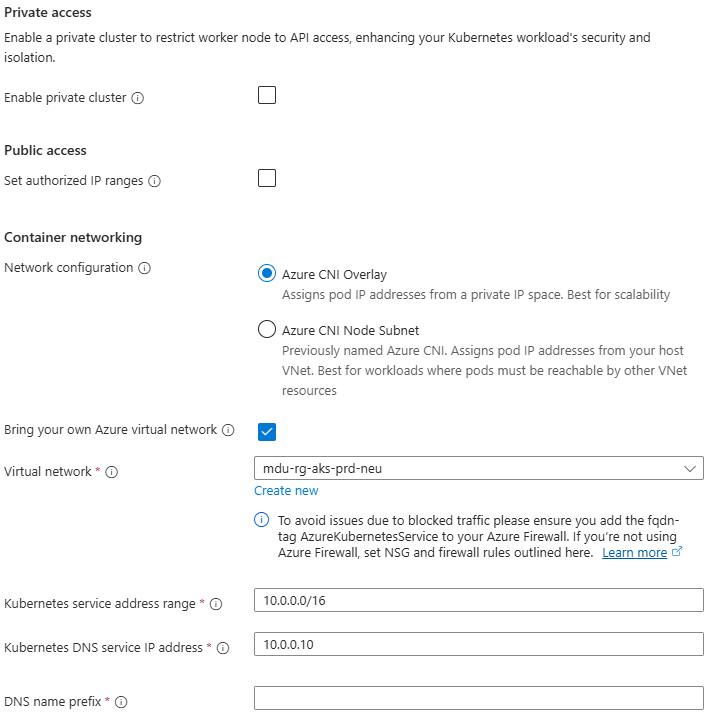
    Under Networking, you will see options for Private/Public Access, and also for Container Networking. This is an important chopice as there are 2 clear options:

    • Azure CNI Overlay – Pods get IPs from a private CIDR address space that is separate from the node VNet.
    • Azure CNI Node Subnet – Pods get IPs directly from the same VNet subnet as the nodes.

    You also have the option to integrate this into your own VNet which you can specify during the cluster creation process.

    Again, we’ll talk more about these options in a later post, but its important to understand the distinction between the two.

    Step 4: Review and Create

    Select Review + Create – note at this point I have not selected any monitoring, security or integration with an Azure Container Registry and am just taking the defaults. Again (you’re probably bored of reading this….), we’ll deal with these in a later post dedicated to each topic.

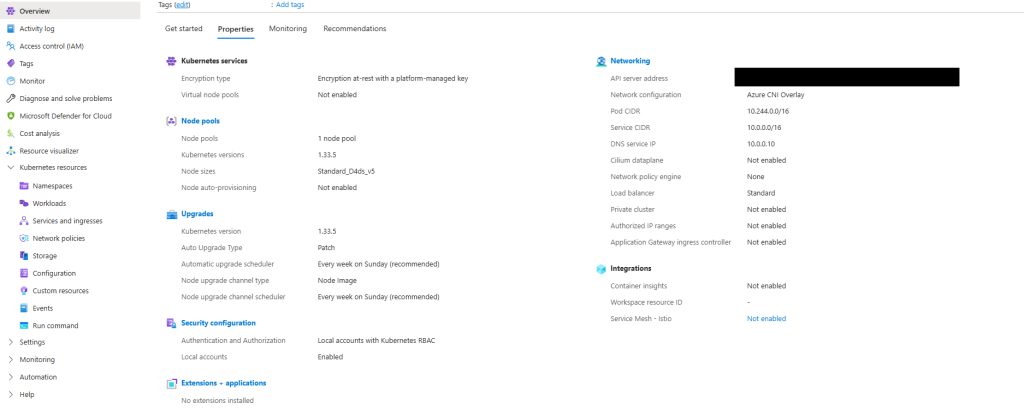
    Once deployed, explore:

    • Node pools
    • Workloads
    • Services and ingresses
    • Cluster configuration

    Notice how much complexity is hidden – if you scroll back up to the “Azure-managed v Customer-managed” diagram, you have responsibility for managing:

    • Cluster nodes
    • Networking
    • Workloads
    • Storage

    Even though Azure abstracts away responsibility for things like key-value store, scheduler, controller and management of the cluster API, a large amount of responsibility still remains.


    What Comes Next in the Series

    This post sets the foundation for what AKS is and how it looks out of the box using a standard deployment with the “defaults”.

    Over the course of the series, we’ll move through the various concepts which will help to inform us as we move towards making design decisions for production workloads:

    • Kubernetes Architecture Fundamentals (control plane, node pools, and cluster design), and how they look in AKS
    • Networking for Production AKS (VNets, CNI, ingress, and traffic flow)
    • Identity, Security, and Access Control
    • Scaling, Reliability, and Resilience
    • Cost Optimisation and Governance
    • Monitoring, Alerting and Visualizations
    • Alignment with the Azure Well Architected Framework
    • And lots more ……

    See you on the next post!
    Azure Lab Services Is Retiring: What to Use Instead (and How to Plan Your Migration)

    Microsoft has announced that Azure Lab Services will be retired on June 28, 2027. New customer sign-ups have already been disabled as of July 2025, which means the clock is officially ticking for anyone using the service today.

    You can read the official announcement on Microsoft Learn here: https://learn.microsoft.com/en-us/azure/lab-services/retirement-guide

    While 2027 may feel a long way off, now is the time to take action!

    For those of you who have never heard of Azure Lab Services, lets take a look at what it was and how you would have interacted with it (even if you didn’t know you were!).

    What is/was Azure Lab Services?

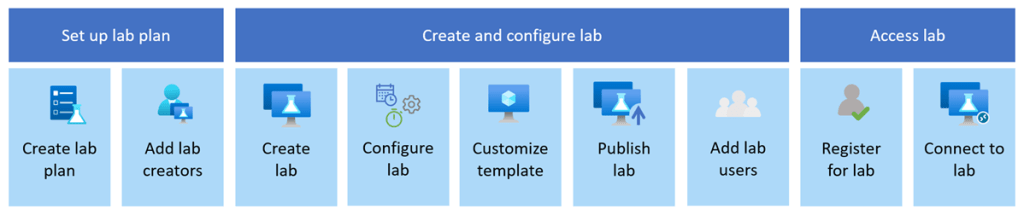
    Image: Microsoft Learn

    Azure Lab Services allowed you to create labs with infrastructure managed by Azure. The service handles all the infrastructure management, from spinning up virtual machines (VMs) to handling errors and scaling the infrastructure.

    If you’ve ever been on a Microsoft course, participated in a Virtual Training Days course, or attended a course run by a Microsoft MCT, Azure Lab Services is what the trainer would have used to facilitate:

    • Classrooms and training environments
    • Hands-on labs for workshops or certifications
    • Short-lived dev/test environments

    Azure Lab Services was popular because it abstracted away a lot of complexity around building lab or classroom environments. Its retirement doesn’t mean Microsoft is stepping away from virtual labs—it means the responsibility shifts back to architecture choices based on the requirements you have.

    If you or your company is using Azure Lab Services, the transition to a new service is one of those changes where early planning pays off—especially if your labs are tied to academic calendars, training programmes, or fixed budgets.

    So what are the alternatives?

    Microsoft has outlined several supported paths forward. None are a 1:1 replacement, so the “right” option depends on who your users are and how they work. While these solutions aren’t necessarily education-specific, they support a wide range of education and training scenarios.

    Azure Virtual Desktop (AVD)

    Image: Microsoft Learn

    🔗 https://learn.microsoft.com/azure/virtual-desktop/

    AVD is the most flexible option and the closest match for large-scale, shared lab environments. AVD is ideal for providing full desktop and app delivery scenarios and provides the following benefits:

    • Multi-session Windows 10/11, which either Full Desktop or Single App Delivery options
    • Full control over networking, identity, and images. One of the great new features of AVD (still in preview mode) is that you can now use Guest Identities in your AVD environments, which can be really useful for training environments and takes the overhead of user management away.
    • Ideal for training labs with many concurrent users
    • Supports scaling plans to reduce costs outside working hours (check out my blog post on using Scaling Plans in your AVD Environments)

    I also wrote a set of blog posts about setting up your AVD environments from scratch which you can find here and here.

    Windows 365

    🔗 https://learn.microsoft.com/windows-365/

    Windows 365 offers a Cloud PC per user, abstracting away most infrastructure concerns. Cloud PC virtual machines are Microsoft Entra ID joined and support centralized end-to-end management using Microsoft Intune. You assign Cloud PC’s by assigning a license to that user in the same way as you would assign Microsoft 365 licences. The benefits of Windows 365 are:

    • Simple to deploy and manage
    • Predictable per-user pricing
    • Well-suited to classrooms or longer-lived learning environments

    The trade-off is that there is less flexibility and typically higher cost per user than shared AVD environments, as the Cloud PC’s are dedicated to the users and cannot be shared.

    Azure DevTest Labs

    Image: Microsoft Learn

    🔗 https://learn.microsoft.com/azure/devtest-labs/

    A strong option for developer-focused labs, Azure DevTest labs are targeted at enterprise customers. It also has a key difference to the other alternative solutions, its the only one that offers access to Linux VMs as well as Windows VMs.

    • Supports Windows and Linux
    • Built-in auto-shutdown and cost controls
    • Works well for dev/test and experimentation scenarios

    Microsoft Dev Box

    🔗 https://learn.microsoft.com/dev-box/

    Dev Box is aimed squarely at professional developers. It’s ideal for facilitating hands-on learning where training leaders can use Dev Box supported images to create identical virtual machines for trainees. Dev Box virtual machines are Microsoft Entra ID joined and support centralized end-to-end management with Microsoft Intune.

    • High-performance, secure workstations
    • Integrated with developer tools and workflows
    • Excellent for enterprise engineering teams

    However, its important to note that as of November 2025, DevBox is being integrated into Windows365. The service is built on top of Windows365, so Micrsoft has decided to unify the offerings. You can read more about this announcement here but as of November 2025, Microsoft are no longer accepting new DevBox customers – https://learn.microsoft.com/en-us/azure/dev-box/dev-box-windows-365-announcement?wt.mc_id=AZ-MVP-5005255

    When First-Party Options Aren’t Enough

    If you relied heavily on the lab orchestration features of Azure Lab Services (user lifecycle, lab resets, guided experiences), you may want to evaluate partner platforms that build on Azure:

    These solutions provide:

    • Purpose-built virtual lab platforms
    • User management and lab automation
    • Training and certification-oriented workflows

    They add cost, but also significantly reduce operational complexity.

    Comparison: Azure Lab Services Alternatives

    Lets take a look at a comparison of each service showing cost, use cases and strengths:

    ServiceTypical Cost ModelBest Use CasesKey StrengthWhen 3rd Party Tools Are Needed
    Azure Virtual DesktopPay-per-use (compute + storage + licensing)Large classrooms, shared labs, training environmentsMaximum flexibility and scalabilityFor lab orchestration, user lifecycle, guided labs
    Windows 365Per-user, per-monthClassrooms, longer-lived learning PCsSimplicity and predictabilityRarely needed
    Azure DevTest LabsPay-per-use with cost controlsDev/test, experimentation, mixed OS labsCost governanceFor classroom-style delivery
    Microsoft Dev BoxPer-user, per-monthEnterprise developersPerformance and securityNot typical
    Partner PlatformsSubscription + Azure consumptionTraining providers, certification labsTurnkey lab experiencesCore dependency

    Don’t Forget Hybrid Scenarios

    If some labs or dependencies must remain on-premises, you can still modernise your management approach by deploying Azure Virtual Desktop locally and manage using Azure Arc, which will allow you to

    • Apply Azure governance and policies
    • Centralise monitoring and management
    • Transition gradually toward cloud-native designs

    Start Planning Now

    With several budget cycles between now and June 2027, the smartest move is to:

    1. Inventory existing labs and usage patterns
    2. Map them to the closest-fit replacement
    3. Pilot early with a small group of users

    Azure Lab Services isn’t disappearing tomorrow—but waiting until the last minute will almost certainly increase cost, risk, and disruption.

    If you treat this as an architectural evolution rather than a forced migration, you’ll end up with a platform that’s more scalable, more secure, and better aligned with how people actually learn and work today.