
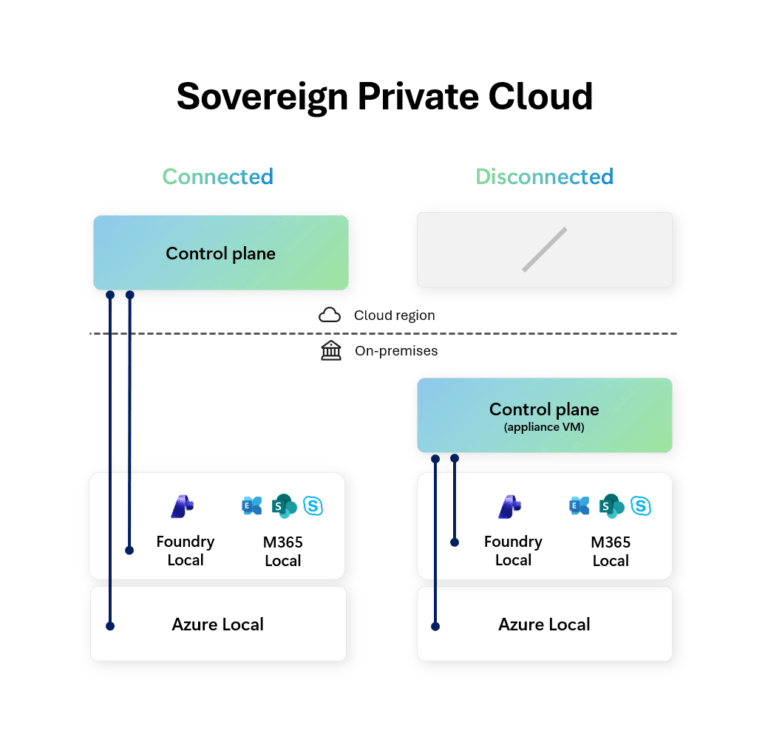
Microsoft have just announced the General Availability of Disconnected Operations for Azure Local, M365 Local and Foundry Local.
Reading between the lines of the announcement seems to be aimed less at about “offline cloud” and more about Microsoft defining a clearer Sovereign Cloud architecture. While the headline is Azure Local disconnected operations + Microsoft 365 Local + Foundry Local, the bigger story is this:
Microsoft is trying to give customers a sovereign stack that spans infrastructure, productivity, and AI — and lets them choose where on the connectivity spectrum each workload sits.
Lets dig a bit deeper into this.
This is a Sovereign Private Cloud story
The Microsoft Learn page for Sovereign Private Cloud also makes the architecture intent more explicit, and positions that front and center as supporting locally hosted, hybrid, and fully disconnected environments. :
- Azure Local for infrastructure
- Microsoft 365 Local for productivity
- Unified control and lifecycle management
- Workload mobility between Azure and on-premises
- Support for hybrid and disconnected deployment models
Announcing Azure Local, M365 Local, and Foundry Local together isn’t just about a bundling of product releases, it’s a shift to a full-stack sovereign operating model:
- Infrastructure stays local,
- Productivity stays local,
- AI inferencing can stay local,
- Control Plane can be cloud-hosted or on-premises depending on mode.
Azure Local is the foundation — but M365 Local and Foundry Local are the interesting parts
Most people immediately focus on Azure Local (understandably). We now get a local control plane (which is managed by the management appliance) that provides a Azure portal and ARM experience similar to the Azure Portal.
Flipping to disconnected mode means you do lose Azure Virtual Desktop (understandably), but still get options such as VMs, Kubernetes, Container Registry, Key Vault and Azure Policy.
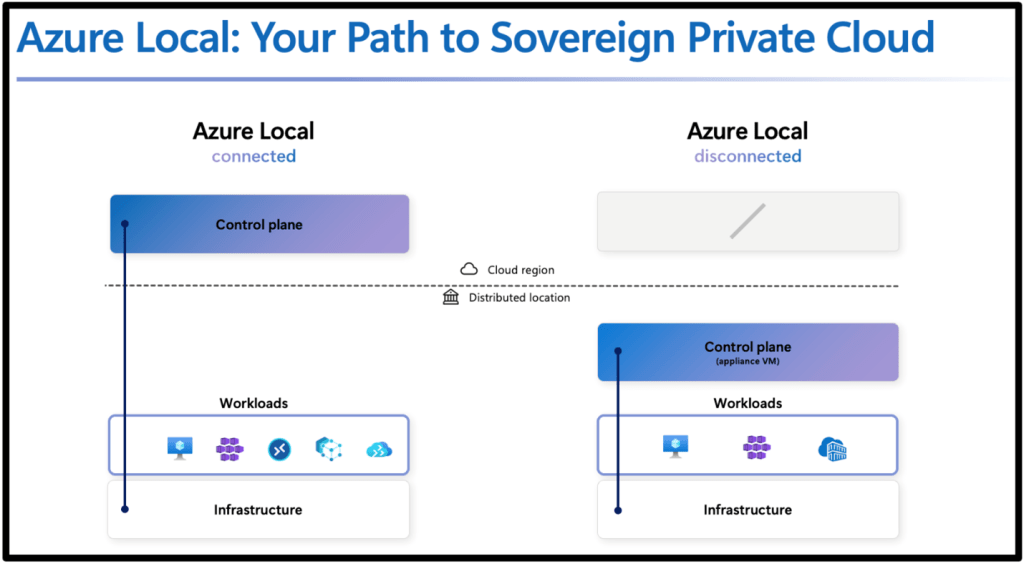
But the more important signal is that Microsoft is extending the same sovereign/disconnected pattern up the stack:
- Microsoft 365 Local = productivity continuity inside the sovereign boundary
- Foundry Local = AI inferencing/model capability inside the sovereign boundary
That matters because “sovereign” projects usually fail at one of these layers:
- Infra is fine, but productivity still leaks to cloud services
- Infra and productivity are local, but AI requires cloud inference
- Everything is local, but operations become unmanageable
Microsoft is clearly trying to close those gaps. But are they?
Microsoft 365 Local: what it is, and what cloud use cases it’s trying to replace
What Microsoft 365 Local actually is
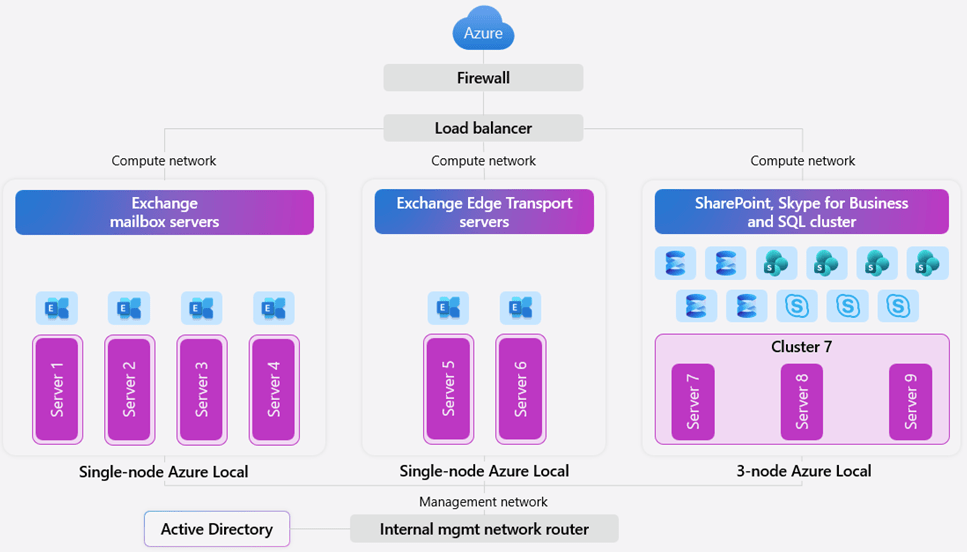
The Microsoft Learn page is direct in the positioning of M365 Local:
Microsoft 365 Local runs Exchange Server, SharePoint Server, and Skype for Business Server on customer-owned Azure Local infrastructure with Azure-consistent management, and it supports hybrid and fully disconnected deployments.
It also emphasizes:
- customer-owned and customer-managed environment
- data residency / access / compliance control
- validated reference architecture and hardened baseline
- certified hardware / partner-led deployment paths
What cloud use cases it’s potentially replacing
Microsoft 365 Local is not a like-for-like replacement for the entire modern Microsoft 365 cloud suite. The cloud use cases it appears to target (email, document collaboration, unified comms) are the ones where organizations would otherwise be pushed toward:
- Exchange Online (email/calendar)
- SharePoint Online (document collaboration/intranet)
- Teams Online (cloud-first collaboration and video/audio conferencing)
Microsoft 365 Local does this using their stack of traditional on-premises server products:
- Exchange Server
- SharePoint Server
- Skype of Business Server
Foundry Local: what it is, and what cloud AI use cases it’s trying to replace
In the sovereign announcement, Microsoft says Foundry Local now supports bringing large multimodal models into fully disconnected sovereign environments, using partner infrastructure (for example NVIDIA-based platforms) so customers can run local AI inferencing within their own boundaries.
What cloud use cases Foundry Local is trying to replace
Microsoft Foundry (cloud) is positioned as the place to design and operate AI apps/agents at scale, with:
- a large model catalog
- managed compute deployments
- serverless API deployments
- prompt flow orchestration
- Azure-hosted endpoints/APIs
That means Foundry Local is potentially replacing cloud-hosted AI patterns like:
- Serverless model APIs hosted by Microsoft
- Managed compute model hosting in Azure
- cloud-based prompt/app development pipelines for the inference/runtime side when data cannot leave the operational boundary
Foundry Local is effectively Microsoft’s answer for customers who need:
“Foundry-style AI capabilities, but the model runtime and data path must stay on-prem / inside the sovereign boundary.”
That’s a big gap in the market, and Microsoft is trying to close it.
What this stack is replacing, architecturally
If you zoom out, the trio maps cleanly to three cloud categories:
1) Azure Local disconnected
Potentially replacing: cloud-managed hybrid infrastructure patterns where WAN dependency is still too high
With: local control plane + Azure-consistent management for infra and some Arc-enabled services.
2) Microsoft 365 Local
Potentially replacing: reliance on Microsoft 365 SaaS for core productivity in environments that can’t support that connectivity/risk model
With: on-prem productivity server workloads on Azure Local under customer control.
3) Foundry Local
Potentially replacing: Azure-hosted model inference/serverless AI endpoints for sensitive AI use cases
With: local inferencing and APIs inside the same sovereign boundary.
That’s why this announcement matters: it’s not just infra resilience. It’s a stack-level sovereignty story.
The hard question: what if you need truly fully disconnected?
Microsoft’s wording now includes “fully disconnected” for Sovereign Private Cloud, and the Azure Local disconnected docs are a genuine step forward. But many organizations still need to define “fully disconnected” much more strictly than a marketing phrase ever can.
In practice, “fully disconnected” usually means:
- no internet path
- no cloud control plane dependency
- no cloud identity dependency
- no cloud telemetry path
- updates and artifacts moved through approved transfer processes
If that’s your requirement, you need to compare options honestly and look at some alternatives that already fit that narrative.
Fully disconnected alternative 1: Azure Stack Hub
If you want the most explicit Microsoft-native air-gapped model, Azure Stack Hub is still the reference point.

Microsoft’s Azure Stack Hub docs are very clear:
- you can deploy and use it without internet connectivity
- disconnected mode requires AD FS
- multitenancy is not supported in disconnected mode because it would require Microsoft Entra ID
- Microsoft describes this as a scenario for use in “factory floors, cruise ships, and mine shafts”
If you were to look at this really closely, that is about as explicit as Microsoft gets to stating that something is “fully disconnected”.
Why it’s still relevant
Azure Stack Hub is often the better fit when the requirement is:
- pure private cloud
- internal-only identity
- no usage data sent to Azure
- no hybrid dependency as a baseline design
The trade-off
Microsoft also documents the operational compromises in disconnected mode:
- impaired marketplace flow (manual syndication)
- no telemetry
- some extension/tooling limitations
- constraints around service principals/identity workflows, etc.
That’s the normal cost of real isolation.
Fully disconnected alternative 2: Red Hat OpenShift
If the center of gravity is containers/Kubernetes, OpenShift is one of the strongest mature options for disconnected environments.
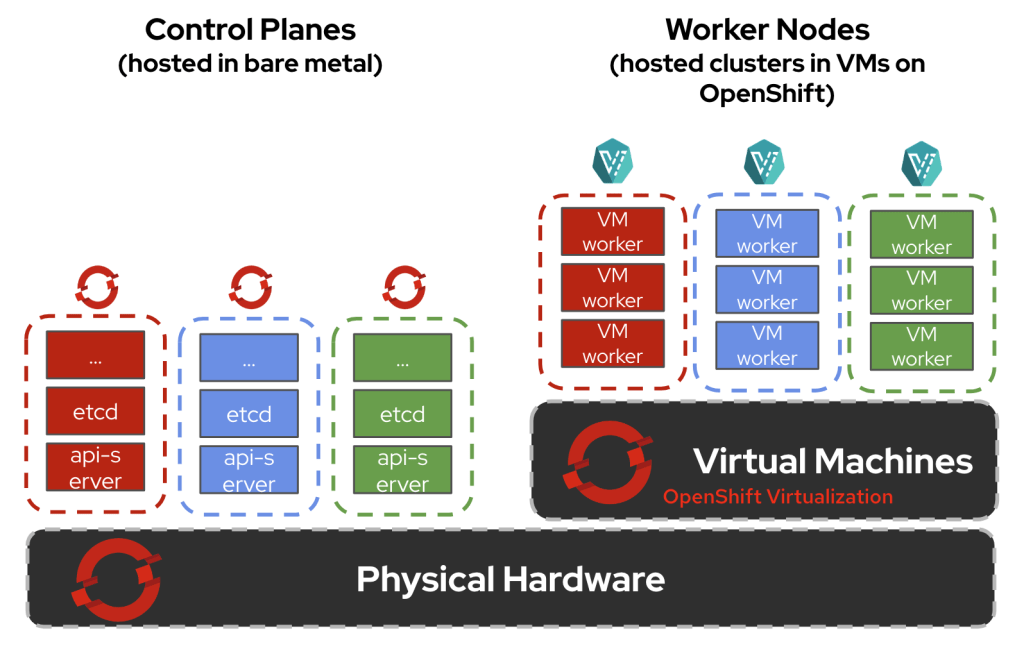
Red Hat’s docs are excellent here because they define terms clearly:
- Disconnected environment = no full internet access
- Air-gapped network = completely isolated external network
- Restricted network = limited connectivity (proxies/firewalls, etc.)
That taxonomy is exactly what more cloud vendors should be using.
Red Hat also documents:
- extra setup is required because OpenShift automates many internet-dependent functions by default
- preferred disconnected practices (image mirroring, local update service, etc.)
- a wide range of disconnected install patterns, including on-prem and vSphere-based deployments
What OpenShift is replacing
OpenShift disconnected is often replacing:
- managed Kubernetes services in public cloud
- cloud-native CI/CD and image delivery assumptions
- internet-dependent operator/update workflows
It’s a great fit if your target state is platform engineering and Kubernetes-first operations — but it absolutely requires discipline around mirroring, registries, and update lifecycle.
So where do M365 Local and Foundry Local fit versus these alternatives?
This is the key architecture question that can be answered in a number of ways.
If you want a Microsoft-centric sovereign stack (infra + productivity + AI)
Azure Local + M365 Local + Foundry Local is very compelling, because Microsoft is finally addressing all three layers together:
- infra continuity
- productivity continuity
- AI continuity
inside one sovereign/private-cloud framing.
That’s the strongest part of the announcement.
If you need “hard air gap” with minimal cloud relationship
Azure Stack Hub is still the clearer Microsoft answer, because the disconnected mode assumptions are explicitly documented (AD FS, no multitenancy, no Azure dependency during operation).
If you need broad private-cloud or Kubernetes-first flexibility
Red Hat OpenShift is a serious alternative, especially when:
- you already run those stacks
- your ops teams are built around them
- your security model is based on internal depots, mirrors, and transfer controls rather than cloud-integrated management
Conclusion
Microsoft is not just shipping “offline features.”, they’re building a Sovereign Private Cloud narrative where:
- Azure Local covers infrastructure,
- Microsoft 365 Local covers productivity,
- Foundry Local covers AI,
- and customers can choose connected, hybrid, or fully disconnected modes based on mission and risk.
But “fully disconnected” still needs precise architecture definitions in every real project. Because in practice, the right question is never:
“Can this run disconnected?”
It’s:
“Which layer is disconnected, which layer isn’t, and who owns the operational overhead?”
Hope you found this post useful – see you next time

 Michael Durkan