
We Built This AI Backlash: from the Robot in the Room to the Slop Button and the Sliding Scale of Trust

Why we welcome some AI into our lives without a second thought, and pour scorn on the rest

Everything that is automated or moves gets a name in our house. It’s a tradition we’ve continued since our children were small. I’ve had cars with various names, from Marty Mondeo to my current Pedro Peugeot. My cycling-mad wife doesn’t escape: she has two racing bikes in dark green and purple/pink which my drama-mad daughter has gleefully named Elphaba and Glinda. The most recent addition to our stable of “things that move and need a name” is our robot vacuum, which we have named Hallie.

Normally, Mondays are work-from-home days for me and it’s when Hallie gets to work. I set Hallie off to whatever rooms need attention and go back to my desk, and at some point it trundles into the office, steering round the chair legs with a camera on its nose. I was on a client call when Hallie entered a few weeks ago, and I caught myself watching it and asking a question I had never asked before. Is that camera only stopping it hitting the wall? Does it have a microphone? Is it listening not just to this call, but to everything we do day-to-day?

This led me down a rabbit hole, and my digging turned the question turned into a bigger one: why do we welcome some AI into our lives without a second thought, and pour scorn on the rest?

And before anyone asks – yes I quite obviously generated the image above using AI, and no my office is not that tidy ….. moving on …..

The Robot in the Room

So, is Hallie listening? The honest answer is neither “of course not” nor “they are all spying on us”. Many camera-guided vacuums carry a microphone for a built-in voice assistant (Ecovacs’ Deebot range answers to “OK YIKO”), and the same research that exposed Ecovacs vacuums covered its robot mowers too. The documented incidents are real:

The important thing to say here is that I have found no credible evidence that robot vacuums are designed to secretly record conversations. The documented failures the same thing we’ve seen for years in technology as the primary drivers of most security incidents and data leaks: weak authentication, shared encryption keys, data kept too long and people with access who should not have it. The device does not need to be malicious. It only needs to be insecure.

So if we break this down: the vacuum does a job, it does not pretend to be me, and its risk is invisible. Remember those three points, because they come up again as we step through the post.

Alexa, what time is it …..

We have been here before. Siri arrived in 2011 and the Amazon Echo in 2014, and within a few years an always-listening microphone on the kitchen counter was completely normal. With it came a suspicion that never quite went away: that Alexa or a Nest speaker is quietly recording every conversation in the house.
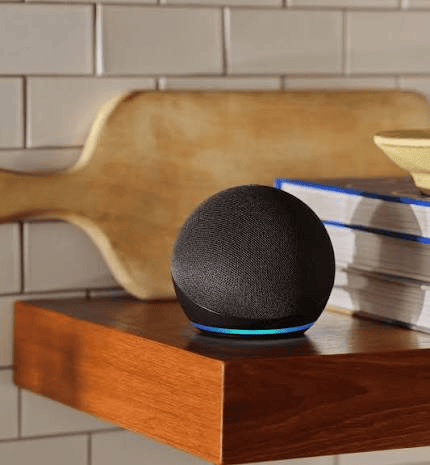
Image Credit: Amazon

Amazon says Echo devices detect the wake word locally and only send audio once they hear it. But the record does not let the vendors off the hook. In March 2025 Amazon removed the option on some Echo models to keep voice requests off the cloud. In 2023 it paid $25 million to settle FTC allegations over retaining children’s Alexa recordings, and $5.8 million over Ring, where a former employee spied on customers through their cameras. Amazon denied breaking the law in both cases.

The danger was never a speaker secretly transcribing dinner. It was recordings kept too long, a privacy setting quietly withdrawn and people with access they should not have had. And still the speaker stays on the counter because our quest for convenience won that argument a decade ago.

The AI Pair Programmer

As technology professionals, the same pattern of convenience has followed us into our working lives. In 2021 GitHub Copilot arrived as an AI pair programmer that sat beside you across your SDLC, in whatever language you were working in.

Like everything, it has evolved into something more than it was originally intended to do. Between GitHub Copilot’s agentic features, Claude Code working directly in the terminal and the repository, and the preview Code capability in the Copilot, which builds hosted internal apps from a plain-language description, the assistant has stopped sitting beside you and started taking the keyboard.

Think about how most Azure Landing Zone deployments have been built: Terraform modules written by hand, networking blocks copied from whatever repo worked last time. Microsoft already gives us Azure Verified Modules, a supported library of Bicep and Terraform modules, and GitHub is full of real-world templates. Put GitHub Copilot on top, across the full deployment lifecycle, and you get what I’ve started referring to as Infrastructure-by-Prompt (IbP).

I wrote on LinkedIn recently that IaC is being replaced by IbP, and that we’re entering a time where the quality of your cloud infrastructure will be defined by the quality of your prompt. What IbP replaces is the hand-authoring: the artefact in the repository is still Bicep or Terraform, still reviewed, still deployed through a pipeline.

The bar to entry has dropped dramatically, but with it comes problems. Agent-generated templates fail quietly in the same places hand-written ones do: hard-coded SKUs, public network access left enabled, diagnostic settings missing. The answer here is to tell the agent to build on AVM modules, and keep every gate you would apply to a human change: a what-if or plan in the pull request, policy as code, and a named human reviewer who actually understands what has been produced before approving it.

We can accept the entry bar dropping, but the bar for production must not. Otherwise we’re just deploying slop into Production without any governance, controls or supportability.

Lets be clear on this: IbP sits longside the robot vacuum, it does a job and its risk is invisible until something goes wrong. An IbP template nobody reviewed is slop with a blast radius.

The Slop Button

Which brings me to the one place we have decided to push back. Open your LinkedIn feed at any time, and you’ll be confronted by carousels and posts with lists about Agent governance that all look and sound the same, but still subtly different.

In July LinkedIn added a “Seems like AI slop” option to the three-dot menu on posts and comments. LinkedIn called AI slop a top priority, shipped new classifiers alongside the button and quietly retired its own AI “enhance your post” feature.
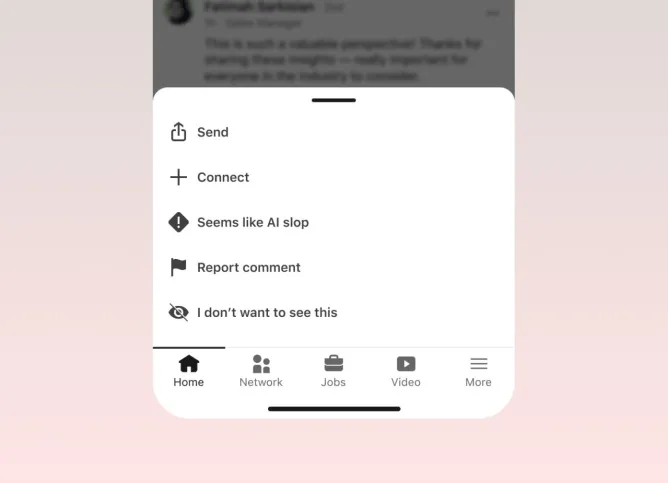
Image Credit: LinkedIn

In August, The Register reported that more than a million members had used the button, and that copy-pasted AI posts were seeing around 40% fewer views. AI Detection firm Pangram flagged over 40% of long LinkedIn posts as fully AI-written (these were posts seen by users of its own Chrome extension).

What’s interesting is the attitude shift. Two years ago, “I used AI to write this” was a productivity humblebrag. Today people hide it. Yet LinkedIn has been explicit that using AI and producing slop are not the same thing. That distinction is the whole argument.

The Sliding Scale of Trust

Put those stories side by side, add the clearest case of AI we have chosen to trust, and a pattern appears. By March 2026 Waymo was reported to be delivering roughly 500,000 paid driverless rides a week across 10 US cities, and in April it moved its London fleet to autonomous driving with specialists behind the wheel.

Image Credit: Reuters

Lets stop and think about this – we have no issue with letting AI-powered software drive us home, yet we flag a LinkedIn post for sounding too smooth.

TrustExampleDoes a job or speaks for us?Who put in the work?Is the risk visible?Our reaction
MostFraud detection, spam filtersDoes a jobThe vendorNoNot noticed at all
RobotaxiDoes a jobThe operator, over yearsYes, veryAccepted, with scrutiny
Robot vacuumDoes a jobThe vendorNoWelcomed, rarely questioned
 Smart speakerDoes a job, and listensThe vendorPartlyAccepted, with suspicion
IbP templateDoes a job for youThe engineer, if reviewedOnly if you review itEmbraced, often under-reviewed
LeastAI-written post under a human nameSpeaks for usThe readerYes, to the readerScorned

Three questions decide where something lands. Does it do a job, or does it speak for us? Who put in the work to make it good: the maker, or the audience left to sift through it? And can we see the risk?

Our assessment of trust for each case follows the first two questions and largely ignores the third. The robotaxi earns its place: its risk is obvious, and the operator spent years paying it down in public. The vacuum and the speaker sit higher than their record justifies, because their risk is out of sight. The AI-written post is scorned hardest, when the worst it usually does is waste a minute of your attention. On that third question, we have the scale upside down.

IbP is the one to watch, because it can land anywhere. Grounded in verified modules, planned and reviewed, it is the robotaxi. Unreviewed, it is slop, carrying the hidden risk of the vacuum.

Conclusion

The practical guidance is the same at home and at work. Know what the thing can reach, and limit it.

At home, turn off the vacuum’s voice assistant if you never use it, schedule the clean outside call times, don’t have calls in the same room as the speaker, and put IoT devices on their own network segment. At work, make agent identity and actions visible, keep a human in the loop on anything that speaks or deploys under your name.

We did not stumble into this era, we built it – one convenience at a time, from the speaker on the counter to the vacuum under the desk to the agent in the pipeline. The LinkedIn backlash is not the public turning against AI. It is the public drawing a line between AI that serves them and AI that performs at them.
Microsoft’s Sovereign Cloud Strategy: is it really “Disconnected”?

Image Credit: Microsoft

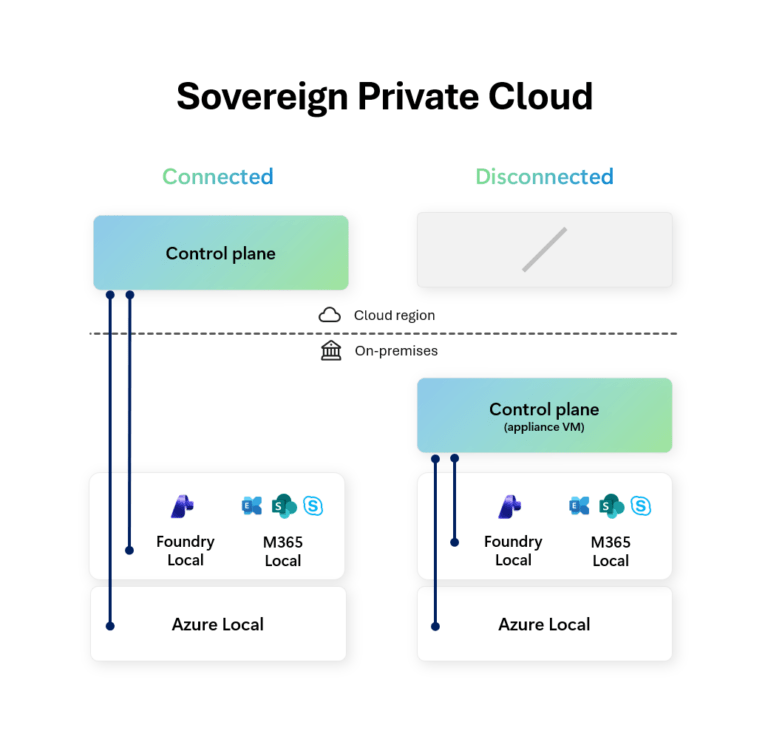
In February 2026, Microsoft announced general availability of disconnected operations for Azure Local and Microsoft 365 Local, alongside large-model support for Foundry Local on Azure Local (which remains in preview and is available by request).

Reading between the lines of the announcement seems to be aimed less at about “offline cloud” and more about Microsoft defining a clearer Sovereign Cloud architecture. While the headline is Azure Local disconnected operations + Microsoft 365 Local + Foundry Local, the bigger story is this:

Microsoft is trying to give customers a sovereign stack that spans infrastructure, productivity, and AI — and lets them choose where on the connectivity spectrum each workload sits.

Lets dig a bit deeper into this.


This is a Sovereign Private Cloud story

The Microsoft Learn page for Sovereign Private Cloud also makes the architecture intent more explicit, and positions that front and center as supporting locally hosted, hybrid, and fully disconnected environments. :

  • Azure Local for infrastructure
  • Microsoft 365 Local for productivity
  • Unified control and lifecycle management
  • Workload mobility between Azure and on-premises
  • Support for hybrid and disconnected deployment models

Announcing Azure Local, M365 Local, and Foundry Local together isn’t just about a bundling of product releases, it’s a shift to a full-stack sovereign operating model:

  • Infrastructure stays local,
  • Productivity stays local,
  • AI inferencing can stay local,
  • Control Plane can be cloud-hosted or on-premises depending on mode.

Azure Local is the foundation — but M365 Local and Foundry Local are the interesting parts

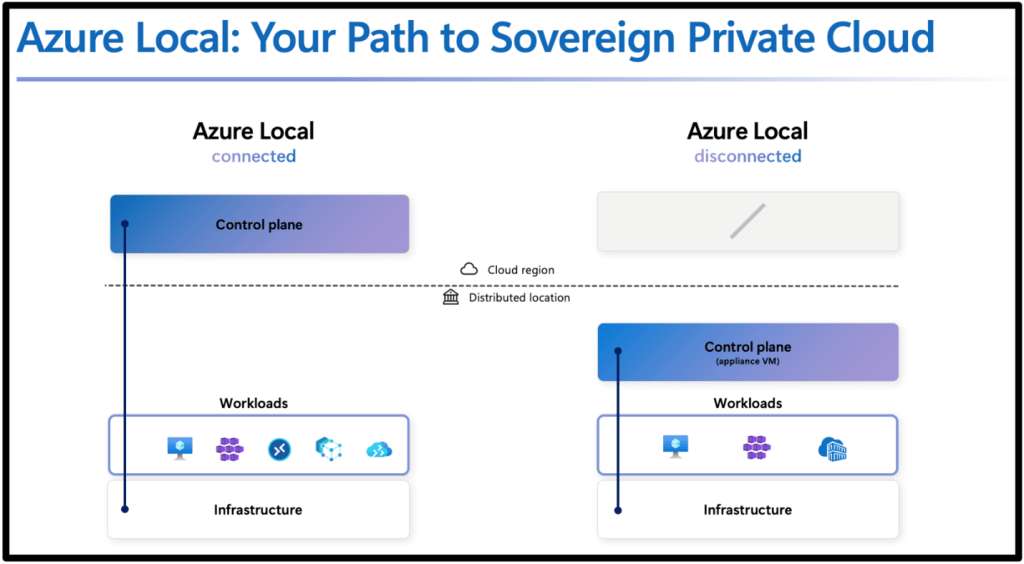
Most people immediately focus on Azure Local (understandably). We now get a local control plane (which is managed by the management appliance) that provides a Azure portal and ARM experience similar to the Azure Portal.

Flipping to disconnected mode means you do lose Azure Virtual Desktop (understandably), but still get options such as VMs, Kubernetes, Container Registry, Key Vault and Azure Policy.

Image Credit: Microsoft/Douglas Phillips

But the more important signal is that Microsoft is extending the same sovereign/disconnected pattern up the stack:

  • Microsoft 365 Local = productivity continuity inside the sovereign boundary
  • Foundry Local = AI inferencing/model capability inside the sovereign boundary

That matters because “sovereign” projects usually fail at one of these layers:

  • Infra is fine, but productivity still leaks to cloud services
  • Infra and productivity are local, but AI requires cloud inference
  • Everything is local, but operations become unmanageable

Microsoft is clearly trying to close those gaps. But are they?


Microsoft 365 Local: what it is, and what cloud use cases it’s trying to replace

What Microsoft 365 Local actually is

Image Credit: Microsoft

The Microsoft Learn page is direct in the positioning of M365 Local:

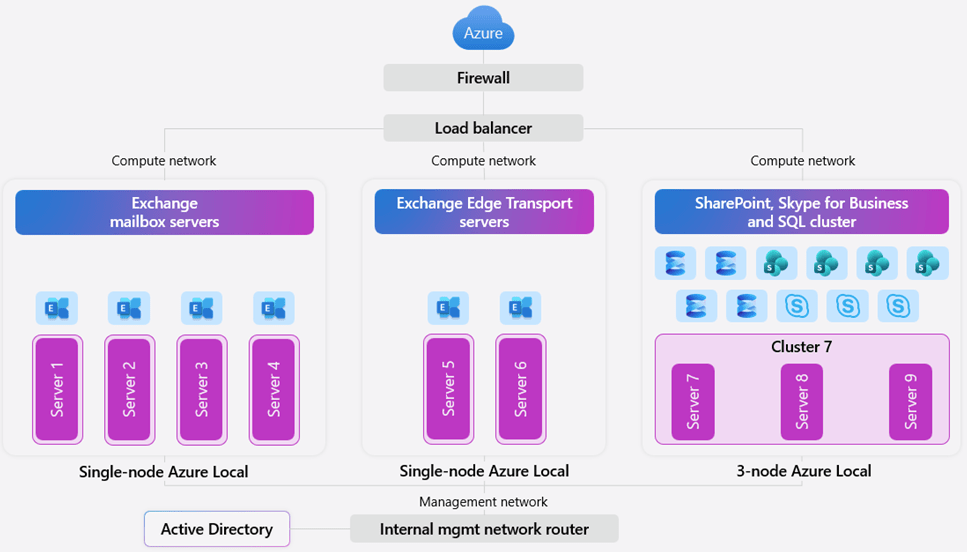
Microsoft 365 Local runs Exchange Server, SharePoint Server, and Skype for Business Server on customer-owned Azure Local infrastructure with Azure-consistent management, and it supports hybrid and fully disconnected deployments.

It also emphasizes:

  • customer-owned and customer-managed environment
  • data residency / access / compliance control
  • validated reference architecture and hardened baseline
  • certified hardware / partner-led deployment paths

What cloud use cases it’s potentially replacing

Microsoft 365 Local is not a like-for-like replacement for the entire modern Microsoft 365 cloud suite. The cloud use cases it appears to target (email, document collaboration, unified comms) are the ones where organizations would otherwise be pushed toward:

  • Exchange Online (email/calendar)
  • SharePoint Online (document collaboration/intranet)
  • Teams Online (cloud-first collaboration and video/audio conferencing)

Microsoft 365 Local does this using their stack of traditional on-premises server products:

  • Exchange Server
  • SharePoint Server
  • Skype of Business Server

Foundry Local: what it is, and what cloud AI use cases it’s trying to replace

In the sovereign announcement, Microsoft says Foundry Local now supports bringing large multimodal models into fully disconnected sovereign environments, using partner infrastructure (for example NVIDIA-based platforms) so customers can run local AI inferencing within their own boundaries.

What cloud use cases Foundry Local is trying to replace

Microsoft Foundry (cloud) is positioned as the place to design and operate AI apps/agents at scale, with:

  • a large model catalog
  • managed compute deployments
  • serverless API deployments
  • prompt flow orchestration
  • Azure-hosted endpoints/APIs

That means Foundry Local is potentially replacing cloud-hosted AI patterns like:

  • Serverless model APIs hosted by Microsoft
  • Managed compute model hosting in Azure
  • cloud-based prompt/app development pipelines for the inference/runtime side when data cannot leave the operational boundary

Foundry Local is effectively Microsoft’s answer for customers who need:

“Foundry-style AI capabilities, but the model runtime and data path must stay on-prem / inside the sovereign boundary.”

That’s a big gap in the market, and Microsoft is trying to close it.


What this stack is replacing, architecturally

If you zoom out, the trio maps cleanly to three cloud categories:

1) Azure Local disconnected

Potentially replacing: cloud-managed hybrid infrastructure patterns where WAN dependency is still too high
With: local control plane + Azure-consistent management for infra and some Arc-enabled services.

2) Microsoft 365 Local

Potentially replacing: reliance on Microsoft 365 SaaS for core productivity in environments that can’t support that connectivity/risk model
With: on-prem productivity server workloads on Azure Local under customer control.

3) Foundry Local

Potentially replacing: Azure-hosted model inference/serverless AI endpoints for sensitive AI use cases
With: local inferencing and APIs inside the same sovereign boundary.

That’s why this announcement matters: it’s not just infra resilience. It’s a stack-level sovereignty story.


The hard question: what if you need truly fully disconnected?

Microsoft’s wording now includes “fully disconnected” for Sovereign Private Cloud, and the Azure Local disconnected docs are a genuine step forward. But many organizations still need to define “fully disconnected” much more strictly than a marketing phrase ever can.

In practice, “fully disconnected” usually means:

  • no internet path
  • no cloud control plane dependency
  • no cloud identity dependency
  • no cloud telemetry path
  • updates and artifacts moved through approved transfer processes

If that’s your requirement, you need to compare options honestly and look at some alternatives that already fit that narrative.


Fully disconnected alternative 1: Azure Stack Hub

If you want the most explicit Microsoft-native air-gapped model, Azure Stack Hub is still the reference point.

Diagram showing Azure Stack Hub job roles
Image Credit: Microsoft

Microsoft’s Azure Stack Hub docs are very clear:

  • you can deploy and use it without internet connectivity
  • disconnected mode requires AD FS
  • multitenancy is not supported in disconnected mode because it would require Microsoft Entra ID
  • Microsoft describes this as a scenario for use in “factory floors, cruise ships, and mine shafts”

If you were to look at this really closely, that is about as explicit as Microsoft gets to stating that something is “fully disconnected”.

Why it’s still relevant

Azure Stack Hub is often the better fit when the requirement is:

  • pure private cloud
  • internal-only identity
  • no usage data sent to Azure
  • no hybrid dependency as a baseline design

The trade-off

Microsoft also documents the operational compromises in disconnected mode:

  • impaired marketplace flow (manual syndication)
  • no telemetry
  • some extension/tooling limitations
  • constraints around service principals/identity workflows, etc.

That’s the normal cost of real isolation.


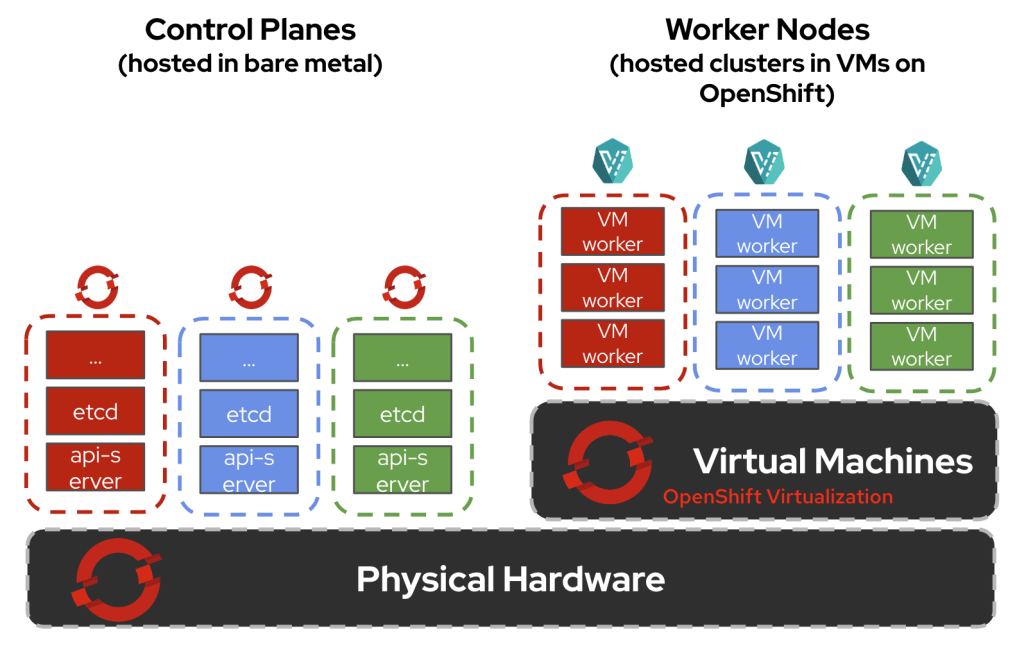
Fully disconnected alternative 2: Red Hat OpenShift

If the center of gravity is containers/Kubernetes, OpenShift is one of the strongest mature options for disconnected environments.

Image Credit: Red Hat

Red Hat’s docs are excellent here because they define terms clearly:

  • Disconnected environment = no full internet access
  • Air-gapped network = completely isolated external network
  • Restricted network = limited connectivity (proxies/firewalls, etc.)

That taxonomy is exactly what more cloud vendors should be using.

Red Hat also documents:

  • extra setup is required because OpenShift automates many internet-dependent functions by default
  • preferred disconnected practices (image mirroring, local update service, etc.)
  • a wide range of disconnected install patterns, including on-prem and vSphere-based deployments

What OpenShift is replacing

OpenShift disconnected is often replacing:

  • managed Kubernetes services in public cloud
  • cloud-native CI/CD and image delivery assumptions
  • internet-dependent operator/update workflows

It’s a great fit if your target state is platform engineering and Kubernetes-first operations — but it absolutely requires discipline around mirroring, registries, and update lifecycle.


So where do M365 Local and Foundry Local fit versus these alternatives?

This is the key architecture question that can be answered in a number of ways.

If you want a Microsoft-centric sovereign stack (infra + productivity + AI)

Azure Local + M365 Local + Foundry Local is very compelling, because Microsoft is finally addressing all three layers together:

  • infra continuity
  • productivity continuity
  • AI continuity
    inside one sovereign/private-cloud framing.

That’s the strongest part of the announcement.

If you need “hard air gap” with minimal cloud relationship

Azure Stack Hub is still the clearer Microsoft answer, because the disconnected mode assumptions are explicitly documented (AD FS, no multitenancy, no Azure dependency during operation).

If you need broad private-cloud or Kubernetes-first flexibility

Red Hat OpenShift is a serious alternative, especially when:

  • you already run those stacks
  • your ops teams are built around them
  • your security model is based on internal depots, mirrors, and transfer controls rather than cloud-integrated management

Conclusion

Microsoft is not just shipping “offline features.”, they’re building a Sovereign Private Cloud narrative where:

  • Azure Local covers infrastructure,
  • Microsoft 365 Local covers productivity,
  • Foundry Local covers AI,
  • and customers can choose connected, hybrid, or fully disconnected modes based on mission and risk.

But “fully disconnected” still needs precise architecture definitions in every real project. Because in practice, the right question is never:

“Can this run disconnected?”

It’s:

“Which layer is disconnected, which layer isn’t, and who owns the operational overhead?”

Hope you found this post useful – see you next time