
If you have spent any meaningful time provisioning resources in Azure, you have almost certainly hit a quota limit at least once. Maybe a Virtual Machine deployment failed because the vCPU limit for a given SKU family was already at its ceiling, or a new SQL Managed Instance request was rejected with an error that had nothing to do with your spending limit.
Quota errors are disruptive and the frustration they cause is amplified by the fact that they are often poorly understood. Azure quotas are not a billing mechanism. They are not a punishment for being power users. They exist for a reason that is deeply tied to how Azure operates as a global cloud platform — and that’s where the whole quota model starts to make a lot more sense.
In this post, we are going to look at what Azure Quotas are, why they exist, how they are scoped, and what you need to know to manage them properly as part of your Azure environment design.
What Are Azure Quotas?
An Azure quota is a limit on the number of a specific resource type that can be provisioned within a combination of a subscription and region. Quotas exist across almost every Azure resource category — compute, networking, storage, data, analytics, and managed services.
They are entirely separate from your billing arrangement. You could have a Pay-As-You-Go subscription with no spending cap and still hit a quota limit, because quotas are not about money — they are about capacity allocation.
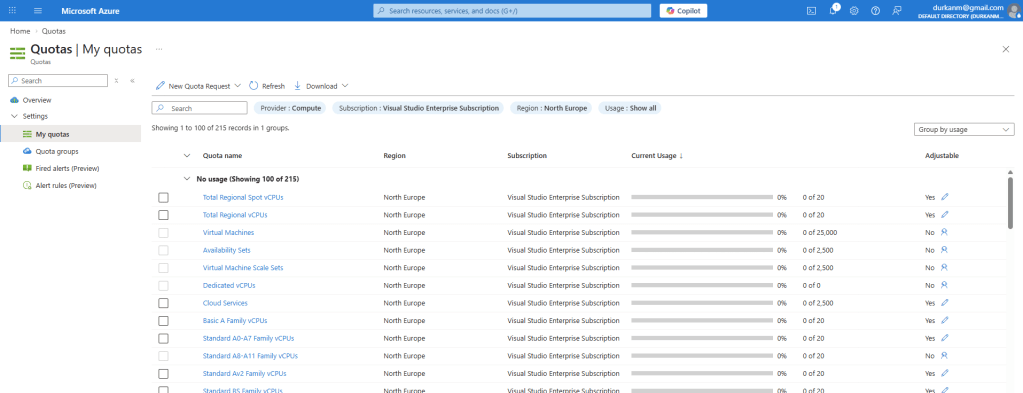
If you go into the Azure Portal and search for “Quotas”, it will being you into the Quotas screen where you will see something like this:
Azure does not have Infinite Capacity
I took an online AI course a few weeks ago and during that course, the presenter looked proudly into the camera and without skipping a beat proclaimed that “you’ll be deploying your AI Infrastructure into Azure’s global network of datacenters which have infinite compute capacity to handle those workloads”……
I won’t name the person or course, but let’s be clear:
Azure does not have infinite capacity.
The public perception of cloud computing is that you can provision as much as you need, whenever you need it. This is the result of agressive investment in data centre infrastructure at a massive scale, but this does not translate automatically to limitless physical hardware and capacity.
Behind the portal UI, every Azure region is a collection of data centres with a certain amount of physical capacity: CPU cores, memory, NVMe storage, network switching, GPU cards, and power.
At any given moment, capacity in a region is being consumed by millions of subscriptions across thousands of customers, and that capacity needs to be managed carefully to ensure that:
- Resources are available for customers who need them, when they need them
- No single subscription can exhaust regional capacity at the expense of others
- Microsoft can plan, build, and deliver new capacity in line with demand forecasting
- New services and SKUs can be introduced in a controlled and predictable way
Quotas are one of the control mechanisms that make all of this possible. They allow Microsoft to manage capacity across a global infrastructure estate while still delivering the self-service, on-demand experience that cloud computing promises.
Let’s think about this in real-world comparison terms – the vending machine in your office only has a certain number of Coke Zeros on its roll. Its popular. When all the Coke Zeros have been purchased, you either need to pick something else for your snack (Diet Coke, Orignal Coke…. maybe even Red Bull) or wait for the vendor to restock the Coke Zero roll again.
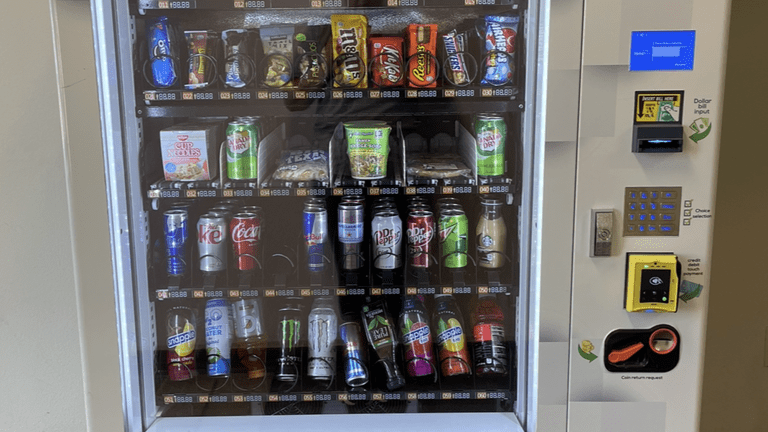
In much the same way, if the VM SKU you want is not available in Azure, you need to choose an alternative or contact Microsoft to get more allocated or “re-stocked”.
Regional Capacity and Why Location Matters
One of the most important things to understand about quotas is that they are regionally scoped. A quota for Standard Dv5 vCPUs in West Europe is entirely separate from the same quota in North Europe or East US 2. This is the physical reality of how Azure regions are built and operated.
Each Azure region is an independent physical footprint. When Microsoft expands capacity in one region, that expansion does not automatically flow to another. A region that is in high demand — particularly newer regions, GPU-heavy regions, or regions under pressure from AI and analytics workloads — can experience genuine capacity constraints that are invisible to customers until they hit a limit.
This is especially relevant for services like Microsoft Fabric Capacity, where specific SKU sizes may simply be unavailable in a given region at a given time, or SQL Managed Instance, where hardware generation availability varies by region. For Virtual Machines, the granularity goes further still — quota is tracked not just per region, but per VM SKU family. Running out of Ev5 quota does not affect your Dv5 quota, and vice versa – each family is tracked independently.
This regional scoping has a direct consequence for how you design multi-region architectures. If your primary region runs out of quota headroom, your fallback or DR region needs its own independent quota allocation — sufficient to support a failover scenario without triggering additional increase requests at the worst possible moment.
It also explains why Microsoft has introduced the concept of capacity reservations alongside quotas:
- A quota says ‘you are allowed to provision up to N of this resource in this region.’
- A capacity reservation says ‘Microsoft will hold that capacity specifically for you.’
For production workloads with predictable scaling needs, capacity reservations provide a stronger guarantee — but they come with a cost commitment.
Default Quotas
Every new Azure subscription starts with a set of default quotas which are conservative by design. A brand-new subscription is an unknown quantity from Microsoft’s perspective — there is no history of usage, no established relationship, and no predictable demand profile. The defaults are low enough to allow experimentation and initial deployments without pre-allocating significant regional capacity to a subscription that may never use it at scale.
As your usage grows and your workloads mature, those defaults will almost certainly become insufficient.
Lets take a look at this – in the screenshot below, you can see that I’m using 4 out of my 65 quota-allocated vCPUs for the “Standard DSv4 Family vCPUs”. Great, so I’ve used 4, and have 61 left ….

Eh, no. Those 4 vCPU’s are being taken up by a single machine.
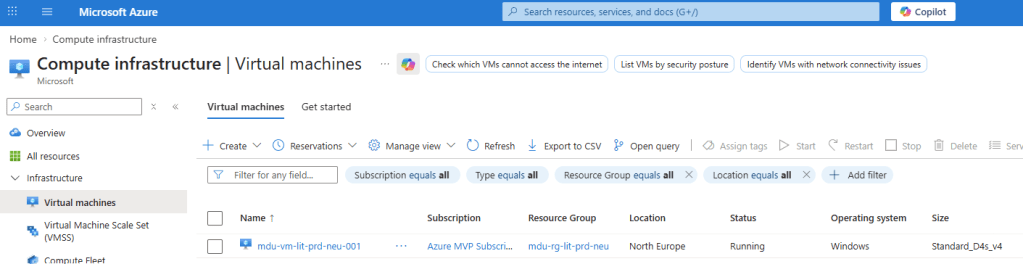
The default vCPU limit of 65 cores per region is enough to deploy a small fleet of standalone VMs. Its not going to be sufficient if I want to run a sizeable VM Scale Set, or maybe a large AKS Cluster. The good news is that most quotas are adjustable upward on request, without requiring any change to your subscription type or billing arrangement.
Thats just for VMs though, for the likes of SQL Managed Instance, quota constraints are less about raw numbers and more about service-level capacity. Managed Instance is a resource-intensive service, and Microsoft manages the underlying hardware footprint carefully.
Please don’t start harping on about “Landing Zones” again …..
Sorry, but I will. Those of you who have read my blog know I encourage the use of Landing Zones, not matter what size your organisation or project is.
The translation point here is the concept of “quotas per subsciption” that has been mentioned already. The eagle-eyed among you will have noticed that the 65 vCPUs for my “Standard DSv4 Family vCPUs” are only relevant to the North Europe region. If we take the filter off North Europe and search for that SKU again:
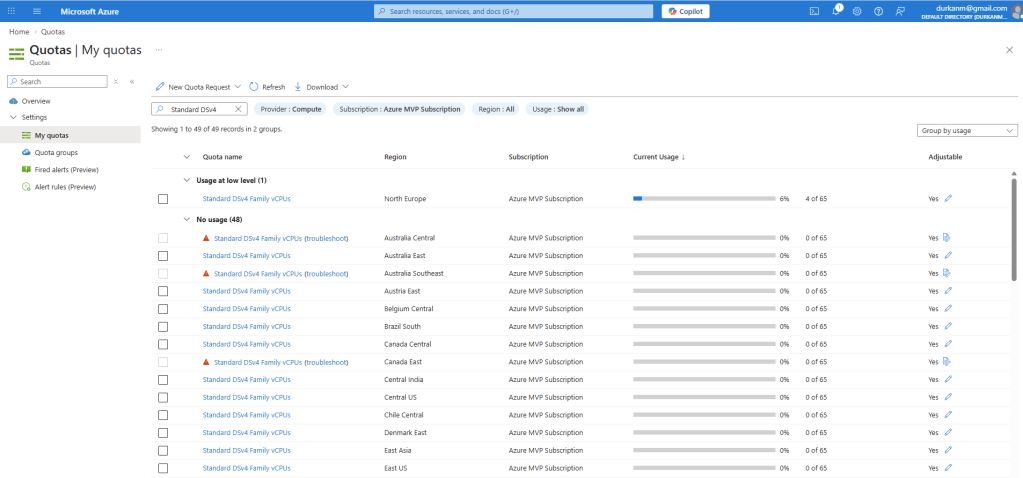
Aha – that looks better. I have LOADS of capacity available to me across the world (not in some regions though – note the warning signs which are telling me this SKU is in high demand in these regions).
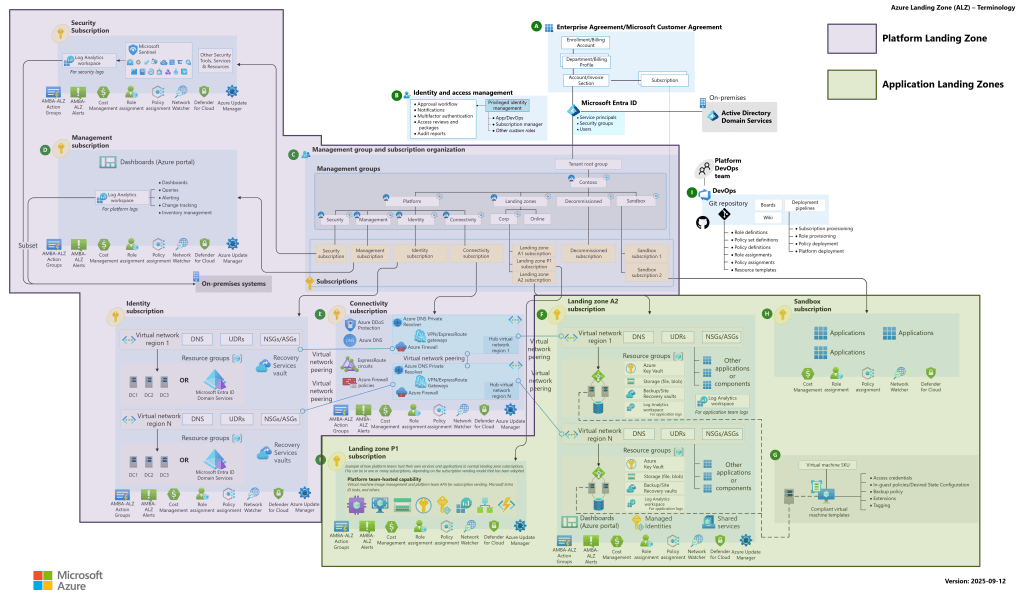
And this leads to Landing Zone discussions, because if you are deploying resources across multiple regions, you need to carefully plan, scope and secure those regions. But also, Landing Zone accelerators and guidance provided by Microsoft work off the concept of “Subscriptions per Resource or workload”. So those AKS Clusters, VM Scale Sets. SQL Managed Instances and Microsoft Fabric deployments are more than likely going to be in separate subscriptions.
This may sound more difficult to manage, so Microsoft has something called “Quota Groups” where you can bundle multiple subscriptions into a centralised space which will help you to manage your allocated quotas more easily.
I like this Landing Zone diagram – you can find the full description on Platform and Application Landing Zones, plus the full Visio version of this diagram here.
Conclusion
Quotas are one of those Azure fundamentals that tend to get learned the hard way — usually during a failed deployment, a blocked scaling event, or a support call that takes longer than expected. Understanding them before you hit a limit is a meaningful operational advantage, particularly when you are designing environments that need to grow and scale reliably.
I hope this post was useful — and if you do hit a quota limit in the wild, at least now you know exactly why it is there.
 Michael Durkan