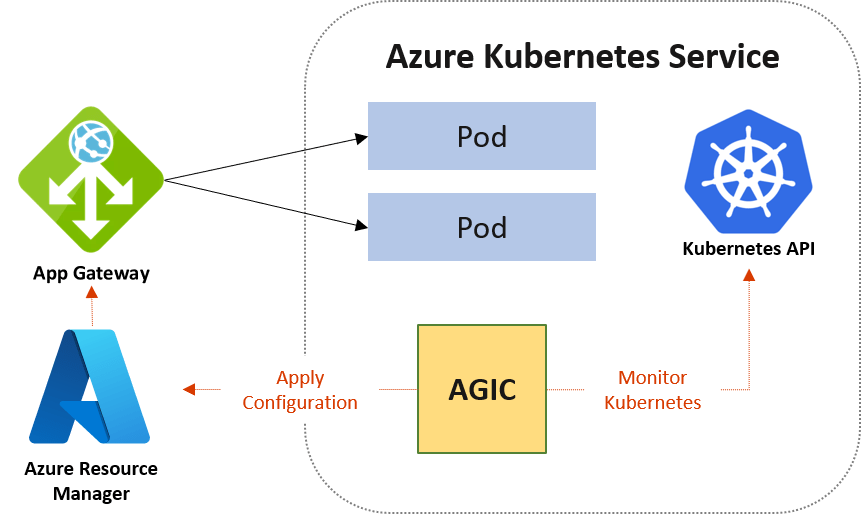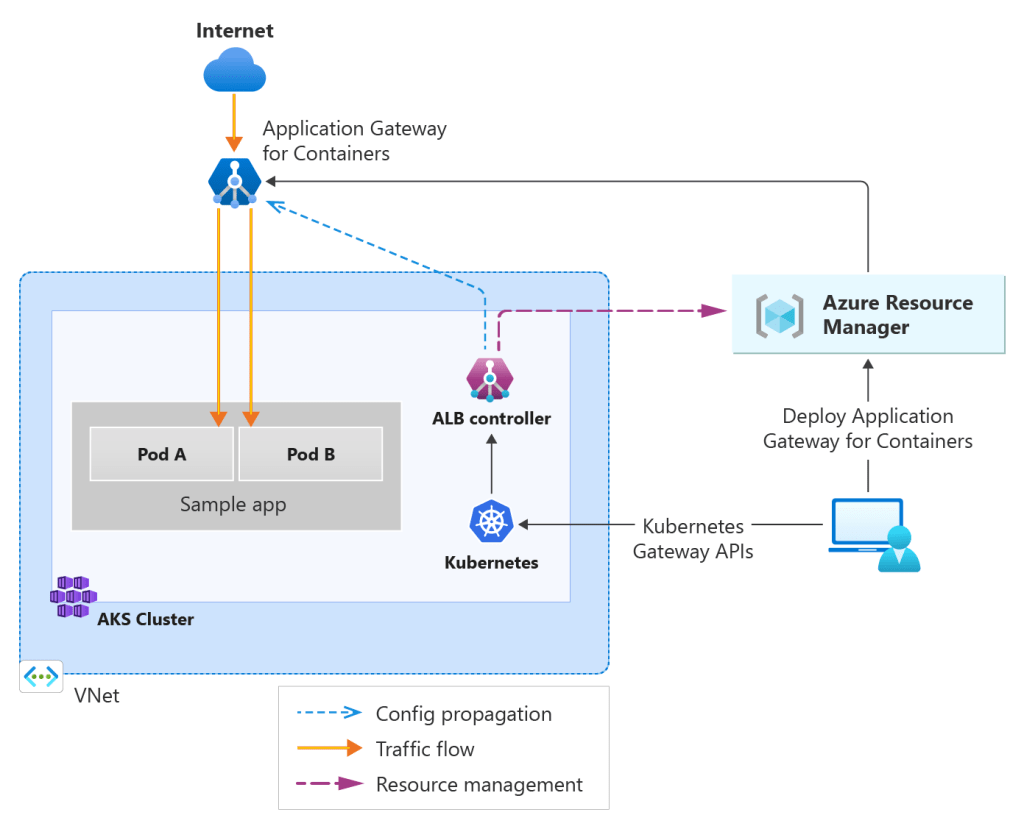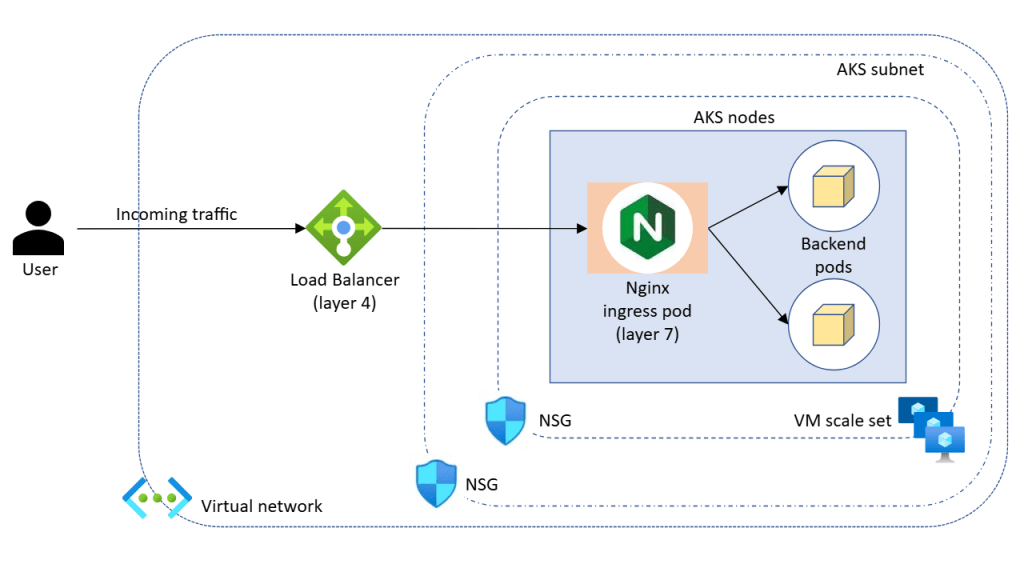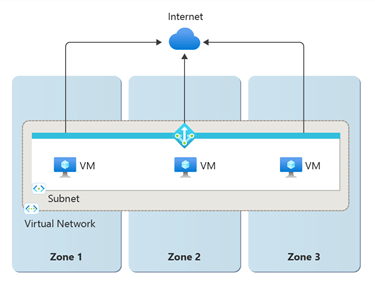
AKS Networking – Which model should you choose?

In the previous post, we broke down AKS Architecture Fundamentals — control plane vs data plane, node pools, availability zones, and early production guardrails.

Now we move into one of the most consequential design areas in any AKS deployment:

Networking.

If node pools define where workloads run, networking defines how they communicate — internally, externally, and across environments.

Unlike VM sizes or replica counts, networking decisions are difficult to change later. They shape IP planning, security boundaries, hybrid connectivity, and how your platform evolves over time.

This post takes a look at AKS networking by exploring:

  • The modern networking options available in AKS
  • Trade-offs between Azure CNI Overlay and Azure CNI Node Subnet
  • How networking decisions influence node pool sizing and scaling
  • How the control plane communicates with the data plane

Why Networking in AKS Is Different

With traditional Iaas and PaaS services in Azure, networking is straightforward: a VM or resource gets an IP address in a subnet.

With Kubernetes, things become layered:

  • Nodes have IP addresses
  • Pods have IP addresses
  • Services abstract pod endpoints
  • Ingress controls external access

AKS integrates all of this into an Azure Virtual Network. That means Kubernetes networking decisions directly impact:

  • IP address planning
  • Subnet sizing
  • Security boundaries
  • Peering and hybrid connectivity

In production, networking is not just connectivity — it’s architecture.


The Modern AKS Networking Choices

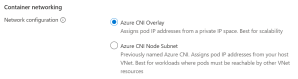
Although there are some legacy models still available for use, if you try to deploy an AKS cluster in the Portal you will see that AKS offers two main networking approaches:

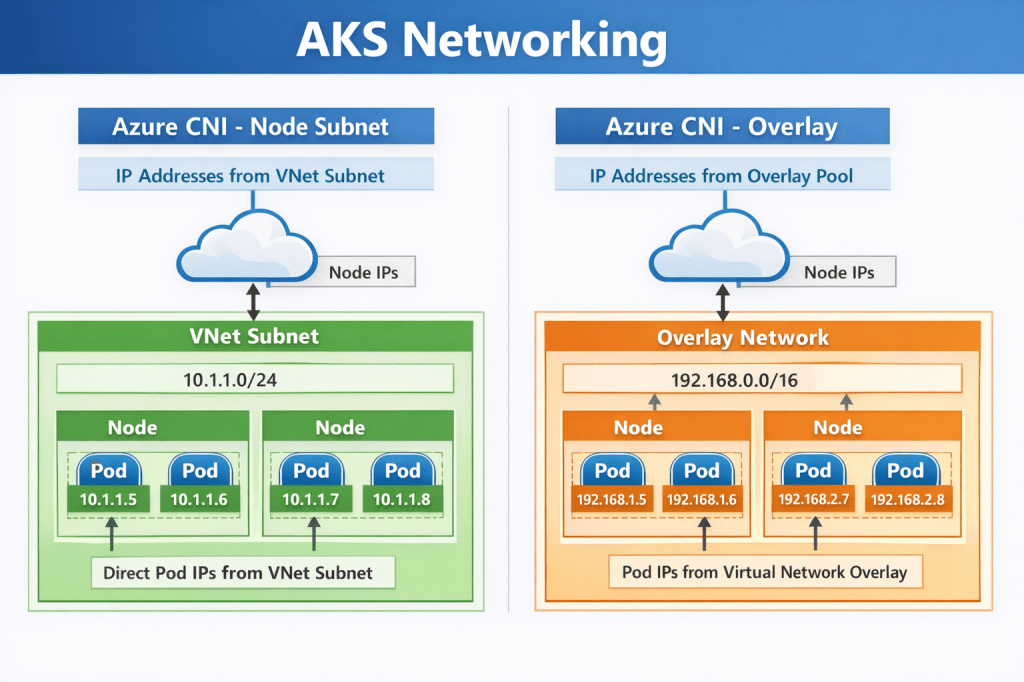
  • Azure CNI Node Subnet (flat network model)
  • Azure CNI Overlay (pod overlay networking)

As their names suggest, both use Azure CNI. The difference lies in how pod IP addresses are assigned and routed. Understanding this distinction is essential before you size node pools or define scaling limits.


Azure CNI Node Subnet

This is the traditional Azure CNI model.

Pods receive IP addresses directly from the Azure subnet. From the network’s perspective, pods appear as first-class citizens inside your VNet.

How It Works

Each node consumes IP addresses from the subnet. Each pod scheduled onto that node also consumes an IP from the same subnet. Pods are directly routable across VNets, peered networks, and hybrid connections.

This creates a flat, highly transparent network model.

Why teams choose it

This model aligns naturally with enterprise networking expectations. Security appliances, firewalls, and monitoring tools can see pod IPs directly. Routing is predictable, and hybrid connectivity is straightforward.

If your environment already relies on network inspection, segmentation, or private connectivity, this model integrates cleanly.

Pros

  • Native VNet integration
  • Simple routing and peering
  • Easier integration with existing network appliances
  • Straightforward hybrid connectivity scenarios
  • Cleaner alignment with enterprise security tooling

Cons

  • High IP consumption
  • Requires careful subnet sizing
  • Can exhaust address space quickly in large clusters

Trade-offs to consider

The trade-off is IP consumption. Every pod consumes a VNet IP. In large clusters, address space can be exhausted faster than expected. Subnet sizing must account for:

  • node count
  • maximum pods per node
  • autoscaling limits
  • upgrade surge capacity

This model rewards careful planning and penalises underestimation.

Impact on node pool sizing

With Node Subnet networking, node pool scaling directly consumes IP space.

If a user node pool scales out aggressively and each node supports 30 pods, IP usage grows rapidly. A cluster designed for 100 nodes may require thousands of available IP addresses.

System node pools remain smaller, but they still require headroom for upgrades and system pod scheduling.


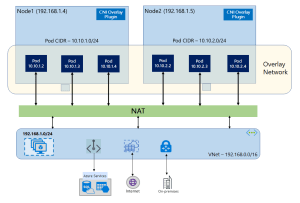
Azure CNI Overlay

Azure CNI Overlay is designed to address IP exhaustion challenges while retaining Azure CNI integration.

Pods receive IP addresses from an internal Kubernetes-managed range, not directly from the Azure subnet. Only nodes consume Azure VNet IP addresses.

How It Works

Nodes are addressable within the VNet. Pods use an internal overlay CIDR range. Traffic is routed between nodes, with encapsulation handling pod communication.

From the VNet’s perspective, only nodes consume IP addresses.

Why teams choose it

Overlay networking dramatically reduces pressure on Azure subnet address space. This makes it especially attractive in environments where:

  • IP ranges are constrained
  • multiple clusters share network space
  • growth projections are uncertain

It allows clusters to scale without re-architecting network address ranges.

Pros

  • Significantly lower Azure IP consumption
  • Simpler subnet sizing
  • Useful in environments with constrained IP ranges

Cons

  • More complex routing
  • Less transparent network visibility
  • Additional configuration required for advanced scenarios
  • Not ideal for large-scale enterprise integration

Trade-offs to consider

Overlay networking introduces an additional routing layer. While largely transparent, it can add complexity when integrating with deep packet inspection, advanced network appliances, or highly customised routing scenarios.

For most modern workloads, however, this complexity is manageable and increasingly common.

Impact on node pool sizing

Because pods no longer consume VNet IP addresses, node pool scaling pressure shifts away from subnet size. This provides greater flexibility when designing large user node pools or burst scaling scenarios.

However, node count, autoscaler limits, and upgrade surge requirements still influence subnet sizing.


Choosing Between Overlay and Node Subnet

Here are the “TLDR” considerations when you need to make the choice of which networking model to use:

  • If deep network visibility, firewall inspection, and hybrid routing transparency are primary drivers, Node Subnet networking remains compelling.
  • If address space constraints, growth flexibility, and cluster density are primary concerns, Overlay networking provides significant advantages.
  • Most organisations adopting AKS at scale are moving toward overlay networking unless specific networking requirements dictate otherwise.

How Networking Impacts Node Pool Design

Let’s connect this back to the last post, where we said that Node pools are not just compute boundaries — they are networking consumption boundaries.

System Node Pools

System node pools:

  • Host core Kubernetes components
  • Require stability more than scale

From a networking perspective:

  • They should be small
  • They should be predictable in IP consumption
  • They must allow for upgrade surge capacity

If using Azure CNI, ensure sufficient IP headroom for control plane-driven scaling operations.

User Node Pools

User node pools are where networking pressure increases. Consider:

  • Maximum pods per node
  • Horizontal Pod Autoscaler behaviour
  • Node autoscaling limits

In Azure CNI Node Subnet environments, every one of those pods consumes an IP. If you design for 100 nodes with 30 pods each, that is 3,000 pod IPs — plus node IPs. Subnet planning must reflect worst-case scale, not average load.

In Azure CNI Overlay environments, the pressure shifts away from Azure subnets — but routing complexity increases.

Either way, node pool design and networking are a single architectural decision, not two separate ones.


Control Plane Networking and Security

One area that is often misunderstood is how the control plane communicates with the data plane, and how administrators securely interact with the cluster.

The Kubernetes API server is the central control surface. Every action — whether from kubectl, CI/CD pipelines, GitOps tooling, or the Azure Portal — ultimately flows through this endpoint.

In AKS, the control plane is managed by Azure and exposed through a secure endpoint. How that endpoint is exposed defines the cluster’s security posture.

Public Cluster Architecture

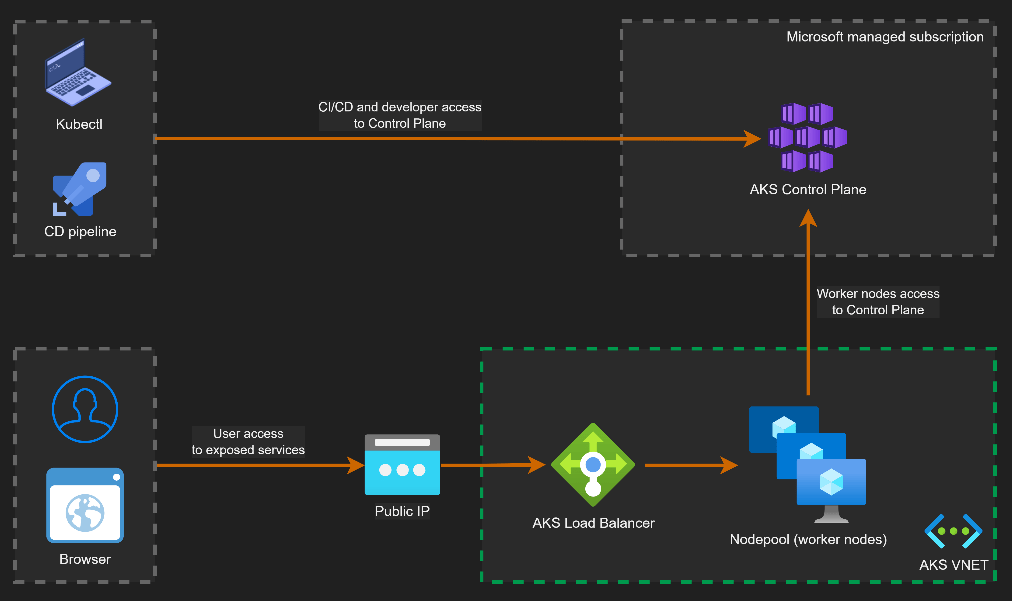
By default, AKS clusters expose a public API endpoint secured with authentication, TLS, and RBAC.

This does not mean the cluster is open to the internet. Access can be restricted using authorized IP ranges and Azure AD authentication.

Image: Microsoft/Houssem Dellai

Key characteristics:

  • API endpoint is internet-accessible but secured
  • Access can be restricted via authorized IP ranges
  • Nodes communicate outbound to the control plane
  • No inbound connectivity to nodes is required

This model is common in smaller environments or where operational simplicity is preferred.

Private Cluster Architecture

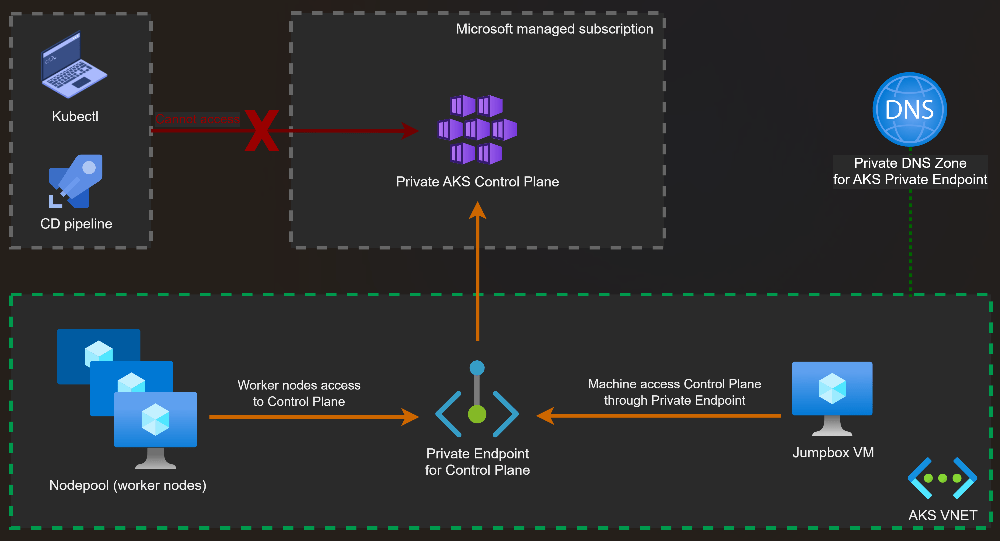
In a private AKS cluster, the API server is exposed via a private endpoint inside your VNet.

Image: Microsoft/Houssem Dellai

Administrative access requires private connectivity such as:

  • VPN
  • ExpressRoute
  • Azure Bastion or jump hosts

Key characteristics:

  • API server is not exposed to the public internet
  • Access is restricted to private networks
  • Reduced attack surface
  • Preferred for regulated or enterprise environments

Control Plane to Data Plane Communication

Regardless of public or private mode, communication between the control plane and the nodes follows the same secure pattern.

The kubelet running on each node establishes an outbound, mutually authenticated connection to the API server.

This design has important security implications:

  • Nodes do not require inbound internet exposure
  • Firewall rules can enforce outbound-only communication
  • Control plane connectivity remains encrypted and authenticated

This outbound-only model is a key reason AKS clusters can operate securely inside tightly controlled network environments.

Common Networking Pitfalls in AKS

Networking issues rarely appear during initial deployment. They surface later when scaling, integrating, or securing the platform. Typical pitfalls include:

  • subnets sized for today rather than future growth
  • no IP headroom for node surge during upgrades
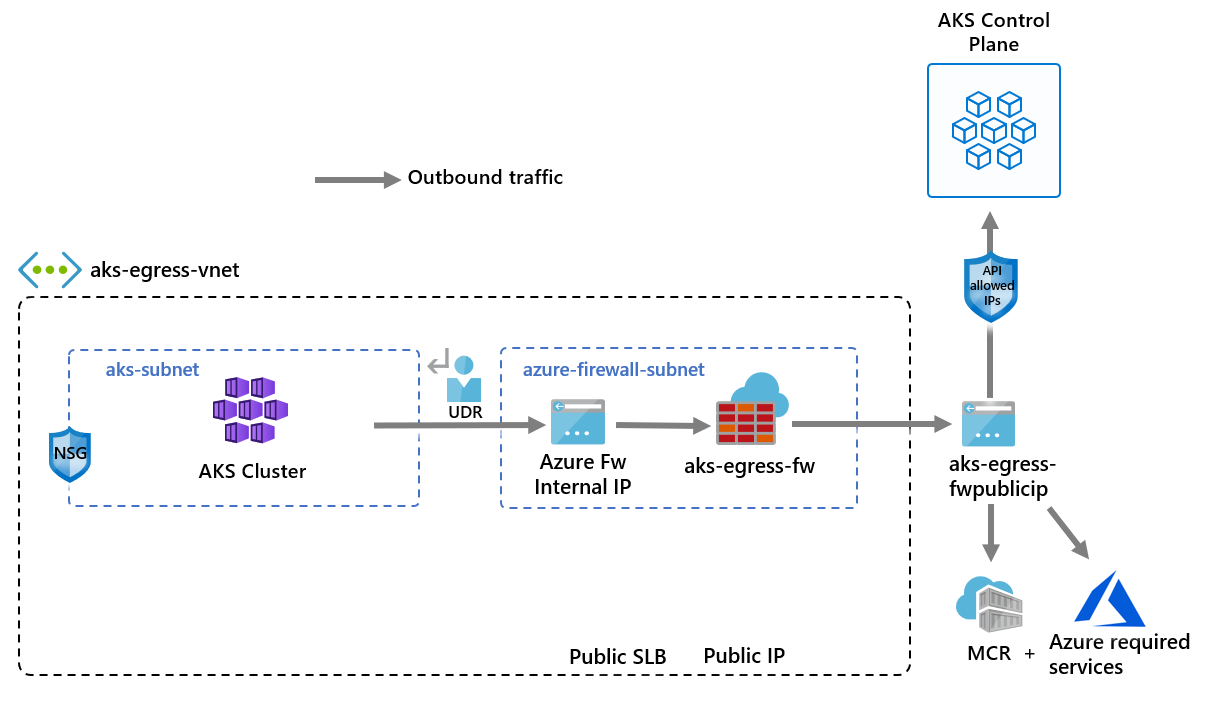
  • lack of outbound traffic control
  • exposing the API server publicly without restrictions

Networking issues rarely appear on day one. They appear six months later — when scaling becomes necessary.


Aligning Networking with the Azure Well-Architected Framework

  • Operational Excellence improves when networking is designed for observability, integration, and predictable growth.
  • Reliability depends on zone-aware node pools, resilient ingress, and stable outbound connectivity.
  • Security is strengthened through private clusters, controlled egress, and network policy enforcement.
  • Cost Optimisation emerges from correct IP planning, right-sized ingress capacity, and avoiding rework caused by subnet exhaustion.

Making the right (or wrong) networking decisions in the design phase has an effect across each of these pillars.


What Comes Next

At this point in the series, we now understand:

  • Why Kubernetes exists
  • How AKS architecture is structured
  • How networking choices shape production readiness

In the next post, we’ll stay on the networking theme and take a look at Ingress and Egress traffic flows. See you then!

AKS Architecture Fundamentals

In the previous post From Containers to Kubernetes Architecture, we walked through the evolution from client/server to containers, and from Docker to Kubernetes. We looked at how orchestration became necessary once we stopped deploying single applications to single servers.

Now it’s time to move from history to design, and in this post we’re going to dive into the practical by focusing on:

How Azure Kubernetes Service (AKS) is actually structured — and what architectural decisions matter from day one.


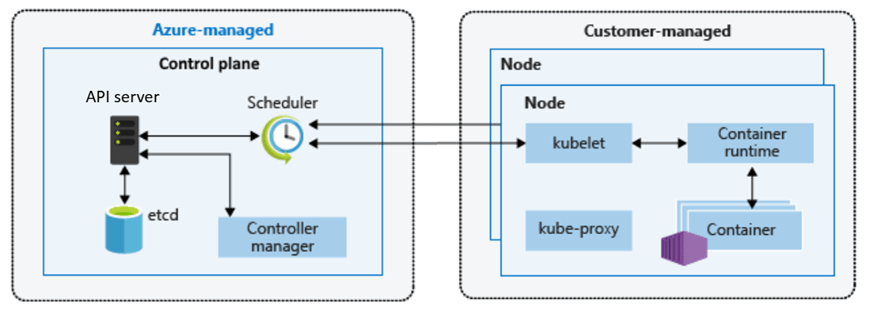
Control Plane vs Data Plane – The First Architectural Boundary

In line with the core design of a vanilla Kubernetes cluster, every AKS cluster is split into two logical areas:

  • The control plane (managed by Azure)
  • The data plane (managed by you)
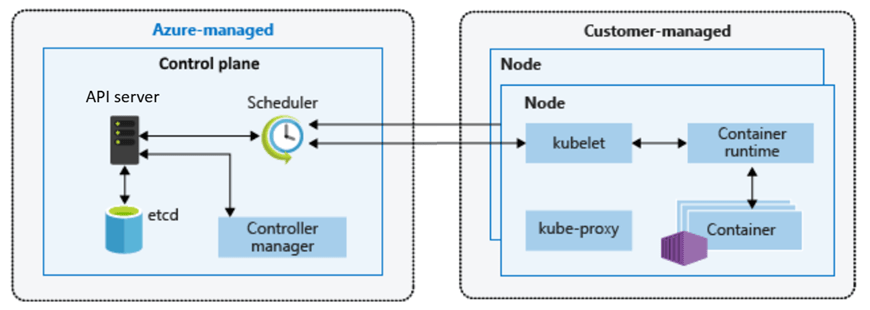
Image Credit – Microsoft

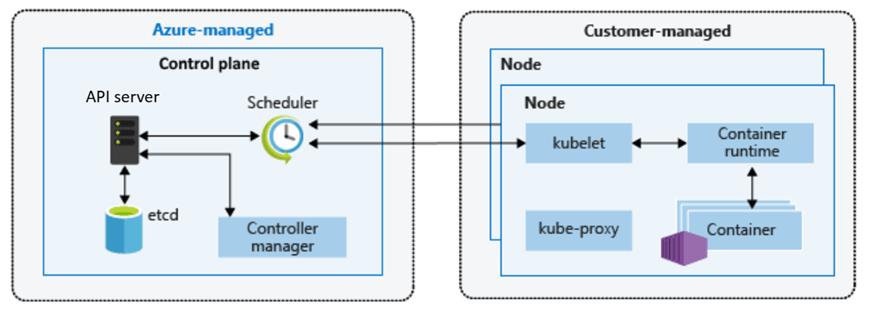
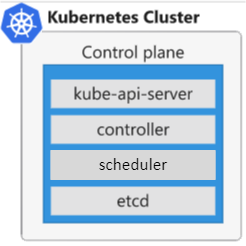
We looked at this in the last post, but lets remind ourselves of the components that make up each area.

The Control Plane (Azure Managed)

When you create an AKS cluster, you do not deploy your own API server or etcd database. Microsoft runs the Kubernetes control plane for you.

That includes:

  • The Kubernetes API server
  • etcd (the cluster state store)
  • The scheduler
  • The controller manager
  • Control plane patching and upgrades

This is not just convenience — it is risk reduction. Operating a highly available Kubernetes control plane is non‑trivial. It requires careful configuration, backup strategies, certificate management, and upgrade sequencing.

In AKS, that responsibility shifts to Azure. You interact with the cluster via the Kubernetes API (through kubectl, CI/CD pipelines, GitOps tools, or the Azure Portal), but you are not responsible for keeping the brain of the cluster alive.

That abstraction directly supports:

  • Operational Excellence
  • Reduced blast radius
  • Consistent lifecycle management

It also empowers Operations to enable Development teams to start their cycles earlier in the project as opposed to waiting for the control plane to be stood up and functionally ready.

The Data Plane (Customer Managed)

The data plane is where your workloads run. This consists of:

  • Virtual machine nodes
  • Node pools
  • Pods and workloads
  • Networking configuration

You choose:

  • VM SKU
  • Scaling behaviour
  • Availability zones
  • OS configuration (within supported boundaries)

This is intentional. Azure abstracts complexity where it makes sense, but retains control and flexibility where architecture matters.


Node Pools – Designing for Isolation and Scale

One of the most important AKS concepts is the node pool. A node pool is a group of VMs with the same configuration. At first glance, it may look like a scaling convenience feature. In production, it is an isolation and governance boundary.

There are 2 different types of node pool – System and User.

System Node Pool

Every AKS cluster requires at least one system node pool, which is a specialized group of nodes dedicated to hosting critical cluster components. While you can run application pods on them, their primary role is ensuring the stability of core services.

This pool runs:

  • Core Kubernetes components
  • Critical system pods

In production, this pool should be:

  • Small but resilient
  • Dedicated to system workloads
  • Not used for business application pods

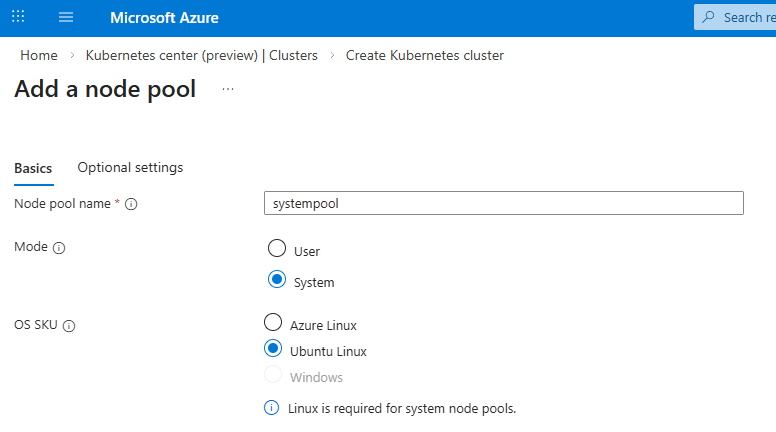
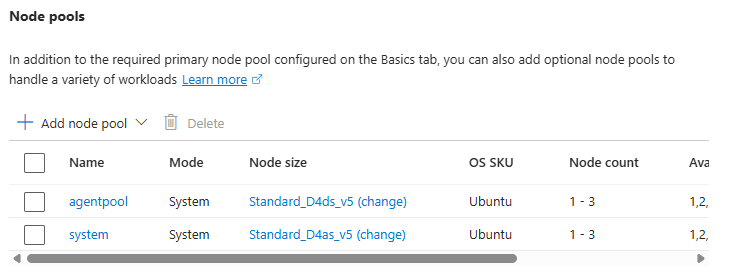
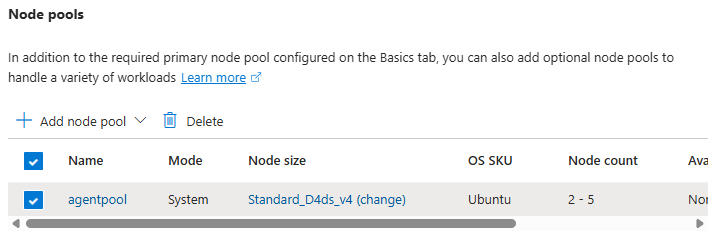
In our first post, we took the default “Node Pool” option – however you do have the option to add a dedicated system node pool:

It is recommended that you create a dedicated system node pool to isolate critical system pods from your application pods to prevent misconfigured or rogue application pods from accidentally deleting system pods.

You don’t need the system node pool SKU size to be the same as your user node Pool SKU size – however its recommended that you make both highly available.

User Node Pools

User node pools are where your applications and workloads run. You can create multiple pools for different purposes within the same AKS cluster:

  • Compute‑intensive workloads
  • GPU workloads
  • Batch jobs
  • Isolated environments

Looking at the list, traditionally these workloads would have lived on their own dedicated hardware or processing areas. The advantage of AKS is that this enables:

  • Better scheduling control – the scheduler can control the assignment of resources to workloads in node pools.
  • Resource isolation – resources are isolated in their own node pools.
  • Cost optimisation – all of this runs on the same set of cluster VMs, so cost is predictive and stable.

In production, multiple node pools are not optional — they are architectural guardrails.


Regional Design and Availability Zones

Like all Azure resources, when you create an AKS cluster you choose a region. That decision impacts latency, compliance, resilience, and cost.

But production architecture requires a deeper question:

How does this cluster handle failure?

Azure supports availability zones in many regions. A production AKS cluster should at a bare minimum:

  • Use zone‑aware node pools
  • Distribute nodes across multiple availability zones

This ensures that a single data centre failure does not bring down your workloads. It’s important to understand that:

  • The control plane is managed by Azure for high availability
  • You are responsible for ensuring node pool zone distribution

Availability is shared responsibility.


Networking Considerations (At a High Level)

AKS integrates into an Azure Virtual Network. That means your cluster:

  • Has IP address planning implications
  • Participates in your broader network topology
  • Must align with security boundaries

Production mistakes often start here:

  • Overlapping address spaces
  • Under‑sized subnets
  • No separation between environments

Networking is not a post‑deployment tweak – its a day‑one design decision that you make with your wider cloud and architecture teams. We’ll go deep into networking in the next post, but even at the architecture stage, you need to make conscious choices.


Upgrade Strategy – Often Ignored, Always Critical

Kubernetes evolves quickly. AKS supports multiple Kubernetes versions, but older versions are eventually deprecated. The full list of supported AKS versions can be found at the AKS Release Status page

A production architecture must consider:

  • Version lifecycle
  • Upgrade cadence
  • Node image updates

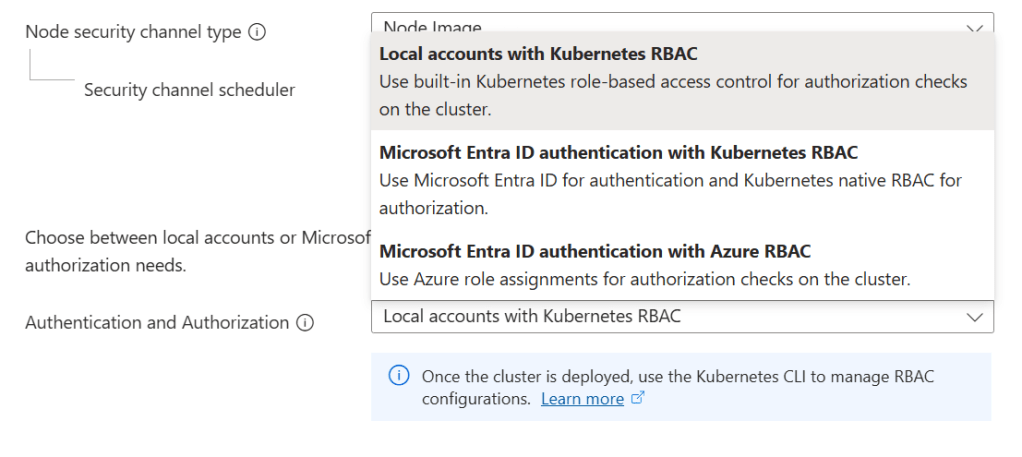
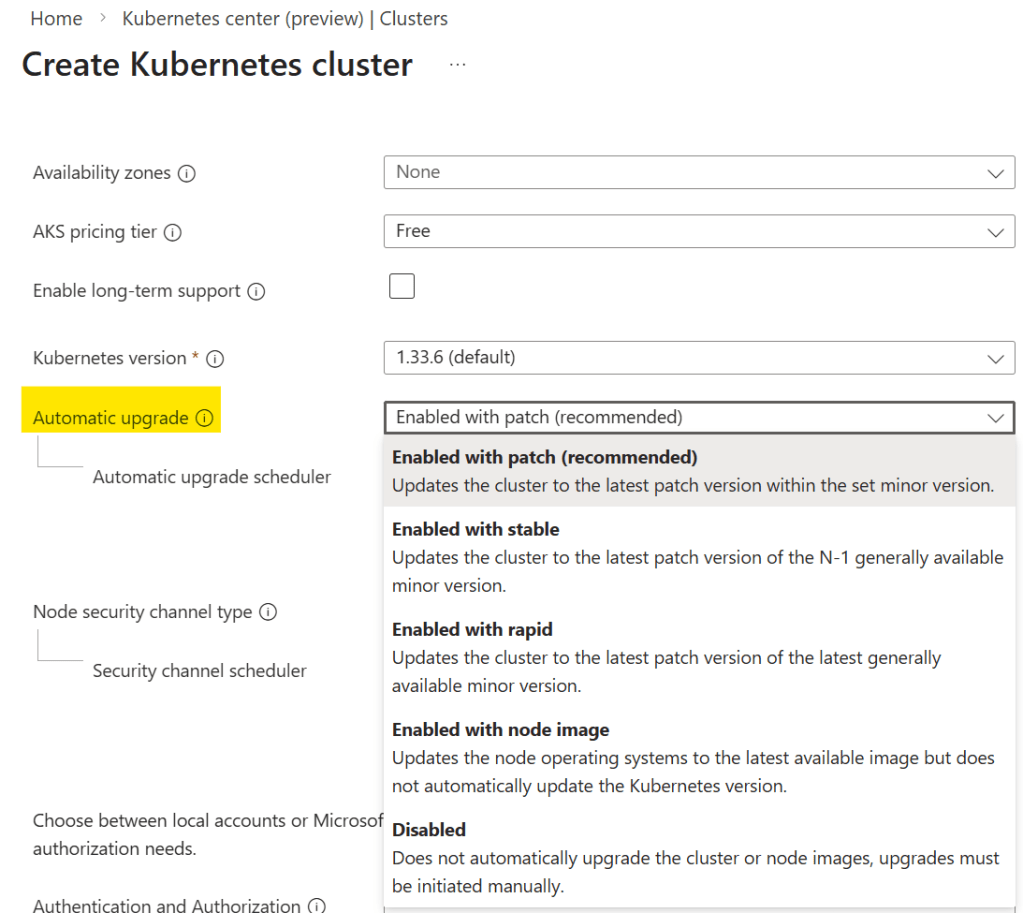
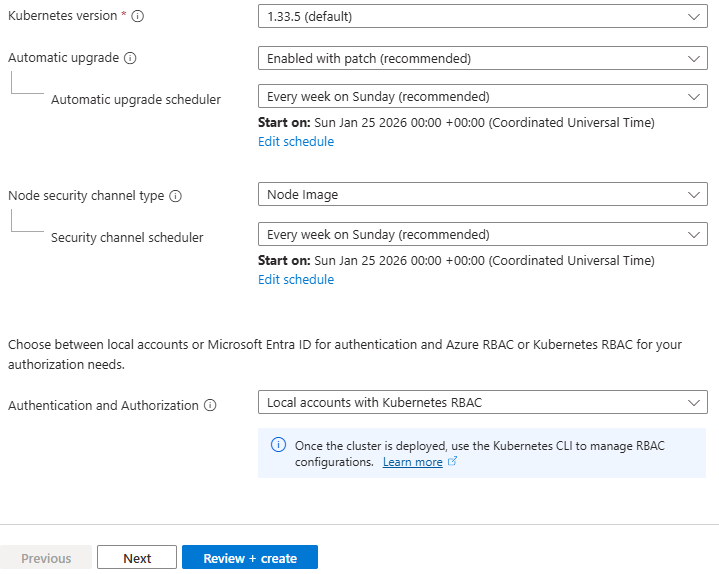
In AKS, control plane upgrades are managed by Azure — but you control when upgrades occur and how node pools are rolled. When you create your cluster, you can specify the upgrade option you wish to use:

Its important to pay attention to this as it may affect your workloads. For example, starting in Kubernetes v1.35, Ubuntu 24.04 because the default OS SKU. What this means if you are upgrading from a lower version of Kubernetes, your node OS will be auto upgraded from Ubuntu 22.04 to 24.04.

Ignoring upgrade planning is one of the fastest ways to create technical debt in a cluster. This is why testing in lower environments to see how your workloads react to these upgrades is vital.


Mapping This to the Azure Well‑Architected Framework

Let’s anchor this back to the bigger picture and see how AKS maps to the Azure Well-Architected Framework.

Operational Excellence

  • AKS’s managed control plane reduces operational complexity.
  • Node pools introduce structured isolation.
  • Availability zones improve resilience.

Designing with these in mind from the start prevents reactive firefighting later.

Reliability

Zone distribution, multiple node pools, and scaling configuration directly influence workload uptime. Reliability is not added later — it is designed at cluster creation.

Cost Optimisation

Right‑sizing node pools and separating workload types prevents over‑provisioning. Production clusters that mix everything into one large node pool almost always overspend.


Production Guardrails – Early Principles

Before we move into deeper topics in the next posts, let’s establish a few foundational guardrails:

  • Separate system and user node pools
  • Use availability zones where supported
  • Plan IP addressing before deployment (again, we’ll dive into networking and how it affects workloads in more detail in the next post)
  • Treat upgrades as part of operations, not emergencies
  • Avoid “single giant node pool” design

These are not advanced optimisations. They are baseline expectations for production AKS.


What Comes Next

Now that we understand AKS architecture fundamentals, the next logical step is networking.

In the next post, we’ll go deep into:

  • Azure CNI and networking models
  • Ingress and traffic flow
  • Internal vs external exposure
  • Designing secure network boundaries

Because once architecture is clear, networking is what determines whether your cluster is merely functional or truly production ready.

See you on the next post!
From Containers to Kubernetes Architecture

In the previous post, What Is Azure Kubernetes Service (AKS) and Why Should You Care?, we got an intro to AKS, compared it to Azure PaaS services in terms of asking when is the right choice, and finally spun up an AKS cluster to demonstrate what exactly Microsoft exposes to you in terms of responsibilities.

In this post, we’ll take a step back to first principles and understand why containers and microservices emerged, how Docker changed application delivery, and how those pressures ultimately led to Kubernetes.

Only then does Kubernetes and by extension AKS architecture fully make sense.


From Monoliths to Microservices

If you rewind to the 1990s and early 2000s, most enterprise systems followed a fairly predictable pattern: client/server.

You either had thick desktop clients connecting to a central database server, or you had early web applications running on a handful of physical servers in a data centre. Access was often via terminal services, remote desktop, or tightly controlled internal networks.

Applications were typically deployed as monoliths. One codebase. One deployment artifact. One server—or maybe two, if you were lucky enough to have a test environment.

Infrastructure and application were deeply intertwined. If you needed more capacity, you bought another server. If you needed to update the application, you scheduled downtime. And this wasn’t like the downtime we know today – this could run into days, normally public holiday weekends where you had an extra day. Think you’re going to be having Christmas dinner or opening Easter eggs? Nope – thtere’s an upgrade on those weekends!

This model worked in a world where:

  • Release cycles were measured in months
  • Scale was predictable
  • Users were primarily internal or regionally constrained

But as the web matured in the mid-2000s, and SaaS became mainstream, expectations changed.


Virtualisation and Early Cloud

Virtual machines were the first major shift.

Instead of deploying directly to physical hardware, we began deploying to hypervisors. Infrastructure became more flexible. Provisioning times dropped from weeks to hours, and rollback of changes became easier too which de-risked the deployment process.

Then around 2008–2012, public cloud platforms began gaining serious enterprise traction. Infrastructure became API-driven. You could provision compute with a script instead of a purchase order.

Despite these changes, the application model was largely the same. We were still deploying monoliths—just onto virtual machines instead of physical servers.

The client/server model had evolved into a browser/server model, but the deployment unit was still large, tightly coupled, and difficult to scale independently.


The Shift to Microservices

Around the early 2010s, as organisations like Netflix, Amazon, and Google shared their scaling stories, the industry began embracing microservices more seriously.

Instead of a single large deployment, applications were broken into smaller services. Each service had:

  • A well-defined API boundary
  • Its own lifecycle
  • Independent scaling characteristics

This made sense in a world of global users and continuous delivery.

However, it introduced new complexity. You were no longer deploying one application to one server. You might be deploying 50 services across 20 machines. Suddenly, your infrastructure wasn’t just hosting an app—it was hosting an ecosystem.

And this is where the packaging problem became painfully obvious.


Docker and the Rise of Containers

Docker answered the packaging problem.

Containers weren’t new. Linux containers had existed in various forms for years. But Docker made them usable, portable, and developer-friendly.

Instead of saying “it works on my machine,” developers could now package:

  • Their application code
  • The runtime
  • All dependencies
  • Configuration

Into a single container image. That image could run on a laptop, in a data centre, or in the cloud—consistently. This was a major shift in the developer-to-operations contract.

The old model:

  • Developers handed over code
  • Operations teams configured servers
  • Problems emerged somewhere in between

The container model:

  • Developers handed over a runnable artifact
  • Operations teams provided a runtime environment

But Docker alone wasn’t enough.

Running a handful of containers on a single VM was manageable. Running hundreds across dozens of machines? That required coordination.

We had solved packaging. We had not solved orchestration. As container adoption increased, a new challenge emerged:

Containers are easy. Running containers at scale is not.


Why Kubernetes Emerged

Kubernetes emerged to solve the orchestration problem.

Instead of manually deciding where containers should run, Kubernetes introduced a declarative model. You define the desired state of your system—how many replicas, what resources, what networking—and Kubernetes continuously works to make reality match that description.

This was a profound architectural shift.

It moved us from:

  • Logging into servers via SSH
  • Manually restarting services
  • Writing custom scaling scripts

To:

  • Describing infrastructure and workloads declaratively
  • Letting control loops reconcile state
  • Treating servers as replaceable capacity

The access model changed as well. Instead of remote desktop or SSH being the primary control mechanism, the Kubernetes API became the centre of gravity. Everything talks to the API server.

This shift—from imperative scripts to declarative configuration—is one of the most important architectural changes Kubernetes introduced.


Core Kubernetes Architecture

To understand AKS, you first need to understand core Kubernetes components.

At its heart, Kubernetes is split into two logical areas: the control plane and the worker nodes.

The Control Plane – The Brain of the Cluster

The control plane is the brain of the cluster. It makes decisions, enforces state, and exposes the Kubernetes API.

Key components include:

API Server

The API server is the front door. Whether you use kubectl, a CI/CD pipeline, or a GitOps tool, every request flows through the API server. It validates requests and persists changes.

  • Entry point for all Kubernetes operations
  • Validates and processes requests
  • Exposes the Kubernetes API

Everything—kubectl, CI/CD pipelines, controllers—talks to the API server.

etcd

Behind the scenes sits etcd, a distributed key-value store that acts as the source of truth. It stores the desired and current state of the cluster. If etcd becomes unavailable, the cluster effectively loses its memory.

  • Distributed key-value store
  • Holds the desired and current state of the cluster
  • Source of truth for Kubernetes

If etcd is unhealthy, the cluster cannot function correctly.

Scheduler

The scheduler is responsible for deciding where workloads run. When you create a pod, the scheduler evaluates resource availability and constraints before assigning it to a node.

  • Decides which node a pod should run on
  • Considers resource availability, constraints, and policies

Controller Manager

The controller manager runs continuous reconciliation loops. It constantly compares the desired state (for example, “I want three replicas”) with the current state. If a pod crashes, the controller ensures another is created.

  • Runs control loops
  • Continuously checks actual state vs desired state
  • Takes action to reconcile differences

This combination is what makes Kubernetes self-healing and declarative.


Worker Nodes – Where Work Actually Happens

Worker nodes are where your workloads actually run.

Each node contains:

kubelet

Each node runs a kubelet, which acts as the local agent communicating with the control plane. It ensures that the containers defined in pod specifications are actually running.

  • Agent running on each node
  • Ensures containers described in pod specs are running
  • Reports node and pod status back to the control plane

Container Runtime

Underneath that sits the container runtime—most commonly containerd today. This is what actually starts and stops containers.

  • Responsible for running containers
  • Historically Docker, now containerd in most environments

kube-proxy

Networking between services is handled through Kubernetes networking constructs and components such as kube-proxy, which manages traffic rules.

  • Handles networking rules
  • Enables service-to-service communication n

Pods, Services, and Deployments

Above this infrastructure layer, Kubernetes introduces abstractions like pods, deployments, and services. These abstractions allow you to reason about applications instead of machines.

Pods

  • Smallest deployable unit in Kubernetes
  • One or more containers sharing networking and storage

Deployments

  • Define how pods are created and updated
  • Enable rolling updates and rollback
  • Maintain desired replica counts

Services

  • Provide stable networking endpoints
  • Abstract away individual pod lifecycles

You don’t deploy to a server. You declare a deployment. You don’t track IP addresses. You define a service.

How This Maps to Azure Kubernetes Service (AKS)

AKS does not change Kubernetes—it operationalises it. The Kubernetes architecture remains the same, but the responsibility model changes.

In a self-managed cluster, you are responsible for the control plane. You deploy and maintain the API server. You protect and back up etcd. You manage upgrades.

In AKS, Azure operates the control plane for you.

Microsoft manages the API server, etcd, and control plane upgrades. You still interact with Kubernetes in exactly the same way—through the API—but you are no longer responsible for maintaining its most fragile components.

You retain responsibility for worker nodes, node pools, scaling, and workload configuration. That boundary is deliberate.

It aligns directly with the Azure Well-Architected Framework:

  • Operational Excellence through managed control plane abstraction
  • Reduced operational risk and complexity
  • Clear separation between platform and workload responsibility

AKS is Kubernetes—operationalised.


Why This Matters for Production AKS

Every production AKS decision maps back to Kubernetes architecture:

  • Networking choices affect kube-proxy and service routing
  • Node pool design affects scheduling and isolation
  • Scaling decisions interact with controllers and the scheduler

Without understanding the underlying architecture, AKS can feel opaque.

With that understanding, it becomes predictable.


What Comes Next

Now that we understand:

  • Why containers emerged
  • Why Kubernetes exists
  • How Kubernetes is architected
  • How AKS maps to that architecture

We’re ready to start making design decisions.

In the next post, we’ll move into AKS architecture fundamentals, including:

  • Control plane and data plane separation
  • System vs user node pools
  • Regional design and availability considerations

See you on the next post

What Is Azure Kubernetes Service (AKS) and Why Should You Care?

In every cloud native architecture discussion you have had over the last few years or are going to have in the coming years, you can be guaranteed that someone has or will introduce Kubernetes as a hosting option on which your solution will run.

There’s also different options when Kubernetes enters the conversation – you can choose to run:

Kubernetes promises portability, scalability, and resilience. In reality, operating Kubernetes yourself is anything but simple.

Have you’ve ever wondered whether Kubernetes is worth the complexity—or how to move from experimentation to something you can confidently run in production?

Me too – so let’s try and answer that question. For anyone who knows me or has followed me for a few years knows, I like to get down to the basics and “start at the start”.

This is the first post is of a blog series where we’ll focus on Azure Kubernetes Service (AKS), while also referencing the core Kubernetes offerings as a reference. The goal of this series is:

By the end (whenever that is – there is no set time or number of posts), we will have designed and built a production‑ready AKS cluster, aligned with the Azure Well‑Architected Framework, and suitable for real‑world enterprise workloads.

With the goal clearly defined, let’s start at the beginning—not by deploying workloads or tuning YAML, but by understanding:

  • Why AKS exists
  • What problems it solves
  • When it’s the right abstraction.

What Is Azure Kubernetes Service (AKS)?

Azure Kubernetes Service (AKS) is a managed Kubernetes platform provided by Microsoft Azure. It delivers a fully supported Kubernetes control plane while abstracting away much of the operational complexity traditionally associated with running Kubernetes yourself.

At a high level:

  • Azure manages the Kubernetes control plane (API server, scheduler, etcd)
  • You manage the worker nodes (VM size, scaling rules, node pools)
  • Kubernetes manages your containers and workloads

This division of responsibility is deliberate. It allows teams to focus on applications and platforms rather than infrastructure mechanics.

You still get:

  • Native Kubernetes APIs
  • Open‑source tooling (kubectl, Helm, GitOps)
  • Portability across environments

But without needing to design, secure, patch, and operate Kubernetes from scratch.

Why Should You Care About AKS?

The short answer:

AKS enables teams to build scalable platforms without becoming Kubernetes operators.

The longer answer depends on the problems you’re solving.

AKS becomes compelling when:

  • You’re building microservices‑based or distributed applications
  • You need horizontal scaling driven by demand
  • You want rolling updates and self‑healing workloads
  • You’re standardising on containers across teams
  • You need deep integration with Azure networking, identity, and security

Compared to running containers directly on virtual machines, AKS introduces:

  • Declarative configuration
  • Built‑in orchestration
  • Fine‑grained resource management
  • A mature ecosystem of tools and patterns

However, this series is not about adopting AKS blindly. Understanding why AKS exists—and when it’s appropriate—is essential before we design anything production‑ready.


AKS vs Azure PaaS Services: Choosing the Right Abstraction

Another common—and more nuanced—question is:

“Why use AKS at all when Azure already has PaaS services like App Service or Azure Container Apps?”

This is an important decision point, and one that shows up frequently in the Azure Architecture Center.

Azure PaaS Services

Azure PaaS offerings such as App Service, Azure Functions, and Azure Container Apps work well when:

  • You want minimal infrastructure management responsibility
  • Your application fits well within opinionated hosting models
  • Scaling and availability can be largely abstracted away
  • You’re optimising for developer velocity over platform control

They provide:

  • Very low operational overhead – the service is an “out of the box” offering where developers can get started immediately.
  • Built-in scaling and availability – scaling comes as part of the service based on demand, and can be configured based on predicted loads.
  • Tight integration with Azure services – integration with tools such as Azure Monitor and Application Insights for monitoring, Defender for Security monitoring and alerting, and Entra for Identity.

For many workloads, this is exactly the right choice.

AKS

AKS becomes the right abstraction when:

  • You need deep control over networking, runtime, and scheduling
  • You’re running complex, multi-service architectures
  • You require custom security, compliance, or isolation models
  • You’re building a shared internal platform rather than a single application

AKS sits between IaaS and fully managed PaaS:

Azure PaaS abstracts the platform for you. AKS lets you build the platform yourself—safely.

This balance of control and abstraction is what makes AKS suitable for production platforms at scale.


Exploring AKS in the Azure Portal

Before designing anything that could be considered “production‑ready”, it’s important to understand what Azure exposes out of the box – so lets spin up an AKS instance using the Azure Portal.

Step 1: Create an AKS Cluster

  • Sign in to the Azure Portal
  • In the search bar at the top, Search for Kubernetes Service
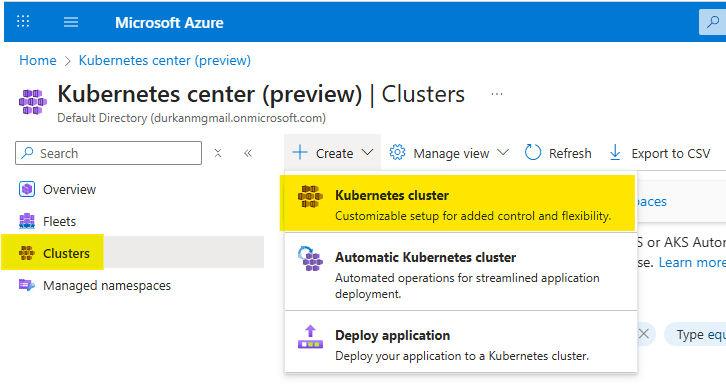
  • When you get to the “Kubernetes center page”, click on “Clusters” on the left menu (it should bring you here automatically). Select Create, and select “Kubernetes cluster”. Note that there are also options for “Automatic Kubernetes cluster” and “Deploy application” – we’ll address those in a later post.
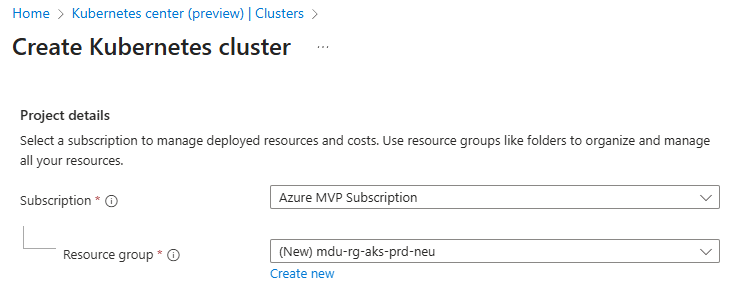
  • Choose your Subscription and Resource Group
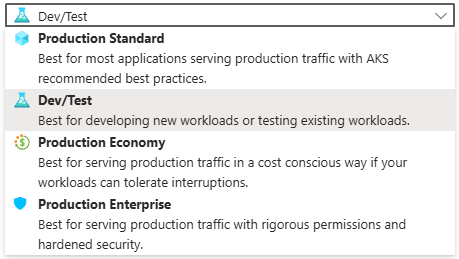
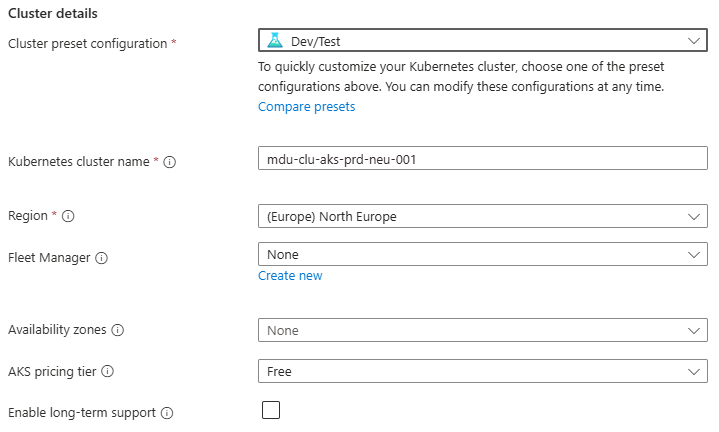
  • Enter a Cluster preset configuration, Cluster name and select a Region. You can choose from four different preset configurations which have clear explanations based on your requirements
  • I’ve gone for Dev/Test for the purposes of spinning up this demo cluster.
  • Leave all other options as default for now and click “Next” – we’ll revisit these in detail in later posts.

Step 2: Configure the Node Pool

  • Under Node pools, there is an agentpool automatically added for us. You can change this if needed to select a different VM size, and set a low min/max node count

    This is your first exposure to separating capacity management from application deployment.

    Step 3: Networking

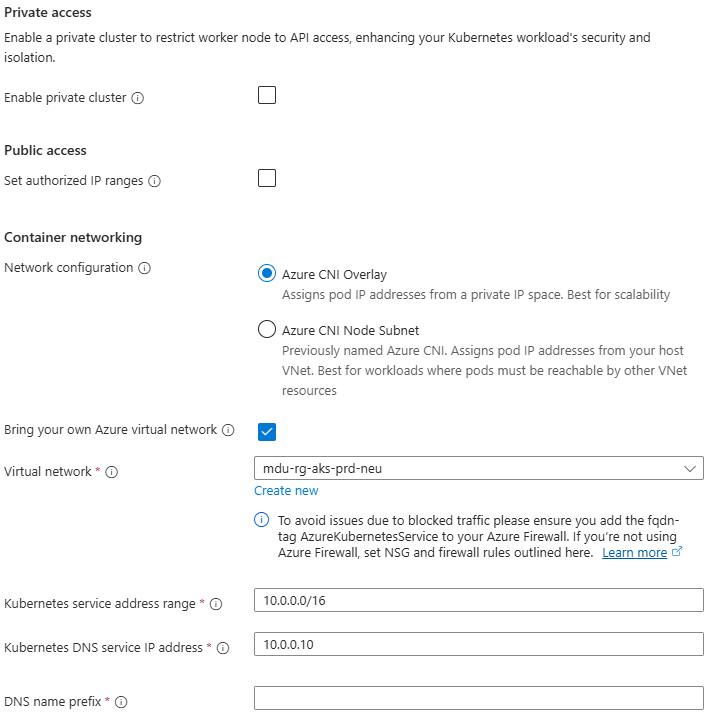
    Under Networking, you will see options for Private/Public Access, and also for Container Networking. This is an important chopice as there are 2 clear options:

    • Azure CNI Overlay – Pods get IPs from a private CIDR address space that is separate from the node VNet.
    • Azure CNI Node Subnet – Pods get IPs directly from the same VNet subnet as the nodes.

    You also have the option to integrate this into your own VNet which you can specify during the cluster creation process.

    Again, we’ll talk more about these options in a later post, but its important to understand the distinction between the two.

    Step 4: Review and Create

    Select Review + Create – note at this point I have not selected any monitoring, security or integration with an Azure Container Registry and am just taking the defaults. Again (you’re probably bored of reading this….), we’ll deal with these in a later post dedicated to each topic.

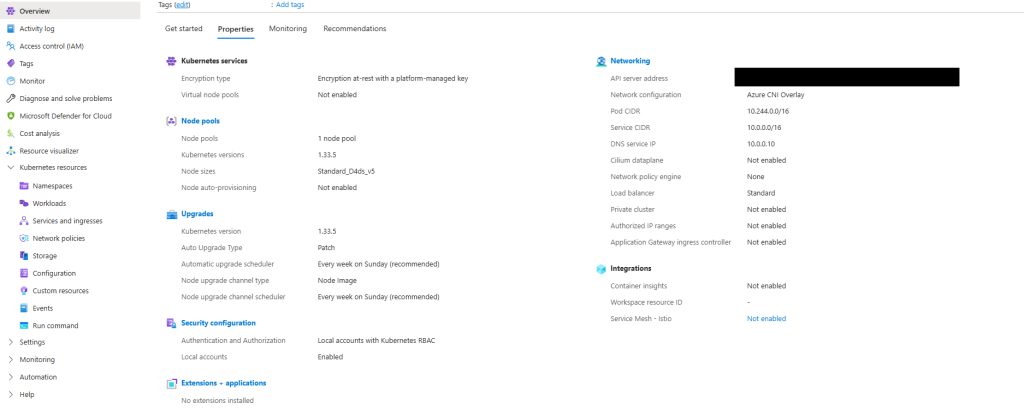
    Once deployed, explore:

    • Node pools
    • Workloads
    • Services and ingresses
    • Cluster configuration

    Notice how much complexity is hidden – if you scroll back up to the “Azure-managed v Customer-managed” diagram, you have responsibility for managing:

    • Cluster nodes
    • Networking
    • Workloads
    • Storage

    Even though Azure abstracts away responsibility for things like key-value store, scheduler, controller and management of the cluster API, a large amount of responsibility still remains.


    What Comes Next in the Series

    This post sets the foundation for what AKS is and how it looks out of the box using a standard deployment with the “defaults”.

    Over the course of the series, we’ll move through the various concepts which will help to inform us as we move towards making design decisions for production workloads:

    • Kubernetes Architecture Fundamentals (control plane, node pools, and cluster design), and how they look in AKS
    • Networking for Production AKS (VNets, CNI, ingress, and traffic flow)
    • Identity, Security, and Access Control
    • Scaling, Reliability, and Resilience
    • Cost Optimisation and Governance
    • Monitoring, Alerting and Visualizations
    • Alignment with the Azure Well Architected Framework
    • And lots more ……

    See you on the next post!
    Azure Container Hosting – which service should you use?

    Its Christmas time, and that means its time for another month of the always fantastic Festive Tech Calendar. This was one of the first events that I participated in when I was trying to break into blogging and public speaking and I’m delighted to be involved again this year.

    This year, the team are raising funds for Beatson Cancer Charity who raise funds to transform the way cancer care is funded and delivered by funding specialists, research and education to invest in a better future for cancer patients. You can make donations via the Just Giving page.

    In this post, I’ll walk through the extensive list of Container hosting options that are available on Azure. I’ll take a look at the Azure-native offerings, include some third-party platforms that run on Azure, and then compare them on performance, scalability, costs, and service limits.

    What counts as “Container Hosting” on Azure?

    For this post I’m treating a “container hosting option” as:

    A service where you can run your own Docker images as workloads, with Azure (or a partner) running the infrastructure.

    There are an extensive list of options (and I will exclude a few off the list below, but the main “go-to” options that I’ve seen in architecture discussions are:

    • Azure Container Apps
    • Azure Kubernetes Service (AKS)
    • Azure Container Instances (ACI)
    • Azure App Service (Web Apps for Containers)
    • Azure Service Fabric (with containers)
    • Azure Red Hat OpenShift (ARO) – OpenShift on Azure
    • Kubernetes platforms on Azure VMs or Azure VMware Solution (VMware Tanzu, Rancher, etc.)

    But what about the humble reliable Virtual Machine?

    OK yes, its still out there as an option – the Virtual Machine with Docker installed to run containers. And its the place where most of us have started on this journey (you can check out a blog series I wrote a few years ago here on the subject of getting started with running Docker on VM’s).

    There are still some situations where you will see a need for Virtual Machines to run containers, but as we’ll see in the options below, this has been superseded by the range of offerings available on Azure who can run containers from single instances right up to enterprise level offerings.

    Azure Container Instances (ACI)

    Lets start with the smallest available form of hosting which is Azure Container Instances. ACI is the “run a container right now without VMs or an orchestrator” service – there are no virtual machines or orchestrators to manage, and containers start within seconds on Azure’s infrastructure. ACI provides a single container or small group of containers (called a container group) on-demand. This simplicity makes it essentially “containers-as-a-service”.

    You can run a container by issuing a single Azure CLI command. It’s completely managed by Azure: patching, underlying host OS, and other maintenance are invisible to the user. ACI also supports both Linux and Windows containers.

    Its great for short-lived tasks and simple container groups, good examples of this would be Cron-style jobs, build workers, data processing pipelines, and dev/test experiments where you just want a container to run for a bit and then disappear.

    Azure App Service (Web Apps for Containers)

    Azure App Service (Web App for Containers) is a Platform-as-a-Service offering that lets you deploy web applications or APIs packaged as Docker containers, without managing the underlying servers.

    This uses all of the features that you would normally see with App Service – you get deployment slots, auto-scaling, traffic routing, and integrated monitoring with Azure Monitor. The benefit of this is that it abstracts away the container management and focuses on developer productivity for web applications.

    The use case of using App Service is the familiarity with the product. Its gives you predictable, reserved capacity and can be used to host HTTP APIs or websites where you don’t want to have the overhead of using Kubernetes, but want to utilise features like deployment slots, built-in auth, easy custom domains, built-in backup & integration.

    Azure Container Apps

    Azure Container Apps is a fully managed container execution environment, designed specifically for microservices, APIs, and event-driven processing.

    It abstracts away the Kubernetes infrastructure and provides a serverless experience for running containers – meaning you can run many containers that automatically scale in response to demand and even scale down to zero when idle.

    Container Apps sits on top of Kubernetes (it runs on Azure’s internal K8s with open technologies like KEDA, Dapr, and Envoy) but as a developer you do not directly interact with Kubernetes objects. Instead, you define Container Apps and Azure handles placement, scaling, and routing.

    Container Apps is an ideal place for running Microservices, APIs and event-driven jobs where you don’t want to manage Kubernetes, and want to scale-to-zero and only pay when there’s traffic. Its a nice “middle ground” between App Service and full AKS.

    Azure Kubernetes Service (AKS)

    We’re finally getting to the good stuff!!

    Image Source – Microsoft

    Azure Kubernetes Service (AKS) is Azure’s flagship container orchestration service, offering a fully managed Kubernetes cluster.

    With AKS, you get the standard open-source Kubernetes experience (API, kubectl, and all) without having to run your own Kubernetes control plane – Azure manages the K8s master nodes (API servers, etc.) as a service.

    You do manage the worker nodes (agent nodes) in terms of deciding their VM sizes, how many, and when to scale (though Azure can automate scaling).

    In terms of ease-of-use, AKS has a steep learning curve if you’re new to containers, because Kubernetes itself is a complex system. Provisioning a cluster is quite easy (via Azure CLI or portal), but operating an AKS cluster effectively requires knowledge of Kubernetes concepts (pods, services, deployments, ingress controllers, config maps, etc.).

    It’s less turn-key than the earlier services – you are stepping into the world of container orchestration with maximum flexibility. One of the main benefits of AKS is that it’s not an opinionated PaaS – it’s Kubernetes, so you can run any containerized workload with any configuration that Kubernetes allows.

    Another reason for choosing AKS is that you can run it locally in your environment on an Azure Local cluster managed by Azure Arc.

    The main reason for choosing AKS is running enterprise or large-scale workloads that need:

    • Full Kubernetes API control
    • Custom controllers, CRDs, service meshes, operators
    • Multi-tenant clusters or complex networking

    If you’re already familiar with Kubernetes, this is usually the default choice.

    Azure Red Hat OpenShift (ARO)

    Azure Red Hat OpenShift (ARO) is a jointly managed offering by Microsoft and Red Hat that provides a fully managed OpenShift cluster on Azure.

    OpenShift is Red Hat’s enterprise Kubernetes distribution that comes with additional tools and an opinionated setup (built on Kubernetes but including components for developers and operations). With ARO, Azure handles provisioning the OpenShift cluster (masters and workers) and critical management tasks, while Red Hat’s tooling is layered on top.

    It’s a first-class Azure service, but under the covers, it’s Red Hat OpenShift Container Platform. In terms of ease-of-use: for teams already familiar with OpenShift, this is much easier than running OpenShift manually on Azure VMs. The service is managed, so tasks like patching the underlying OS, upgrading OpenShift versions, etc., are handled in coordination with Red Hat.

    The use case for ARO comes down to whether you’re an OpenShift customer already, or need OpenShift’s enterprise features (built-in pipelines, operators, advanced multi-tenancy).

    Azure Service Fabric

    Service Fabric predates AKS and was Azure’s first container orchestrator. I’ve not seen this ever out in the wild but it deserves a mention here as its still available as a container hosting platform on Azure.

    Its a mature distributed systems platform from Microsoft, used internally for many Azure services (e.g., SQL DB, Event Hubs). It can orchestrate containers as well as traditional processes (called “guest executables”) and also supports a unique microservices programming model with stateful services and actors where high-throughput is required.

    I’m not going to dive too deep into this topic, but the use case for this really is if you already have significant investment in Service Fabric APIs.

    Third-party Kubernetes & container platforms on Azure

    Beyond the native services above, you can also run a variety of third-party platforms on Azure:

    • Kubernetes distributions on Azure VMs: VMware Tanzu Kubernetes Grid, Rancher, Canonical Kubernetes, etc., deployed directly onto Azure VMs.
    • Azure VMware Solution + Tanzu: run vSphere with Tanzu or Tanzu Kubernetes Grid on Azure VMware Solution (AVS) and integrate with Azure native services.

    There are a number of reasons for ignoring the native Azure services and going for a “self-managed” model:

    • If you need a feature that AKS/ARO doesn’t provide (e.g., custom Kubernetes version or different orchestrator, or multi-cloud control plane).
    • If you want to avoid cloud vendor lock-in at the orchestration layer (some companies choose BYO Kubernetes to not depend on AKS specifics).
    • If your organization already invested in those tools (e.g., they use Rancher to manage clusters across AWS, on-prem and also want to include Azure).
    • If you have an on-prem extension scenario: e.g., using VMware Tanzu in private cloud and replicating environment in Azure via AVS to have consistency and easy migration of workloads.
    • Or if you require extreme custom control: e.g., specialized network plugins or kernel settings that AKS might not allow.

    Comparison Summary

    Lets take a quick comparison summary where you can see at a glance the ease of use, hosting, cost model and use cases of each service:

    OptionEase of UseHosting ModelCost ModelBest For
    Azure Container InstancesVery High Serverless Pay per second of CPU/Memory, no idle cost.Quick tasks, burst workloads, dev/test, simple APIs.
    Azure App Service High PaaSFixed cost per VM instance (scaled-out). Always-on cost (one or more instances).Web apps & APIs needing zero cluster mgmt, CI/CD integration, and auto-scaling.
    Azure Container AppsModerate ServerlessPay for resources per execution (consumption model) + optional reserved capacity. Idle = zero cost.Microservice architectures, event-driven processing, varying workloads where automatic scale and cost-efficiency are key.
    Azure Kubernetes Service (AKS)Low (for beginners).  Moderate (for K8s proficient teams).Managed Kubernetes (IaaS+PaaS mix)Pay for VMs (nodes) only. Control plane free (standard tier) Complex, large, or custom container deployments
    Azure Red Hat OpenShift (ARO)Moderate/Low – easy for OpenShift experts, but more complex than AKS for pure K8s users. Managed OpenShift (enterprise K8s)Pay for VMs + Red Hat surcharge. Higher baseline cost than AKS.Organizations requiring OpenShift’s features (built-in CI, catalog, stricter multi-tenancy) or who have OpenShift on-prem and want cloud parity.
    Azure Service FabricLow – steep learning curve IaaS (user-managed VMs) with PaaS runtimePay for VMs No automatic scaling – you manage cluster size.Stateful, low-latency microservices, or mixed workloads (containers + processes). Teams already leveraging SF’s unique capabilities.

    Conclusion

    As we can see above, Azure offers a rich spectrum of container hosting options.
    Serverless and PaaS options cover most workloads with minimal ops overhead, while managed Kubernetes and third-party platforms unlock maximum flexibility at higher complexity.

    In my own opinion, the best way to go is to make the decision based on business needs and the core knowledge that exists within your team. Use managed and/or serverless options by default; move to Kubernetes only when needed.

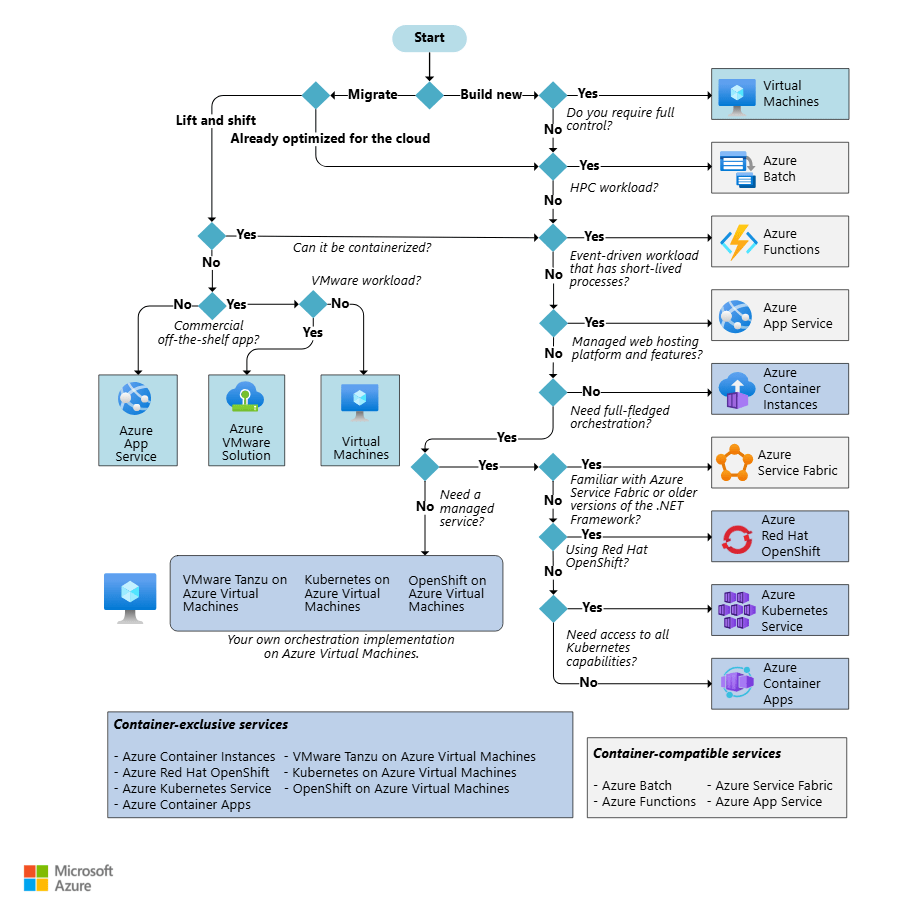
    You can use the decision tree shown below as an easy reference to make the decision based on the workload you wish to run.

    Image Source – Microsoft

    I hope this blog post was useful! For a deeper dive, you can find the official Microsoft guide for choosing a Container hosting service at this link.

    100 Days of Cloud – Day 88: Azure Kubernetes Service

    Its Day 88 of my 100 Days of Cloud journey and as promised, in todays post I’ve finally gotten to Azure Kubernetes Service.

    On Day 86, we introduced the components that make up Kubernetes, tools used to manage the environment and also some considerations you need to be aware of when using Kubernetes, and in the last post we installed a local Kubernetes Cluster using Minikube.

    Today we move on to Azure Kubernetes Service and we’ll look first at how this differs in architecture from an on-premises installation of Kubernetes.

    Azure Kubernetes Service

    As always lets start with the definition – Azure Kubernetes Service (AKS) is a managed Kubernetes service that lets you quickly deploy and manage clusters. The operational overhead is offloaded to Azure, and it handles critical tasks such as health monitoring and maintenance.

    When you create an AKS cluster, a control plane or master node is automatically created and configured, and provided at no cost as a managed Azure resource. You only pay for the nodes attached to the AKS cluster. The control plane and its resources reside only on the region where you created the cluster.

    Image Credit: Microsoft

    AKS Cluster Nodes are run on Azure Virtual Machines (which can be either Linux or Windows Server 2019), so you can size your nodes based on the storage, CPU, memory and type that you require for your workloads. These are billed as standard VMs so any discounts (including reservations) are automatically applied.

    Its important to note though that VM sizes with less than 2 CPUs may not be used with AKS – this is to ensure that the required system required pods and applications can run reliably.

    When you scale out the number of nodes, Azure automatically creates and configures the requested number of VMs. Nodes of the same configuration are known as Node Pools and you define the number of nodes required in a pool during initial setup (which we’ll see below).

    Azure has the following limits:

    • Maximum of 5000 Clusters per subscription
    • Maximum of 100 Nodes per cluster with Virtual Machine Availability Sets and Basic Load Balancer SKU
    • Maximum of 1000 Nodes per cluster with Virtual Machine Scale Sets and Standard Load Balancer SKU
    • Maximum of 100 Node Pools per cluster
    • Maximum of 250 Pods per node

    When you create a cluster using the Azure portal, you can choose a preset configuration to quickly customize based on your scenario. You can modify any of the preset values at any time.

    • Standard – Works well with most applications.
    • Dev/Test – Use this if experimenting with AKS or deploying a test application.
    • Cost-optimized – reduces costs on production workloads that can tolerate interruptions.
    • Batch processing – Best for machine learning, compute-intensive, and graphics-intensive workloads. Suited for applications requiring fast scale-up and scale-out of the cluster.
    • Hardened access – Best for large enterprises that need full control of security and stability.

    If we go into the Portal and “Create a Resource”, select “Containers” frm the categories and click on “Create” under Kubernetes Service:

    As we can see this throws us into our screen for creating our Cluster. As always, we need to select a Subscription and Resource Group. Down below this is where it gets interesting, and we can see the preset configurations that we described above:

    We can see that “Standard ($$)” is selected by default, and if we click on “Learn more and compare presets”, we get a screen showing us details of each option:

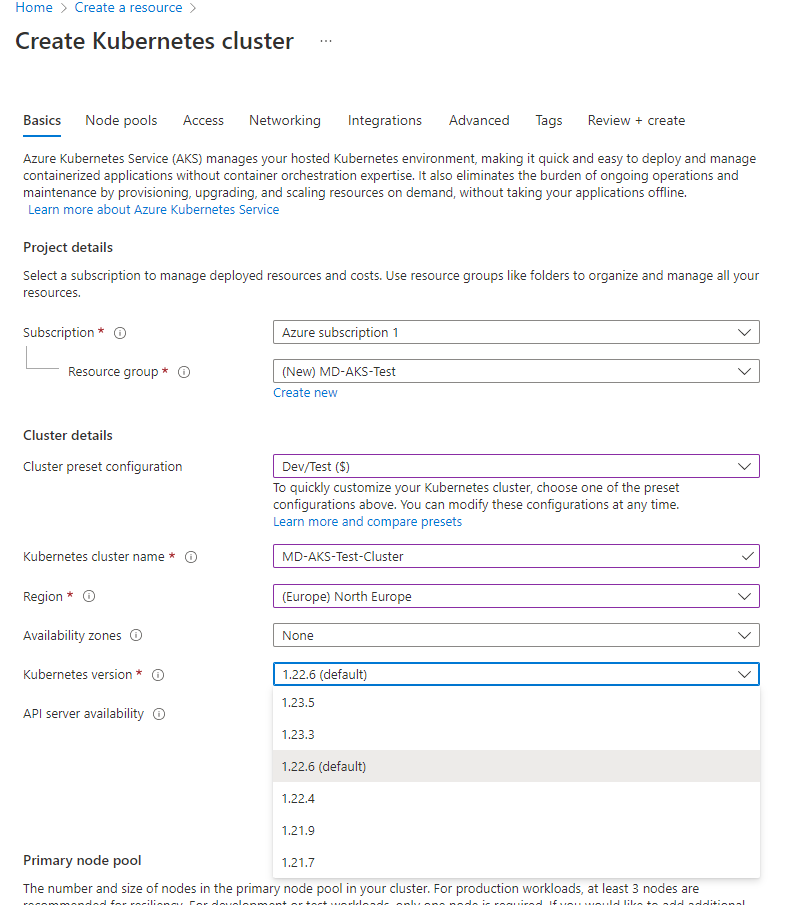
    I’m going to select “Dev/Test ($)” and click apply to come back to the Basics screen. I now give the Cluster a name and select a region. We can also see that I can select different Kubernetes versions from the dropdown:

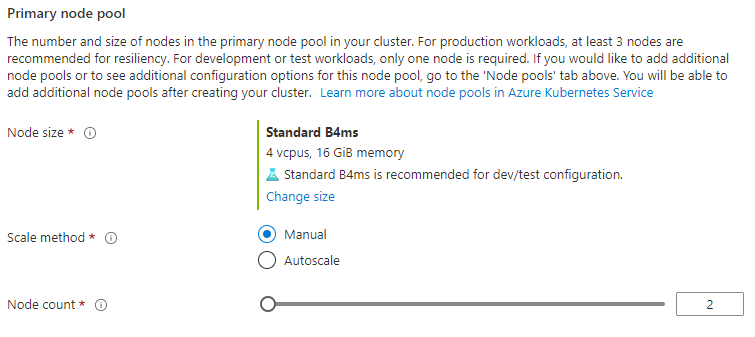
    Finally on this screen, we select the Node Pool options and can select Node size (you can change the size and select whatever VM size that you need to meet your needs), manual or auto scaling and the Node Count:

    We click next and move on to the “Node Pools” screen, where we can add other Node Pools and select encryption options:

    The next screen is “Access” where we can specify RBAC access and also AKS-managed Azure AD which controls access using Azure AD Group membership. Note that this option cannot be disabled after it is enabled:

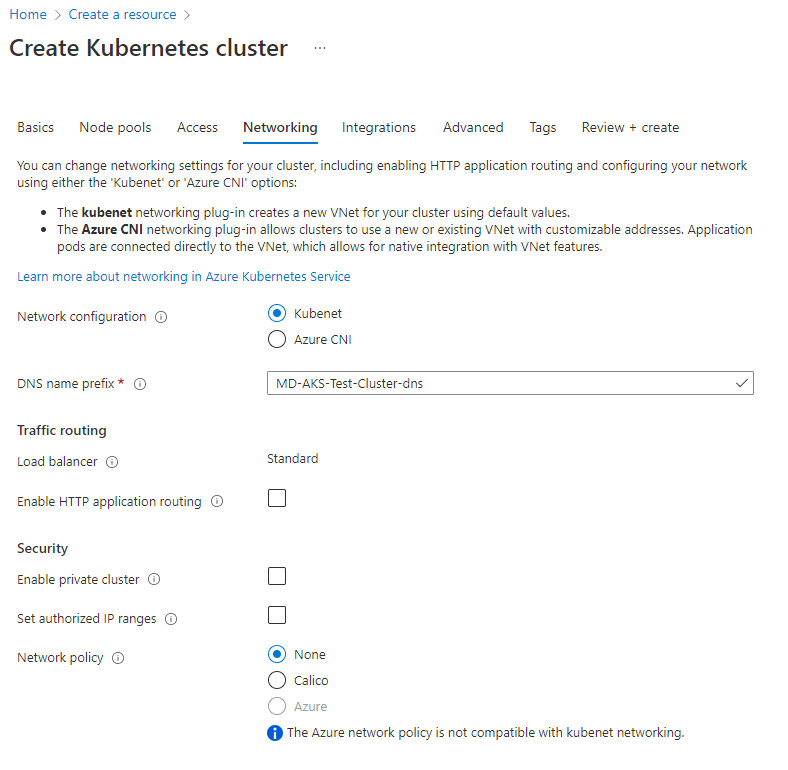
    The next screen is Networking and this is where things get interesting – we can use kubenet to create a VNet using default values, or Azure CNI (Container Networking Interface) which allows you to specify a subnet from your own managed Vnets. We can also specify Network policies to define rules for ingress and egress traffic in and out of the cluster.

    The next screen is Integrations, where we can integrate with Azure Container Registry and also enable Azure Monitor and Azure Policy.

    At this point, we can click Review and Create and go make a cup of tea while thats being created.

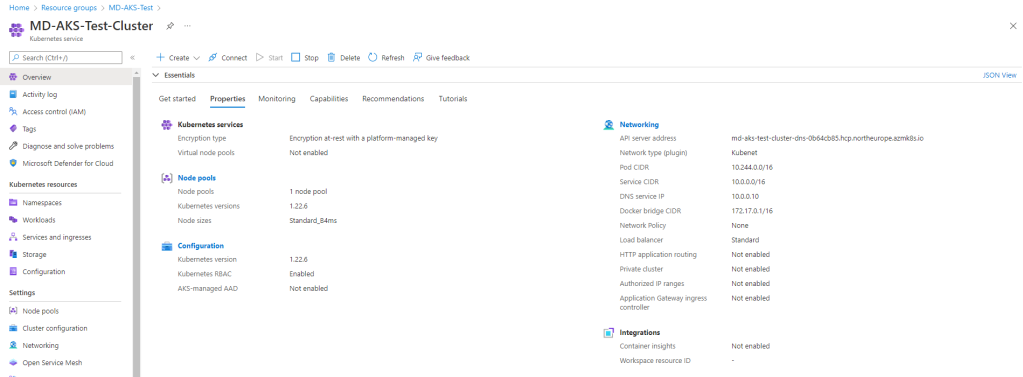
    And once thats done (the deployment, not the tea….), we can see the Cluster has been created:

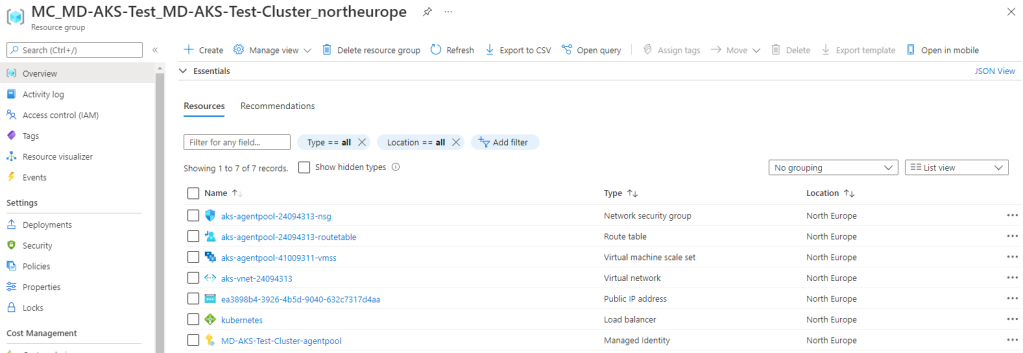
    One interesting thing to note – the cluster has been created in my “MD-AKS-Test” Resource Group, however a second RG has been created that containes the NSG, Route Table, VNet, Load Balancer, Managed Identity and Scale Set, so its separating the underlying management components from the main cluster resource.

    So at thsi point, we need to jump into Cloud Shell and manage the cluster from there. When we launch Cloud Shell and the prompt appears, run:

    az aks get-credentials --resource-group MD-AKS-Test --name MD-AKS-Test-Cluster

    This sets our cluster as the current context in the Cloud Shell and allows us to run kubectl commands against it. We can now run kubectl get nodes to show us the status of the nodes in our node pool:

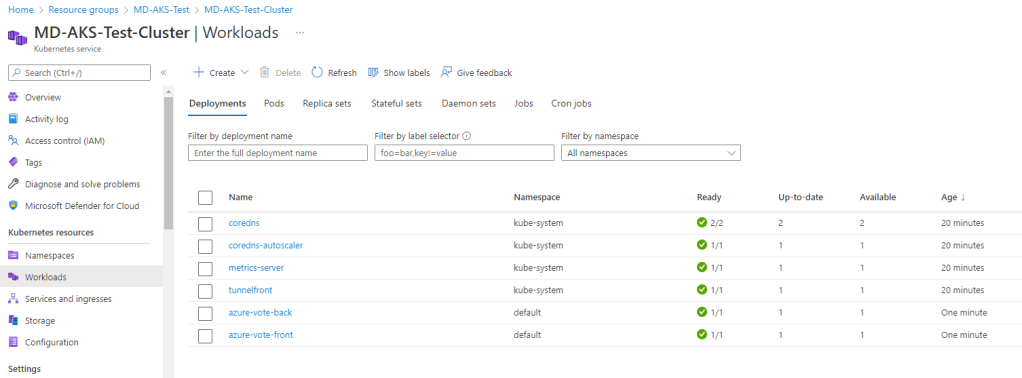
    At this point, you are ready to deploy an application into your Cluster! You can use the process as described here to create your YAML file and deploy and test the sample Azure Voting App. Once this is deployed, you can check the “Workloads” menu from your cluster in the Portal to see that this is running:

    If we click into either of the “azure-vote” deployments, we can see the underlying Pod in place with its internal IP and the node its assigned to:

    To delete the cluster, run az aks delete --resource-group MD-AKS-Test --name MD-AKS-Test-Cluster --yes --no-wait.

    Azure Kubernetes Service or run your own Kubernetes Cluster?

    So this is the million dollar question and there really is no correct answer – it really does depend on your own particular use case.

    Lets try to break it down this way – Deploying and operating your own Kubernetes cluster is complex and will require more work to get the underlying technology set up, such as networking, monitoring, identity management and storage.

    The flip side is that if you go with AKS its a much faster way to get up and running with Kubernetes and you have full access to technologies such as Azure AD and Azure Key Vault, but you don’t have access to your control plane or master nodes. There is also the cost element to think of as Kubernets can get expensive running in the cloud depending on how much you decide to scale.

    Conclusion

    So thats a look at Azure Kubernetes Service and also the benefits of running Kubernetes in Azure versus On-Premises.

    The last few posts have only really scratched the surface on Kubernetes – there is a lot to learn about the technology and a steep learning curve. One thing for sure is that Kubernetes is a really hot technology right now and there is huge demand for people who have it as a skill.

    If you want to follow some folks who know their Kubernetes inside out, the people I would recommend are:

    • Chad Crowell who you can follow on Twitter or his blog. Chad also has an excellent Kubernetes from Scratch course over at CloudSkills.io containing over 30 real world projects to help you ramp up on Kubernetes.
    • Michael Levan who you can follow from all his socials on Linktree and who has published multiple content pieces on his social channels.
    • Richard Hooper (aka Pixel Robots and Microsoft Azure MVP) who you can follow on Twitter or his blog which contains in-depth blog posts and scenarios for AKS. Richard also co-hosts the Azure Cloud Native user group which you can find on Meetup.

    Hope you enjoyed this post, until next time!

    100 Days of Cloud – Day 86: Introduction to Kubernetes

    Its Day 86 of my 100 Days of Cloud journey, and in todays post I’m going to give an introduction to Kubernetes.

    We introduced Containers on Day 81 and gave an overview of how they work and how they differ in architecture when compared to traditional Bare Metal Physical or Virtual Infrastructure. A container is a lightweight environment that can be used to build and securely run applications and their dependencies. We need container management tools such as Docker to run commands and manage our containers.

    Image Credit – Jenny Fong/Docker

    Containers Recap

    We saw how easy it is to deploy and manage containers during the series where I built a monitoring system using a telegraf agent to pull data into an InfluxDB docker container, and then used a Grafana Container to display metrics from the time series database.

    So lets get back to that for a minute and understand a few points about that system:

    • The Docker Host was an Ubuntu Server VM, so we can assume that it ran in a highly available environment – either an on-premises Virtual Cluster such as Hyper-V or VMware or on a Public Cloud VM such as an Azure Virtual Machine or an Amazon EC2 Instance.
    • It took data in from a single datasource, which was brought into a single time series database, which then was presented on a single dashboard.
    • So altogether we had 1 host VM and 2 containers. Because the containers and datasource were static, there was no need for scaling or complex management tasks. The containers were run with persistent storage configured, the underlying apps were configured and after that the system just happily ran.

    So in effect, that was a static system that required very little or no management after creation. But we also had no means of scaling it if required.

    What if we wanted to build something more complex, like a an application with multiple layers where there is a requirement to scale out apps, and respond to increased demand by deploying more container instances, and to scale back if demand is decreasing?

    This is where container orchestration technologies are useful because they can handle this for you. A container orchestrator is a system that automatically deploys and manages containerized apps. It can dynamically respond to changes in the environment to increase or decrease the deployed instances of the managed app. Or, it can ensure all deployed container instances get updated if a new version of a service is released.

    And this is where Kubernetes comes in!

    Kubernetes Overview

    Kubernetes is an open-source platform created by Google for managing and orchestrating containerized workloads. Kubernetes is also known as “K8s”, and can run any Linux container across private, public, and hybrid cloud environments. Kubernetes allows you to build application services that span multiple containers, schedule those containers across a cluster, scale those containers, and manage the health of those containers over time.

    The benefits of using Kubernetes are:

    Its important to note though that all of these tasks require configuration and a good understanding of the underlying technologies. You need to understand concepts such as virtual networks, load balancers, and reverse proxies to configure Kubernetes networking.

    Kubernetes Components

    Image Credit – Microsoft

    A Kubernetes cluster consists of:

    • A set of worker machines, called nodes, that run containerized applications. Every cluster has at least one worker node.
    • A master node or control plane manages the worker nodes and the Pods in the cluster

    Lets take a look at the components that are contained in each of these components

    Control Plane or Master Node

    Image Credit – Microsoft

    The following services make up the control plane for a Kubernetes cluster:

    • API server – the front end to the control plane in your Kubernetes cluster. All the communication between the components in Kubernetes is done through this API.
    • Backing store – used by Kubernetes to save the complete configuration of a Kubernetes cluster. A key-value store called etcd stores the current state and the desired state of all objects within your cluster.
    • Scheduler – responsible for the assignment of workloads across all nodes. The scheduler monitors the cluster for newly created containers, and assigns them to nodes.
    • Controller manager – tracks the state of objects in the cluster. There are controllers to monitor nodes, containers, and endpoints.
    • Cloud controller manage – integrates with the underlying cloud technologies in your cluster when the cluster is running in a cloud environment. These services can be load balancers, queues, and storage.

    Worker Machines or Nodes

    Image Credit – Microsoft

    The following services run on the Kubernetes node:

    • Kubelet – The kubelet is the agent that runs on each node in the cluster, and monitors work requests from the API server. It monitors the nodes and makes sure that the containers scheduled on each node run, as expected.
    • Kube-proxy – The kube-proxy component is responsible for local cluster networking, and runs on each node. It ensures that each node has a unique IP address.
    • Container runtime – the underlying software that runs containers on a Kubernetes cluster. The runtime is responsible for fetching, starting, and stopping container images.

    Pods

    Image Credit – Microsoft

    Unlike in a Docker environment, you can’t run containers directly on Kubernetes. You package the container into a Kubernetes object called a pod, which is effectively a container with all of the management overhead stripped away and passed back to the Kubernetes Cluster.

    A pod can contain multiple containers that make up part of or all of your application, however in general a pod will never contain multiple instances of the same application. So for example, if running a website that requires a database back-end, both of those containers would be packaged into a pod.

    A pod also includes information about the shared storage and network configuration, and yaml coded tempates which define how to run the containers in the pod.

    Managing your Kubernetes environment

    You have a number of options for managing your Kubernetes environment:

    • kubectl – You can use kubectl to deploy applications, inspect and manage cluster resources, and view logs. kubectl can be installed on Linux, macOS and Windows platforms.
    • kind – this is used for running Kubernetes on your local device.
    • minikube – similar to kind in that it allows you to run Kubernetes locally.
    • kubeadm – this is used to create and manage kubernetes clusters in a user friendly way.

    kubectl is by far the most used in enterprise Kubernetes environments, and you can find more details in the documentation here.

    Important Considerations

    While Kubernetes provides an orchestration platform that means you can run your clusters and scale as required, there are certain things you need to be aware that it cannot do, such as:

    • Deployment, scaling, load balancing, logging, and monitoring are all optional. You need to configure these and fit these into your specific solution requirements.
    • There is no limit to the tyes of apps that can run – if it can run in a container, it can run on Kubernetes.
    • Kubernetes doesn’t provide middleware, data-processing frameworks, databases, caches, or cluster storage systems.
    • A container runtime such as Docker is required for managing containers.
    • You need to manage the underlying environment that Kubernetes runs on (memory, networking, storage etc), and also manage upgrades to the Kubernetes platform itself.

    Azure Kubernetes Service

    All of the above considerations and indeed all of the sections we’ve covered in this post require detailed knowledge of both Kubernetes and also the underlying dependencies. This overhead is removed in some part by cloud services such Azure Kubernetes Service (AKS) which reduces these challenges by providing a hosted Kubernetes environment. 

    As a hosted Kubernetes service, Azure handles critical tasks, like health monitoring and maintenance. Since Kubernetes masters are managed by Azure, you only manage and maintain the agent nodes.

    You can create an AKS cluster using:

    • The Azure CLI
    • The Azure portal
    • Azure PowerShell
    • Using template-driven deployment options, like Azure Resource Manager templates, Bicep and Terraform.

    When you deploy an AKS cluster, the Kubernetes master and all nodes are deployed and configured for you. Advanced networking, Azure Active Directory (Azure AD) integration, monitoring, and other features can be configured during the deployment process.

    Conclusion

    And thats a description of Kubernetes, how it works, why its useful and the components that are contained within it. In the next post, we’re going to put all that theory into practice and set up both a local Kubernetes Cluster using minikube, and also look at deploying cluster onto Azure Kubernetes Service.

    Hope you enjoyed this post, until next time!