“Why a Landing Zone?”: How to avoid Azure sprawl from day 1 (and still move fast)

A Landing Zone is never the first thought when a project starts. When the pressure is on to deliver something fast in Azure (or any other cloud environment, the simplest path looks like this:

  • Create a subscription
  • Throw resources into a few Resource Groups
  • Build a VNet (or two)
  • Add some NSGs
  • Ship it

Its a good approach ….. for a Proof Of Concept ….

Here’s the problem though: POC’s keep going and turn into Production environments. Because “we need to go fast….”.

What begins as speed often turns into sprawl, and this isn’t a problem until 30/60/180 days later, when you’ve got multiple teams, multiple environments, and everyone has been “needing to go fast”. And its all originated from that first POC …..

This post is about the pain points that appear when you skip foundations, and more importantly, how you can avoid them from day 1, using the Azure Landing Zone reference architectures as your guardrails and your blueprint.


This is always how it starts….

The business says:

“We need this workload live in Azure quickly.”

The delivery team says:

“No problem. We’ll deploy the services into a Resource Group, lock down the VNet with NSGs, and we’ll worry about the platform stuff later.”

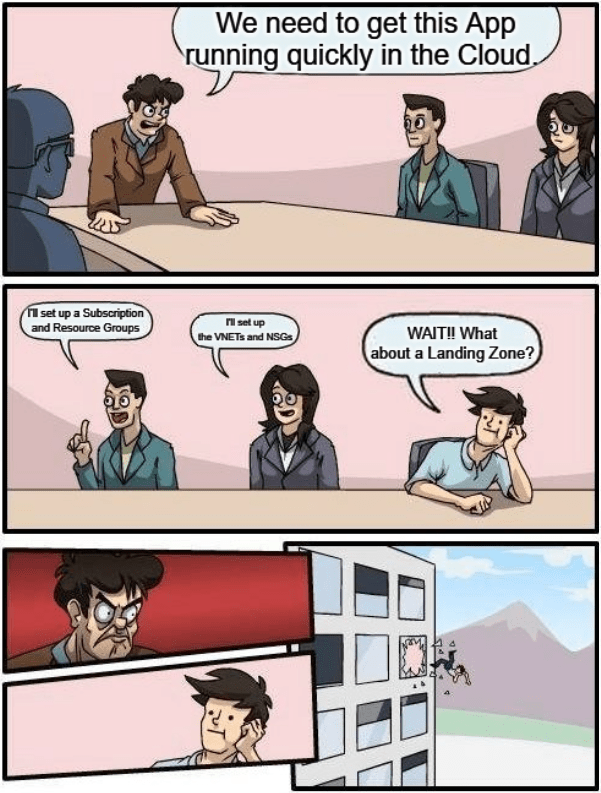
Ops and Security quietly panic (or as per the above example, get thrown out the window….), but everyone’s under pressure, so you crack on.

At this point nobody is trying to build a mess. Everyone is “trying” to do the right thing. But the POC you build in those early days has a habit of becoming “the environment” — the one you’re still using a year later, except now it’s full of exceptions, one-off decisions, and “temporary” fixes that never got undone.


The myth: “Resource Groups + VNets + NSGs = foundation”

Resource Groups are useful. VNets are essential. NSGs absolutely have their place.

But if your “platform strategy” starts and ends there, you haven’t built a foundation — you’ve built a starting configuration.

Azure Landing Zones exist to give you that repeatable foundation: a scalable, modular architecture with consistent controls that can be applied across subscriptions as you grow.


The pain points that show up after the first few workloads

1) Governance drift (a.k.a. “every team invents their own standards”)

You start with one naming convention. Then a second team arrives and uses something else. Tags are optional, so they’re inconsistent. Ownership becomes unclear. Cost reporting turns into detective work.

Then you try to introduce standards later and discover:

  • Hundreds of resources without tags
  • Naming patterns that can’t be fixed without redeploying and breaking things
  • “Environment” means different things depending on who you ask

The best time to enforce consistency is before you have 500 things deployed. Landing Zones bring governance forward. Not as a blocker, but as a baseline: policies, conventions, and scopes that make growth predictable.


2) RBAC sprawl (“temporary Owner” becomes permanent risk)

If you’ve ever inherited an Azure estate, environments tend to have patterns like:

  • “Give them Owner, we’ll tighten it later.”
  • “Add this service principal as Contributor everywhere just to get the pipeline working.”
  • “We need to unblock the vendor… give them access for now.”

Fast-forward a few months and you have:

  • Too many people with too much privilege
  • No clean separation between platform access and workload access
  • Audits and access reviews that are painful and slow

This is where Landing Zones help in a very simple way. The platform team owns the platform. Workload teams own their workloads. And the boundaries are designed into the management group and subscription model, not “managed” by tribal knowledge.


3) Network entropy (“just one more VNet”)

Networking is where improvisation becomes expensive. It starts with:

  • a VNet for the first app
  • a second VNet for the next one
  • a peering here
  • another peering there
  • and then one day someone asks: “What can talk to what?”

And nobody can answer confidently without opening a diagram that looks like spaghetti.

The Azure guidance here is very clear: adopt a deliberate topology (commonly hub-and-spoke) so you centralise shared services, inspection, and connectivity patterns.


4) Subscription blast radius (“one subscription becomes the junk drawer”)

This is one of the biggest “resource group isn’t enough” realities. Resource Groups are not strong boundaries for:

  • quotas and limits
  • policy scope management at scale
  • RBAC complexity
  • cost separation across teams/products
  • incident and breach containment

When everything lives in one subscription, one bad decision has a very wide blast radius. Landing Zones push you toward using subscriptions as a unit of scale, and setting up management groups so you can apply guardrails consistently across them.


So what is a Landing Zone, practically?

In a nutshell, a Landing Zone is the foundation to everything you will do in future in your cloud estate.

The platform team builds a standard, secure, repeatable environment. Application teams ship fast on top of it, without having to re-invent governance, networking, and security every time.

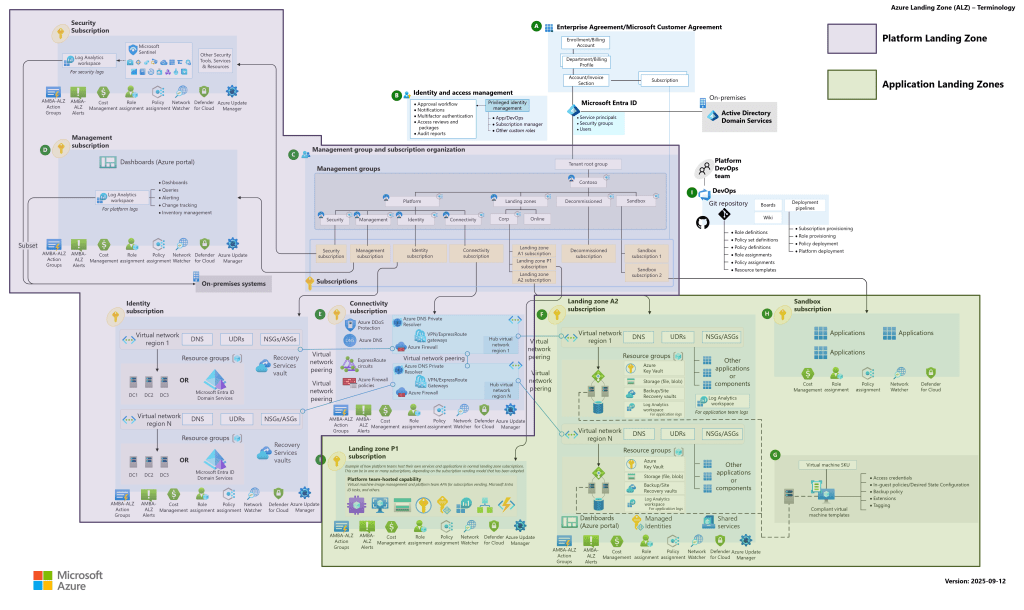
The Azure Landing Zone reference architecture is opinionated for a reason — it gives you a proven starting point that you tailor to your needs.

And it’s typically structured into two layers:

Image Credit: Microsoft

Platform landing zone

Shared services and controls, such as:

  • identity and access foundations
  • connectivity patterns
  • management and monitoring
  • security baselines

Application landing zones

Workload subscriptions where teams deploy their apps and services — with autonomy inside guardrails.

This separation is the secret sauce. The platform stays boring and consistent. The workloads move fast.


Avoiding sprawl from day 1: a simple blueprint

If you want the practical “do this first” guidance, here it is.

1) Don’t freestyle: use the design areas as your checklist

Microsoft’s Cloud Adoption Framework breaks landing zone design into clear design areas. Treat these as your “day-1 decisions” checklist.

Even if you don’t implement everything on day 1, you should decide:

  • Identity and access: who owns what, where privilege lives
  • Resource organisation: management group hierarchy and subscription model
  • Network topology: hub-and-spoke / vWAN direction, IP plan, connectivity strategy
  • Governance: policies, standards, and scope
  • Management: logging, monitoring, operational ownership

The common failure mode is building workloads first, then trying to reverse-engineer these decisions later.


2) Make subscriptions your unit of scale (and stop treating “one sub” as a platform)

If you want to avoid a single subscription becoming a dumping ground, you need a repeatable way to create new workload subscriptions with the right baseline baked in.

This is where subscription vending comes in.

Subscription vending is basically: “new workload subscriptions are created in a consistent, governed way” — with baseline policies, RBAC, logging hooks, and network integration applied as part of the process.

If you can’t create a new compliant subscription easily, you will end up reusing the first one forever… and that’s how sprawl wins.


3) Choose a network pattern early (then standardise it)

Most of the time, the early win is adopting hub-and-spoke:

  • spokes for workloads
  • a hub for shared services and central control
  • consistent ingress/egress and inspection patterns

The point isn’t that hub-and-spoke is “cool” – it gives you a consistent story for connectivity and control.


4) Guardrails that don’t kill speed

This is where people get nervous. They hear “Landing Zone” and think bureaucracy. But guardrails are only slow when they’re manual. Good guardrails are automated and predictable, like:

  • policy baselines for common requirements
  • naming/tagging standards that are enforced early
  • RBAC patterns that avoid “Owner everywhere”
  • logging and diagnostics expectations so ops isn’t blind

This is how you enable teams to move quickly without turning your subscription into a free-for-all.


How can you actually implement this?

Don’t build it from scratch. Use the Azure Landing Zone reference architecture as your baseline, then implement via an established approach (and put it in version control from the start). The landing zone architecture is designed to be modular for exactly this reason: you can start small and evolve without redesigning everything.

Treat it like a product:

  • define what a “new workload environment” looks like
  • automate the deployment of that baseline
  • iterate over time

The goal is not to build the perfect enterprise platform on day 1; its to build something that won’t collapse under its own weight when you scale.


A “tomorrow morning” checklist

If you’re reading this and thinking “right, what do I actually do next?”, here are four actions that deliver disproportionate value:

  1. Decide your management group + subscription strategy
  2. Pick your network topology (and standardise it)
  3. Define day-1 guardrails (policy baseline, RBAC patterns, naming/tags, logging hooks)
  4. Set up subscription vending so new workloads start compliant by default

Do those four things, and you’ll avoid the worst kind of Azure sprawl before it starts.


Conclusion

Skipping a Landing Zone might feel like a quick win today.

But if you know the workload is going to grow — more teams, more environments, more services, more scrutiny — then the question isn’t “do we need a landing zone?”

The question is: do we want to pay for foundations now… or pay a lot more later when we (inevitably) lose control?

Hope you enjoyed this post – this is my contribution to this years Azure Spring Clean event organised by Joe Carlyle and Thomas Thornton. Check out the full schedule on the website!

AKS Networking – Which model should you choose?

In the previous post, we broke down AKS Architecture Fundamentals — control plane vs data plane, node pools, availability zones, and early production guardrails.

Now we move into one of the most consequential design areas in any AKS deployment:

Networking.

If node pools define where workloads run, networking defines how they communicate — internally, externally, and across environments.

Unlike VM sizes or replica counts, networking decisions are difficult to change later. They shape IP planning, security boundaries, hybrid connectivity, and how your platform evolves over time.

This post takes a look at AKS networking by exploring:

  • The modern networking options available in AKS
  • Trade-offs between Azure CNI Overlay and Azure CNI Node Subnet
  • How networking decisions influence node pool sizing and scaling
  • How the control plane communicates with the data plane

Why Networking in AKS Is Different

With traditional Iaas and PaaS services in Azure, networking is straightforward: a VM or resource gets an IP address in a subnet.

With Kubernetes, things become layered:

  • Nodes have IP addresses
  • Pods have IP addresses
  • Services abstract pod endpoints
  • Ingress controls external access

AKS integrates all of this into an Azure Virtual Network. That means Kubernetes networking decisions directly impact:

  • IP address planning
  • Subnet sizing
  • Security boundaries
  • Peering and hybrid connectivity

In production, networking is not just connectivity — it’s architecture.


The Modern AKS Networking Choices

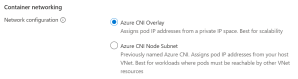
Although there are some legacy models still available for use, if you try to deploy an AKS cluster in the Portal you will see that AKS offers two main networking approaches:

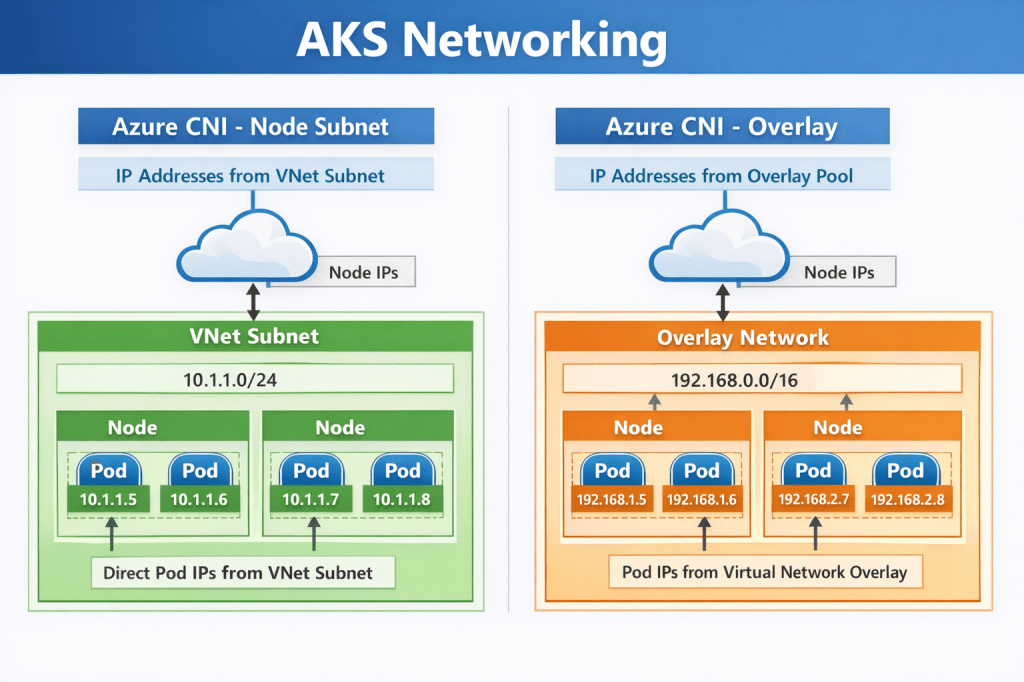
  • Azure CNI Node Subnet (flat network model)
  • Azure CNI Overlay (pod overlay networking)

As their names suggest, both use Azure CNI. The difference lies in how pod IP addresses are assigned and routed. Understanding this distinction is essential before you size node pools or define scaling limits.


Azure CNI Node Subnet

This is the traditional Azure CNI model.

Pods receive IP addresses directly from the Azure subnet. From the network’s perspective, pods appear as first-class citizens inside your VNet.

How It Works

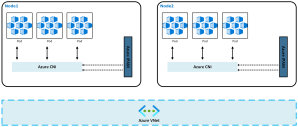
Each node consumes IP addresses from the subnet. Each pod scheduled onto that node also consumes an IP from the same subnet. Pods are directly routable across VNets, peered networks, and hybrid connections.

This creates a flat, highly transparent network model.

Why teams choose it

This model aligns naturally with enterprise networking expectations. Security appliances, firewalls, and monitoring tools can see pod IPs directly. Routing is predictable, and hybrid connectivity is straightforward.

If your environment already relies on network inspection, segmentation, or private connectivity, this model integrates cleanly.

Pros

  • Native VNet integration
  • Simple routing and peering
  • Easier integration with existing network appliances
  • Straightforward hybrid connectivity scenarios
  • Cleaner alignment with enterprise security tooling

Cons

  • High IP consumption
  • Requires careful subnet sizing
  • Can exhaust address space quickly in large clusters

Trade-offs to consider

The trade-off is IP consumption. Every pod consumes a VNet IP. In large clusters, address space can be exhausted faster than expected. Subnet sizing must account for:

  • node count
  • maximum pods per node
  • autoscaling limits
  • upgrade surge capacity

This model rewards careful planning and penalises underestimation.

Impact on node pool sizing

With Node Subnet networking, node pool scaling directly consumes IP space.

If a user node pool scales out aggressively and each node supports 30 pods, IP usage grows rapidly. A cluster designed for 100 nodes may require thousands of available IP addresses.

System node pools remain smaller, but they still require headroom for upgrades and system pod scheduling.


Azure CNI Overlay

Azure CNI Overlay is designed to address IP exhaustion challenges while retaining Azure CNI integration.

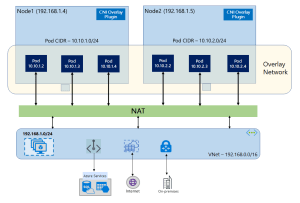
Pods receive IP addresses from an internal Kubernetes-managed range, not directly from the Azure subnet. Only nodes consume Azure VNet IP addresses.

How It Works

Nodes are addressable within the VNet. Pods use an internal overlay CIDR range. Traffic is routed between nodes, with encapsulation handling pod communication.

From the VNet’s perspective, only nodes consume IP addresses.

Why teams choose it

Overlay networking dramatically reduces pressure on Azure subnet address space. This makes it especially attractive in environments where:

  • IP ranges are constrained
  • multiple clusters share network space
  • growth projections are uncertain

It allows clusters to scale without re-architecting network address ranges.

Pros

  • Significantly lower Azure IP consumption
  • Simpler subnet sizing
  • Useful in environments with constrained IP ranges

Cons

  • More complex routing
  • Less transparent network visibility
  • Additional configuration required for advanced scenarios
  • Not ideal for large-scale enterprise integration

Trade-offs to consider

Overlay networking introduces an additional routing layer. While largely transparent, it can add complexity when integrating with deep packet inspection, advanced network appliances, or highly customised routing scenarios.

For most modern workloads, however, this complexity is manageable and increasingly common.

Impact on node pool sizing

Because pods no longer consume VNet IP addresses, node pool scaling pressure shifts away from subnet size. This provides greater flexibility when designing large user node pools or burst scaling scenarios.

However, node count, autoscaler limits, and upgrade surge requirements still influence subnet sizing.


Choosing Between Overlay and Node Subnet

Here are the “TLDR” considerations when you need to make the choice of which networking model to use:

  • If deep network visibility, firewall inspection, and hybrid routing transparency are primary drivers, Node Subnet networking remains compelling.
  • If address space constraints, growth flexibility, and cluster density are primary concerns, Overlay networking provides significant advantages.
  • Most organisations adopting AKS at scale are moving toward overlay networking unless specific networking requirements dictate otherwise.

How Networking Impacts Node Pool Design

Let’s connect this back to the last post, where we said that Node pools are not just compute boundaries — they are networking consumption boundaries.

System Node Pools

System node pools:

  • Host core Kubernetes components
  • Require stability more than scale

From a networking perspective:

  • They should be small
  • They should be predictable in IP consumption
  • They must allow for upgrade surge capacity

If using Azure CNI, ensure sufficient IP headroom for control plane-driven scaling operations.

User Node Pools

User node pools are where networking pressure increases. Consider:

  • Maximum pods per node
  • Horizontal Pod Autoscaler behaviour
  • Node autoscaling limits

In Azure CNI Node Subnet environments, every one of those pods consumes an IP. If you design for 100 nodes with 30 pods each, that is 3,000 pod IPs — plus node IPs. Subnet planning must reflect worst-case scale, not average load.

In Azure CNI Overlay environments, the pressure shifts away from Azure subnets — but routing complexity increases.

Either way, node pool design and networking are a single architectural decision, not two separate ones.


Control Plane Networking and Security

One area that is often misunderstood is how the control plane communicates with the data plane, and how administrators securely interact with the cluster.

The Kubernetes API server is the central control surface. Every action — whether from kubectl, CI/CD pipelines, GitOps tooling, or the Azure Portal — ultimately flows through this endpoint.

In AKS, the control plane is managed by Azure and exposed through a secure endpoint. How that endpoint is exposed defines the cluster’s security posture.

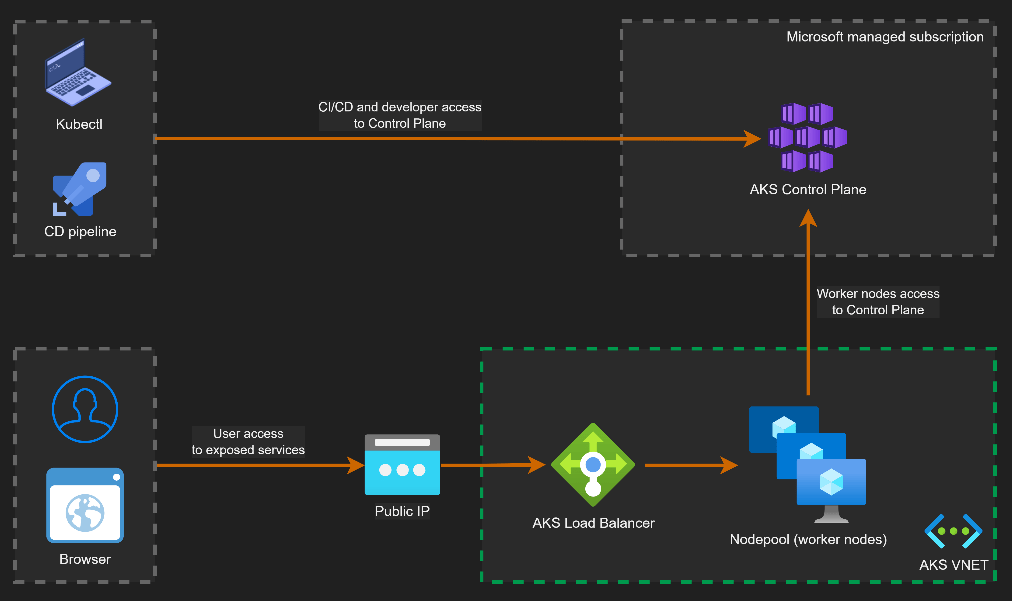
Public Cluster Architecture

By default, AKS clusters expose a public API endpoint secured with authentication, TLS, and RBAC.

This does not mean the cluster is open to the internet. Access can be restricted using authorized IP ranges and Azure AD authentication.

Image: Microsoft/Houssem Dellai

Key characteristics:

  • API endpoint is internet-accessible but secured
  • Access can be restricted via authorized IP ranges
  • Nodes communicate outbound to the control plane
  • No inbound connectivity to nodes is required

This model is common in smaller environments or where operational simplicity is preferred.

Private Cluster Architecture

In a private AKS cluster, the API server is exposed via a private endpoint inside your VNet.

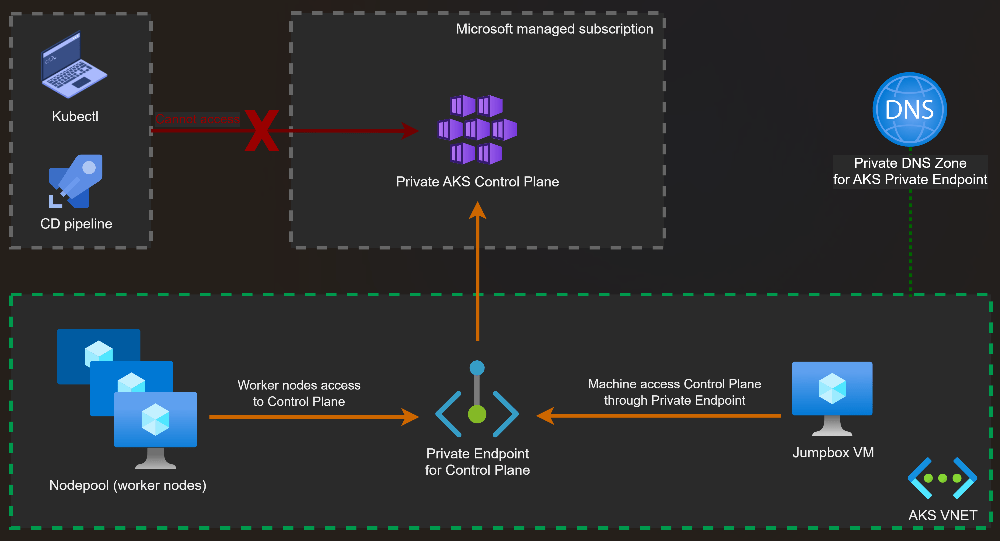
Image: Microsoft/Houssem Dellai

Administrative access requires private connectivity such as:

  • VPN
  • ExpressRoute
  • Azure Bastion or jump hosts

Key characteristics:

  • API server is not exposed to the public internet
  • Access is restricted to private networks
  • Reduced attack surface
  • Preferred for regulated or enterprise environments

Control Plane to Data Plane Communication

Regardless of public or private mode, communication between the control plane and the nodes follows the same secure pattern.

The kubelet running on each node establishes an outbound, mutually authenticated connection to the API server.

This design has important security implications:

  • Nodes do not require inbound internet exposure
  • Firewall rules can enforce outbound-only communication
  • Control plane connectivity remains encrypted and authenticated

This outbound-only model is a key reason AKS clusters can operate securely inside tightly controlled network environments.

Common Networking Pitfalls in AKS

Networking issues rarely appear during initial deployment. They surface later when scaling, integrating, or securing the platform. Typical pitfalls include:

  • subnets sized for today rather than future growth
  • no IP headroom for node surge during upgrades
  • lack of outbound traffic control
  • exposing the API server publicly without restrictions

Networking issues rarely appear on day one. They appear six months later — when scaling becomes necessary.


Aligning Networking with the Azure Well-Architected Framework

  • Operational Excellence improves when networking is designed for observability, integration, and predictable growth.
  • Reliability depends on zone-aware node pools, resilient ingress, and stable outbound connectivity.
  • Security is strengthened through private clusters, controlled egress, and network policy enforcement.
  • Cost Optimisation emerges from correct IP planning, right-sized ingress capacity, and avoiding rework caused by subnet exhaustion.

Making the right (or wrong) networking decisions in the design phase has an effect across each of these pillars.


What Comes Next

At this point in the series, we now understand:

  • Why Kubernetes exists
  • How AKS architecture is structured
  • How networking choices shape production readiness

In the next post, we’ll stay on the networking theme and take a look at Ingress and Egress traffic flows. See you then!

Azure Lab Services Is Retiring: What to Use Instead (and How to Plan Your Migration)

Microsoft has announced that Azure Lab Services will be retired on June 28, 2027. New customer sign-ups have already been disabled as of July 2025, which means the clock is officially ticking for anyone using the service today.

You can read the official announcement on Microsoft Learn here: https://learn.microsoft.com/en-us/azure/lab-services/retirement-guide

While 2027 may feel a long way off, now is the time to take action!

For those of you who have never heard of Azure Lab Services, lets take a look at what it was and how you would have interacted with it (even if you didn’t know you were!).

What is/was Azure Lab Services?

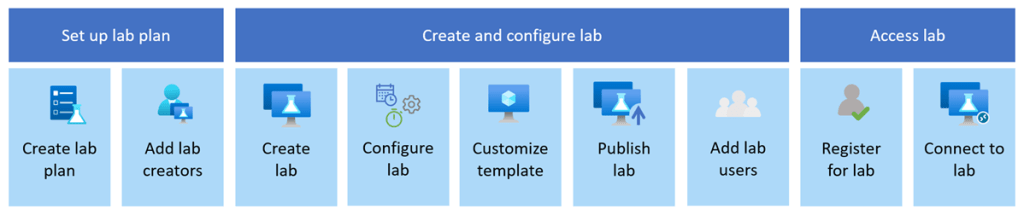
Image: Microsoft Learn

Azure Lab Services allowed you to create labs with infrastructure managed by Azure. The service handles all the infrastructure management, from spinning up virtual machines (VMs) to handling errors and scaling the infrastructure.

If you’ve ever been on a Microsoft course, participated in a Virtual Training Days course, or attended a course run by a Microsoft MCT, Azure Lab Services is what the trainer would have used to facilitate:

  • Classrooms and training environments
  • Hands-on labs for workshops or certifications
  • Short-lived dev/test environments

Azure Lab Services was popular because it abstracted away a lot of complexity around building lab or classroom environments. Its retirement doesn’t mean Microsoft is stepping away from virtual labs—it means the responsibility shifts back to architecture choices based on the requirements you have.

If you or your company is using Azure Lab Services, the transition to a new service is one of those changes where early planning pays off—especially if your labs are tied to academic calendars, training programmes, or fixed budgets.

So what are the alternatives?

Microsoft has outlined several supported paths forward. None are a 1:1 replacement, so the “right” option depends on who your users are and how they work. While these solutions aren’t necessarily education-specific, they support a wide range of education and training scenarios.

Azure Virtual Desktop (AVD)

Image: Microsoft Learn

🔗 https://learn.microsoft.com/azure/virtual-desktop/

AVD is the most flexible option and the closest match for large-scale, shared lab environments. AVD is ideal for providing full desktop and app delivery scenarios and provides the following benefits:

  • Multi-session Windows 10/11, which either Full Desktop or Single App Delivery options
  • Full control over networking, identity, and images. One of the great new features of AVD (still in preview mode) is that you can now use Guest Identities in your AVD environments, which can be really useful for training environments and takes the overhead of user management away.
  • Ideal for training labs with many concurrent users
  • Supports scaling plans to reduce costs outside working hours (check out my blog post on using Scaling Plans in your AVD Environments)

I also wrote a set of blog posts about setting up your AVD environments from scratch which you can find here and here.

Windows 365

🔗 https://learn.microsoft.com/windows-365/

Windows 365 offers a Cloud PC per user, abstracting away most infrastructure concerns. Cloud PC virtual machines are Microsoft Entra ID joined and support centralized end-to-end management using Microsoft Intune. You assign Cloud PC’s by assigning a license to that user in the same way as you would assign Microsoft 365 licences. The benefits of Windows 365 are:

  • Simple to deploy and manage
  • Predictable per-user pricing
  • Well-suited to classrooms or longer-lived learning environments

The trade-off is that there is less flexibility and typically higher cost per user than shared AVD environments, as the Cloud PC’s are dedicated to the users and cannot be shared.

Azure DevTest Labs

Image: Microsoft Learn

🔗 https://learn.microsoft.com/azure/devtest-labs/

A strong option for developer-focused labs, Azure DevTest labs are targeted at enterprise customers. It also has a key difference to the other alternative solutions, its the only one that offers access to Linux VMs as well as Windows VMs.

  • Supports Windows and Linux
  • Built-in auto-shutdown and cost controls
  • Works well for dev/test and experimentation scenarios

Microsoft Dev Box

🔗 https://learn.microsoft.com/dev-box/

Dev Box is aimed squarely at professional developers. It’s ideal for facilitating hands-on learning where training leaders can use Dev Box supported images to create identical virtual machines for trainees. Dev Box virtual machines are Microsoft Entra ID joined and support centralized end-to-end management with Microsoft Intune.

  • High-performance, secure workstations
  • Integrated with developer tools and workflows
  • Excellent for enterprise engineering teams

However, its important to note that as of November 2025, DevBox is being integrated into Windows365. The service is built on top of Windows365, so Micrsoft has decided to unify the offerings. You can read more about this announcement here but as of November 2025, Microsoft are no longer accepting new DevBox customers – https://learn.microsoft.com/en-us/azure/dev-box/dev-box-windows-365-announcement?wt.mc_id=AZ-MVP-5005255

When First-Party Options Aren’t Enough

If you relied heavily on the lab orchestration features of Azure Lab Services (user lifecycle, lab resets, guided experiences), you may want to evaluate partner platforms that build on Azure:

These solutions provide:

  • Purpose-built virtual lab platforms
  • User management and lab automation
  • Training and certification-oriented workflows

They add cost, but also significantly reduce operational complexity.

Comparison: Azure Lab Services Alternatives

Lets take a look at a comparison of each service showing cost, use cases and strengths:

ServiceTypical Cost ModelBest Use CasesKey StrengthWhen 3rd Party Tools Are Needed
Azure Virtual DesktopPay-per-use (compute + storage + licensing)Large classrooms, shared labs, training environmentsMaximum flexibility and scalabilityFor lab orchestration, user lifecycle, guided labs
Windows 365Per-user, per-monthClassrooms, longer-lived learning PCsSimplicity and predictabilityRarely needed
Azure DevTest LabsPay-per-use with cost controlsDev/test, experimentation, mixed OS labsCost governanceFor classroom-style delivery
Microsoft Dev BoxPer-user, per-monthEnterprise developersPerformance and securityNot typical
Partner PlatformsSubscription + Azure consumptionTraining providers, certification labsTurnkey lab experiencesCore dependency

Don’t Forget Hybrid Scenarios

If some labs or dependencies must remain on-premises, you can still modernise your management approach by deploying Azure Virtual Desktop locally and manage using Azure Arc, which will allow you to

  • Apply Azure governance and policies
  • Centralise monitoring and management
  • Transition gradually toward cloud-native designs

Start Planning Now

With several budget cycles between now and June 2027, the smartest move is to:

  1. Inventory existing labs and usage patterns
  2. Map them to the closest-fit replacement
  3. Pilot early with a small group of users

Azure Lab Services isn’t disappearing tomorrow—but waiting until the last minute will almost certainly increase cost, risk, and disruption.

If you treat this as an architectural evolution rather than a forced migration, you’ll end up with a platform that’s more scalable, more secure, and better aligned with how people actually learn and work today.

Top Highlights from Microsoft Ignite 2024: Key Azure Announcements

This year, Microsoft Ignite was held in Chigaco for in-person attendees as well as virtually with key sessions live streamed. As usual, the Book of News was released to show the key announcements and you can find that at this link.

From a personal standpoint, the Book of News was disappointing as at first glance there seemed to be very few key annoucements and enhancements being provided for core Azure Infrastructure and Networking.

However, there were some really great reveals that were announced at various sessions throughout Ignite, and I’ve picked out some of the ones that impressed me.

Azure Local

Azure Stack HCI is no more ….. this is now being renamed to Azure Local. Which makes a lot more sense as Azure managed appliances deployed locally but still managed from Azure via Arc.

So, its just a rename right? Wrong! The previous iteration was tied to specific hardware that had high costs. Azure Local now brings low spec and low cost options to the table. You can also use Azure Local in disconnected mode.

More info can be found in this blog post and in this YouTube video.

Azure Migrate Enhancements

Azure Migrate is product that has badly needed some improvements and enhancements given the capabilities that some of its competitors in the market offer.

The arrival of a Business case option enables customers to create a detailed comparison of the Total Cost of Ownership (TCO) for their on-premises estate versus the TCO on Azure, along with a year-on-year cash flow analysis as they transition their workloads to Azure. More details on that here.

There was also an announcement during the Ignite Session around a tool called “Azure Migrate Explore” which looked like it provides you with a ready-made Business case PPT template generator that can be used to present cases to C-level. Haven’t seen this released yet, but one to look out for.

Finally, one that may hae been missed a few months ago – given the current need for customers to migrate from VMware on-premises deployments to Azure VMware Solution (which is already built in to Azure Migrate via either Appliance or RVTools import), its good to see that there is a preview feature around a direct path from VMware to Azure Stack HCI (or Azure Local – see above). This is a step forward for customers who need to keep their workloads on-premises for things like Data Residency requirements, while also getting the power of Azure Management. More details on that one here.

Azure Network Security Perimeter

I must admit, this one confused me a little bit at first glance but makes sense now.

Network Security Perimeter allows organizations to define a logical network isolation boundary for PaaS resources (for example, Azure Storage acoount and SQL Database server) that are deployed outside your organization’s virtual networks.

So, we’re talking about services that are either deployed outside of a VNET (for whatever reason) or are using SKU’s that do not support VNET integration.

More info can be found here.

Azure Bastion Premium

This has been in preview for a while but is now GA – Azure Bastion Premium offers enhanced security features such as private connectivity and graphical recordings of virtual machines connected through Bastion.

Bastion offers enhanced security features that ensure customer virtual machines are connected securely and to monitor VMs for any anomalies that may arise.

More info can be found here.

Security Copilot integration with Azure Firewall

The intelligence of Security Copilot is being integrated with Azure Firewall, which will help analysts perform detailed investigations of the malicious traffic intercepted by the IDPS feature of their firewalls across their entire fleet using natural language questions. These capabilities were launched on the Security Copilot portal and now are being integrated even more closely with Azure Firewall.

The following capabilities can now be queried via the Copilot in Azure experience directly on the Azure portal where customers regularly interact with their Azure Firewalls: 

  • Generate recommendations to secure your environment using Azure Firewall’s IDPS feature
  • Retrieve the top IDPS signature hits for an Azure Firewall 
  • Enrich the threat profile of an IDPS signature beyond log information 
  • Look for a given IDPS signature across your tenant, subscription, or resource group 

More details on these features can be found here.

DNSSEC for Azure DNS

I was surprised by this annoucement – maybe I had assumed it was there as it had been available as an AD DNS feature for quite some time. Good to see that its made it up to Azure.

Key benefits are:

  • Enhanced Security: DNSSEC helps prevent attackers from manipulating or poisoning DNS responses, ensuring that users are directed to the correct websites. 
  • Data Integrity: By signing DNS data, DNSSEC ensures that the information received from a DNS query has not been altered in transit. 
  • Trust and Authenticity: DNSSEC provides a chain of trust from the root DNS servers down to your domain, verifying the authenticity of DNS data. 

More info on DNSSEC for Azure DNS can be found here.

Azure Confidential Clean Rooms

Some fella called Mark Russinovich was talking about this. And when that man talks, you listen.

Designed for secure multi-party data collaboration, with Confidential Clean Rooms, you can share privacy sensitive data such as personally identifiable information (PII), protected health information (PHI) and cryptographic secrets confidently, thanks to robust trust guarantees that safeguard your data throughout its lifecycle from other collaborators and from Azure operators.

This secure data sharing is powered by confidential computing, which protects data in-use by performing computations in hardware-based, attested Trusted Execution Environments (TEEs). These TEEs help prevent unauthorized access or modification of application code and data during use. 

More info can be found here.

Azure Extended Zones

Its good to see this feature going into GA and hopefully will provide a pathway for future AEZ’s in other locations.

Azure Extended Zones are small-footprint extensions of Azure placed in metros, industry centers, or a specific jurisdiction to serve low latency and data residency workloads. They support virtual machines (VMs), containers, storage, and a selected set of Azure services and can run latency-sensitive and throughput-intensive applications close to end users and within approved data residency boundaries. More details here.

.NET 9

Final one and slightly cheating here as this was announced at KubeCon the week before – .NET9 has been announced. Note that this is a STS release with an expiry of May 2026. .NET 8 is the current LTS version with an end-of-support date of November 2026 (details on lifecycles for .NET versions here).

Link to the full release announcement for .NET 9 (including a link to the KubeCon keynote) can be found here.

Conclusion

Its good to see that in the firehose of annoucements around AI and Copilot, there there are still some really good enhancements and improvements coming out for Azure services.

Azure Networking Zero to Hero – Intro and Azure Virtual Networks

Welcome to another blog series!

This time out, I’m going to focus on Azure Networking, which covers a wide range of topics and services that make up the various networking capabilities available within both Azure cloud and hybrid environments. Yes I could have done something about AI, but for those of you who know me, I’m a fan of the classics!

The intention is to have this blog series serve as both a starting point for anyone new to Azure Networking who is looking to start a learning journey towards that AZ-700 certification, or as an easy reference point for anyone looking for a list of blogs specific to the wide scope of services available in the Azure Networking family.

There isn’t going to be a set number of blog posts or “days” – I’m just going to run with this one and see what happens! So with that, lets kick off with our first topic, which is Virtual Networks.

Azure Virtual Networks

So lets start with the elephant in the room. Yes, I have written a blog post about Azure Virtual Networks before – 2 of them actually as part of my “100 Days of Cloud” blog series, you’ll find Part 1 and Part 2 at these links.

Great, so thats todays blog post sorted!!! Until next ti …… OK, I’m joking – its always good to revise and revisit.

After a Resource Group, a virtual network is likely to be the first actual resource that you create. Create a VM, Database or Web App, the first piece of information it asks you for is what Virtual Network to your resource in.

But of course if you’ve done it that way, you’ve done it backwards because you really should have planned your virtual network and what was going to be in it first! A virtual network acts as a private address space for a specific set of resource groups or resources in Azure. As a reminder, a virtual network contains:

  • Subnets, which allow you to break the virtual network into one or more dedicated address spaces or segments, which can be different sizes based on the requirements of the resource type you’ll be placing in that subnet.
  • Routing, which routes traffic and creates a routing table. This means data is delivered using the most suitable and shortest available path from source to destination.
  • Network Security Groups, which can be used to filter traffic to and from resources in an Azure Virtual Network. Its not a Firewall, but it works like one in a more targeted sense in that you can manage traffic flow for individual virtual networks, subnets, and network interfaces to refine traffic.

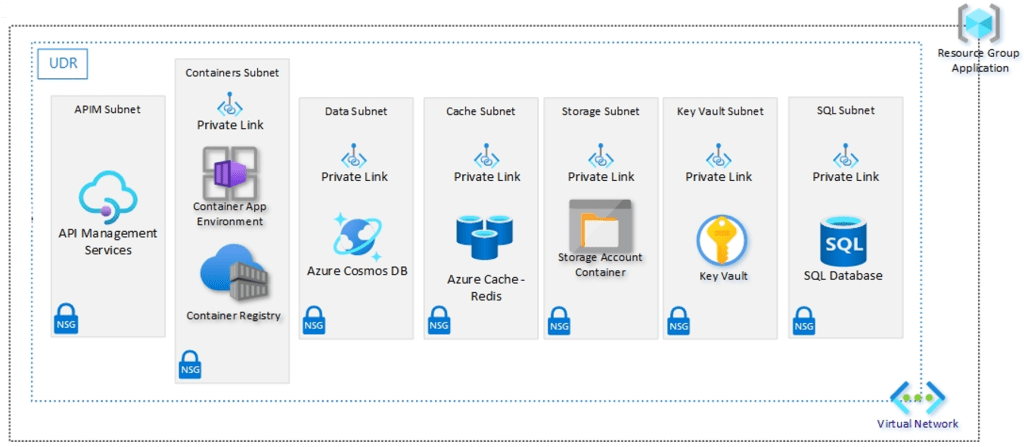
A lot of wordy goodness there, but the easiest way to illustrate this is using a good old diagram!

Lets do a quick overview:

  • We have 2 Resource Groups using a typical Hub and Spoke model where the Hub contains our Application Gateway and Firewall, and our Spoke contains our Application components. The red lines indicate peering between the virtual networks so that they can communicate with each other.
  • Lets focus on the Spoke resource group – The virtual network has an address space of 10.1.0.0/16 defined.
  • This is then split into different subnets where each of the components of the Application reside. Each subnet has an NSG attached which can control traffic flow to and from different subnets. So in this example, the ingress traffic coming into the Application Gateway would then be allows to pass into the API Management subnet by setting allow rules on the NSG.
  • The other thing we see attached to the virtual network is a Route Table – we can use this to define where traffic from specific sources is sent to. We can use System Routes which are automatically built into Azure, or Custom Routes which can be user defined or by using BGP routes across VPN or Express Route services. The idea in our diagram is that all traffic will be routed back to Azure Firewall for inspection before forwarding to the next destination, which can be another peered virtual network, across a VPN to an on-premises/hybrid location, or straight out to an internet destination.

Final thoughts

Some important things to note on Virtual Networks:

  • Planning is everything – before you even deploy your first resource group, make sure you have your virtual networks defined, sized and mapped out for what you’re going to use them for. Always include scaling, expansion and future planning in those decisions.
  • Virtual Networks reside in a single resource group, but you technically can assign addresses from subnets in your virtual network to resources that reside in different resource groups. Not really a good idea though – try to keep your networking and resources confined within resource group and location boundaries.
  • NSG’s are created using a Zero-Trust model, so nothing gets in or out unless you define the rules. The rules are processed in order of priority (lowest numbered rule is processed first), so you would need to build you rules on top of the default ones (for example, RDP and SSH access if not already in place).

Hope you enjoyed this post, until next time!!

Every new beginning comes from some other beginning’s end – a quick review of 2023

Today is a bit of a “dud day” – post Xmas, post birthdays (me and my son) , but before the start of a New Year and the inevitable return to work.

So, its a day for planning for 2024. And naturally, any planning requires some reflection and a look back on what I achieved over the last year.

Highlights from 2023

If I’m being honest my head was in a bit of a spin at the start of 2023. I was coming off the high of submitting my first pre-recorded content session to Festive Tech Calendar, but also in the back of my mind I knew a change was coming as I’d made the decision to change jobs.

I posted the list of goals above on LinkedIn and Twitter (when it was still called that…) on January 2nd, so lets see how I did:

  • Present at both a Conference and User Group – check!
  • Mentor others, work towards MCT – Mentoring was one of the most fulfilling activities I undertook over the last year. The ability to connect with people in the community who need help, advice or just an outsiders view. Its something I would recommend anyone to do. I also learned that mentoring and training are not connected (I may look at the MCT in 2024) – mentoring is more about asking the right questions, being on the same wavelength as your mentees, and understanding their goals to ensure you are aligning and advising them on the correct path.
  • Go deep on Azure Security, DevOps and DevOps Practices – starting a new job this year with a company that is DevSecOps and IAC focused was definitely a massive learning curve and one that I thoroughly enjoyed!
  • AZ-400 and SC-100 Certs – nope! The one certification I passed this year was AZ-500 but to follow on from the previous point, its not all about exams and certifications. I’d feel more confident have a go at the AZ-400 exam now that I have nearly a year’s experience in DevOps, and its something I’ve been saying for a while now – hiring teams aren’t (well, they shouldn’t be!) interested in tons of certifications, they want to see actual experience in the subject which backs the certification.
  • Create Tech Content – check! I was fortunate to be able to submit sessions to both online events and also present live at Global Azure Dublin and South Coast Summit this year. It was also the year when my first LinkedIn Learning course was published (shameless plug, check it out at this link).
  • Run Half Marathon – Sadly no to this one, I made a few attempts and was a week away from my first half-marathon back in March when my knee decided to give up the ghost. Due to work and family commitments, I never returned to this but its back on the list for 2024.
  • Get back to reading books to relax – This is something we all need to do, turn off that screen at night and find time to relax. I’ve done a mix of Tech and Fiction books and hope to continue this trend for 2024.

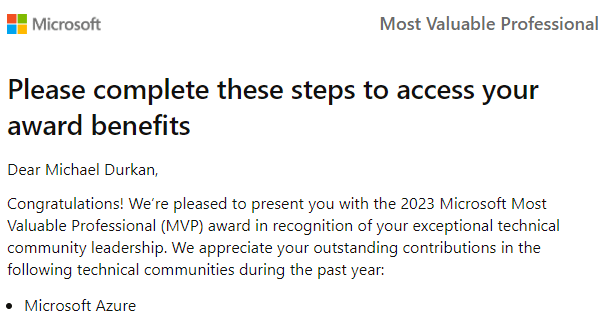
By far though, the biggest thing to happen for me this year was when this email landed in my inbox on April Fools Day …..

I thought it was an April Fools joke. And if my head was spinning, you can imagine how fast it was spinning now!

For anyone involved in Microsoft technologies or solutions, being awarded the MVP title is a dream that we all aspire to. It’s recognition from Microsoft that you are not only a subject matter expert in your field, but someone who is looked up to by other community members for content. If we look at the official definition from Microsoft:

The Microsoft Most Valuable Professionals (MVP) program recognizes exceptional community leaders for their technical expertise, leadership, speaking experience, online influence, and commitment to solving real world problems.

I’m honoured to be part of this group, getting to know people that I looked up and still looked up to, who push me to be a better person each and every day.

Onwards to 2024!

So what are my goals for 2024? Well unlike last year where I explicitly said what I was going to do and declared it, this year is different as I’m not entirely sure. But ultimately, it boils down to 3 main questions:

  • What are my community goals?

The first goal is to do enough to maintain and renew my MVP status for another year. I hope I’ve done enough and will keep working up to the deadline, but you never really know! I have another blog post in the works where I’ll talk about the MVP award, what its meant to me and some general advice from my experiences of my first year of the award.

I’ve gotten the bug for Public Speaking and want to submit some more sessions to conferences and user groups over the next year. So plan to submit to some CFS, but if anyone wants to have me on a user group, please get in touch!

I’ve enjoyed mentoring others on their journey, and the fact that they keep coming back means that the mentees have found me useful as well!

Blogging – this is my 3rd blog post of the year, and my last one was in March! I want get some consistency back into blogging as its something I enjoy doing.

  • What are my learning goals?

I think like everyone, the last 12 months have been a whirlwind of Copilots and AI. I plan to immerse myself in that over the coming year, while also growing my knowledge of Azure. Another goal is to learn some Power Platform – its a topic I know very little about, but want to know more! After that, the exams and the certs will come!

  • What are my personal goals?

So unlike last year, I’m not going to declare that I’ll do a half marathon – at least not in public! The plan is to keep reading both tech and fiction books, keep making some time for myself, and to make the most of my time with my family. Because despite how much the job and the community pulls you back in, there is nothing more important and you’ll never have enough family time.

So thats all from me for 2023 – you’ll be hearing from me again in 2024! Hope you’ve all had a good holiday, and Happy New Year to all!